
 Back to all posts

Broken link building means finding dead links on other websites, creating or offering a relevant live replacement, and asking the site owner to swap your page in. It still works, but the numbers are modest: in BuzzStream's May 2025 analysis of 51 million link-building emails, the reply rate was 3.59%, and a reply is not a link.
At that reply rate, broken link building usually costs more per landed link than people expect. It pays when you already own the replacement asset and one dead page has several relevant referring domains, so a single asset can carry many pitches. When you do not, a delivered placement is often the cleaner buy, and the dead-page list is usually worth more as a list of publishers to approach for a placement than as an outreach queue.
Short summary
- A broken link points to a missing, moved or unavailable page, file or resource.
- Broken link building works best when you replace a dead resource with something that genuinely helps the linking page.
- BuzzStream measured a 3.59% reply rate across 51 million link-building emails (May 2025); a reply is not a link.
- A Curated Link from Rhino Rank costs $60–$210 and lands in 14–21 days (checked 12 September 2026), which is the comparison to run before you commit hours.
- Third-party metrics such as Domain Authority can help you sort prospects, but Google does not use DA as a ranking score.
What is a broken link?
A broken link is a hyperlink that no longer takes users to the intended destination. The linked page may have been deleted, moved without a redirect, renamed, blocked or replaced by a file that no longer exists.
When a browser or crawler requests that URL, the server may return an HTTP response code such as 404 Not Found or 410 Gone. Per MDN's HTTP reference, a 404 means the server cannot find the requested resource, while a 410 means the resource is gone and likely gone for good. For users, the result is simple: they expected a useful page and got a dead end.
You can split broken links into two practical groups:
- Broken outgoing links: links from your site to pages that no longer work.
- Broken incoming links: links from other websites to pages on your site that no longer work.
Both are worth fixing, but they lead to different jobs. Outgoing links are a content maintenance issue. Incoming links are usually a redirect, reclamation or replacement-content issue. Broken link building focuses on a third case: other websites linking to dead pages that you could replace with a better live resource.
What is broken link building?
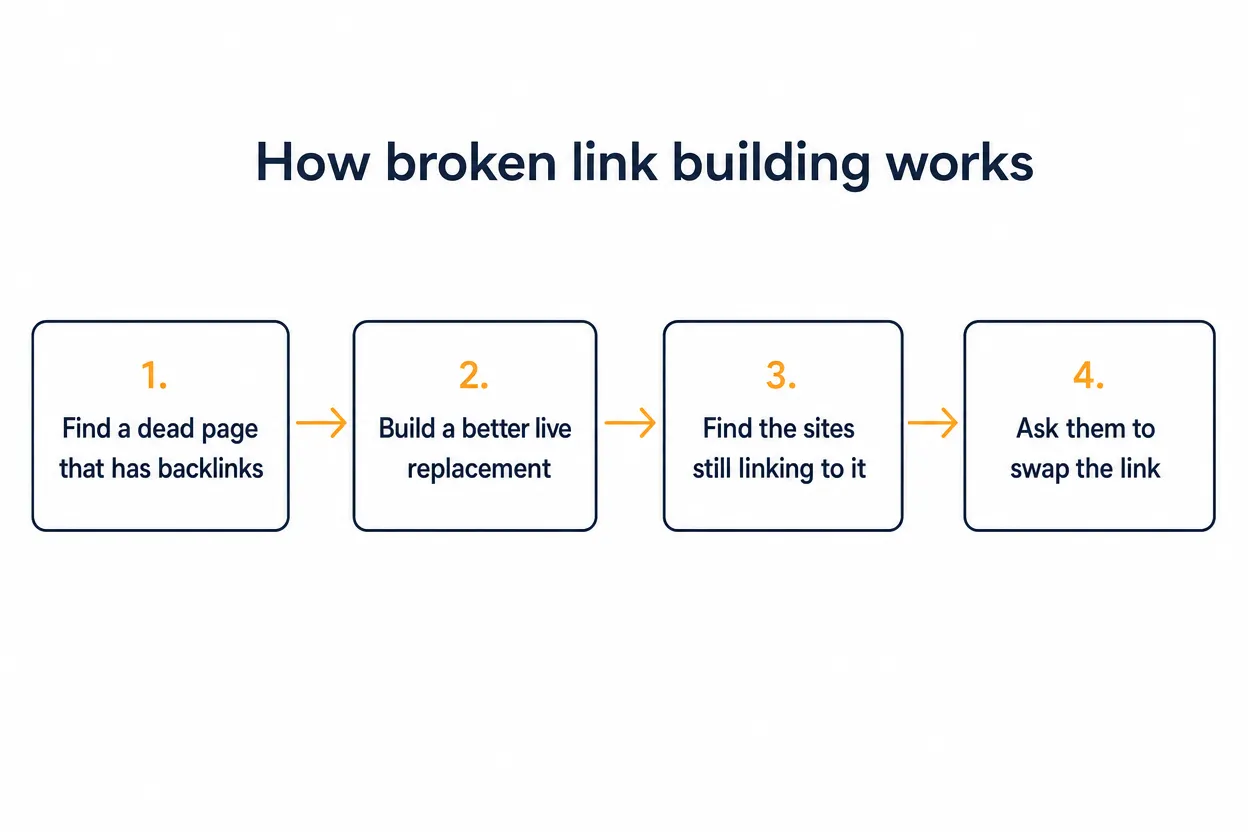
Broken link building is a link acquisition tactic built on relevance and genuine page improvement. You find a dead link on another site, work out why that site linked to the old resource, create or identify a live replacement, then contact the person who can edit the page. The standard is the same one we apply to our Curated Links: the link has to make sense for the reader of the page.
The exchange is not "give me a backlink because I found an error". The better pitch is: "This page links to a resource that no longer works. Here is a live replacement that covers the same job for your readers."
A site owner does not owe you a link because you spotted a 404: they may be busy, miss the email or prefer to remove the link rather than replace it. The tactic earns its place when your replacement is specific enough that swapping it in is the easiest sensible fix.
Broken link building can work for commercial sites, publishers, universities, charities and local organisations. Our guides to building .edu backlinks and .gov backlinks give context for academic and public-sector pages. Either way, a relevant page with a real audience beats a random high-metric domain.
Is broken link building worth it?
Sometimes, and the arithmetic decides. At the reply rates the large outreach studies measure, the hours per landed link determine whether broken link building beats buying a placement.
Two named studies set the expectations. BuzzStream analysed 51 million outreach emails across link-building tactics that included broken link building: "In this analysis, the overall reply rate for link builders is 3.59%, meaning almost 1 in 28 emails gets a reply. The digital PR dataset had a response rate of less than 1%." (Vince Nero, BuzzStream, 6 May 2025.) Campaigns under 100 emails earned higher reply rates than thousand-email blasts.
The older benchmark is larger still. Backlinko and Pitchbox analysed 12 million outreach emails across 3 million sites in 2019: "The vast majority of outreach messages are ignored. Only 8.5% of outreach emails receive a response." (Brian Dean, Backlinko, 16 April 2019.) Adding one follow-up lifted the reply rate to 14.1%, but the ceiling stays low.
Now the arithmetic for 100 emails.
Reply rate | Source | Replies from 100 emails | What it is not |
|---|---|---|---|
3.59% | BuzzStream, 2025 | about 4 | not 4 links |
8.5% | Backlinko, first attempt, 2019 | about 9 | not 9 links |
14.1% | Backlinko, with one follow-up | about 14 | still replies |
Curated Link | Rhino Rank, $60–$210, 14–21 days | 1 delivered link | not an outreach funnel |
A reply is not a live link: some replies are refusals, some are questions, some go quiet. The reply-to-link conversion rate is the number nobody publishes, so treat every reply count as an upper bound.
Batch size and follow-ups move the rate within those limits. The same BuzzStream analysis also compared batch sizes: "We've seen that campaigns with fewer than 100 emails had significantly higher reply rates than those with thousands." Backlinko's ladder runs 8.5% on the first email, 14.1% with one follow-up and 17.1% with two. Our read: small, precise batches with one or two follow-ups beat volume, and the second follow-up is where the study's gain flattens.
We should be blunt about how this prices out. When a client asks us to run broken link building, we price it the way we price any campaign: in hours to a landed link. The brief is always the same three jobs: prospecting a competitor's dead pages, producing or adapting the replacement asset, and outreach with one follow-up. At single-digit reply rates, with only some replies turning into a live link, the client-side hours per landed link routinely come out above the price of a Curated Link on a comparable page.
The comparator is simple. A Curated Link from Rhino Rank costs $60–$210 depending on the referring-domain tier, is delivered in 14–21 days, is do-follow and carries 12-month replacement cover (checked 12 September 2026). There are no prospecting or outreach hours on your side.
Price it yourself
You can price the tactic yourself before you commit hours.
Cost per landed link = (prospecting hours + replacement-content hours + outreach hours) × your hourly cost ÷ (emails sent × reply rate × share of replies that become a live link)
The reply rate comes from the BuzzStream and Backlinko studies. The last factor is the one you supply: no study publishes it. Then compare the answer with the Curated Link price.
So the verdict. Run broken link building yourself when you already own the replacement asset and one dead page has several relevant referring domains, because one asset then carries many pitches. When you do not, buy the placement. Either way, keep the dead-page list: the durable value of broken link building for most sites is discovery, not the link. The list tells you which publishers link on your topic, and it is worth more as a target list for placements than as an outreach queue.
What causes broken links?
Broken links usually come from ordinary site changes rather than dramatic technical failures. The common causes are:
- Deleted pages, where links to the old URL stay live.
- Moved or renamed URLs without a redirect.
- Site migrations and restructures that miss old URLs.
- Typos and formatting errors in the link itself.
- Expired domains and rebrands with incomplete redirects.
- Removed files such as PDFs, images and downloads.
Timeouts, blocks and server errors are weaker broken-link prospects, because the page may come back and nothing needs replacing. Confirm the URL is truly dead before you pitch.
The benefits of broken link building
The main benefit of broken link building is a reason for an editor to make a change.
Better contextual links
A page that already linked to a resource on your topic has shown editorial interest, and you are offering a working option where a dead citation exists. Domain Authority is Moz's third-party 1–100 predictive score, and Moz is direct about the limit: "A common misconception is that DA directly impacts Google rankings. In reality, DA is a predictive metric developed by Moz and is not used by Google to determine search engine rankings." (Moz.) Treat DA as a sorting aid, then judge relevance, traffic and editorial quality on an authoritative website.
A cleaner outreach angle
Cold outreach starts with a favour request; broken link outreach starts with a page problem, a cleaner opening as long as the fix is real. The email can stay short because the page itself explains the reason for contact.
Useful content prompts
Dead pages show you what people used to cite. If several sites linked to an old statistics page or tutorial, that topic had link demand, and you can build something current and better.
Relationship potential
A polite fix note can start a relationship with the editor, and that relationship can later become a guest contribution or a placement. Do not bank on it, though: most exchanges end at the swap, so treat any relationship as a bonus.
Competitive discovery
Broken pages in competitor backlink profiles reveal publishers and resource pages you had not found. Even when outreach fails, the prospect list improves your view of the niche.
The disadvantages and limits
Broken link building has a neat theory and messy execution.
Low and variable replies
The biggest limit is attention: the BuzzStream and Backlinko outreach studies quoted earlier put reply rates in single figures. Many old resource pages are neglected, some contact forms are dead, and most emails simply go unanswered. BuzzStream found that 57% of link-builder replies arrive within six hours. A prospect that is silent after a week has almost certainly said no, so the follow-up is the last email, not the start of a chase.
Replacement content takes work
A weak replacement rarely works: if the dead page was a detailed guide, a thin blog post is not a fair swap, and if the old link supported a specific statistic, a general overview will not help. You often need to reconstruct what the dead page used to do, then improve the answer without copying it.
Some dead links are not opportunities
A dead link on an abandoned page, with no active editorial team, no contact route and no recent updates, may go nowhere even with a perfect replacement. Avoid prospects where the dead page was a direct competitor, a private file or something your page cannot honestly replace.
How to find broken-link opportunities
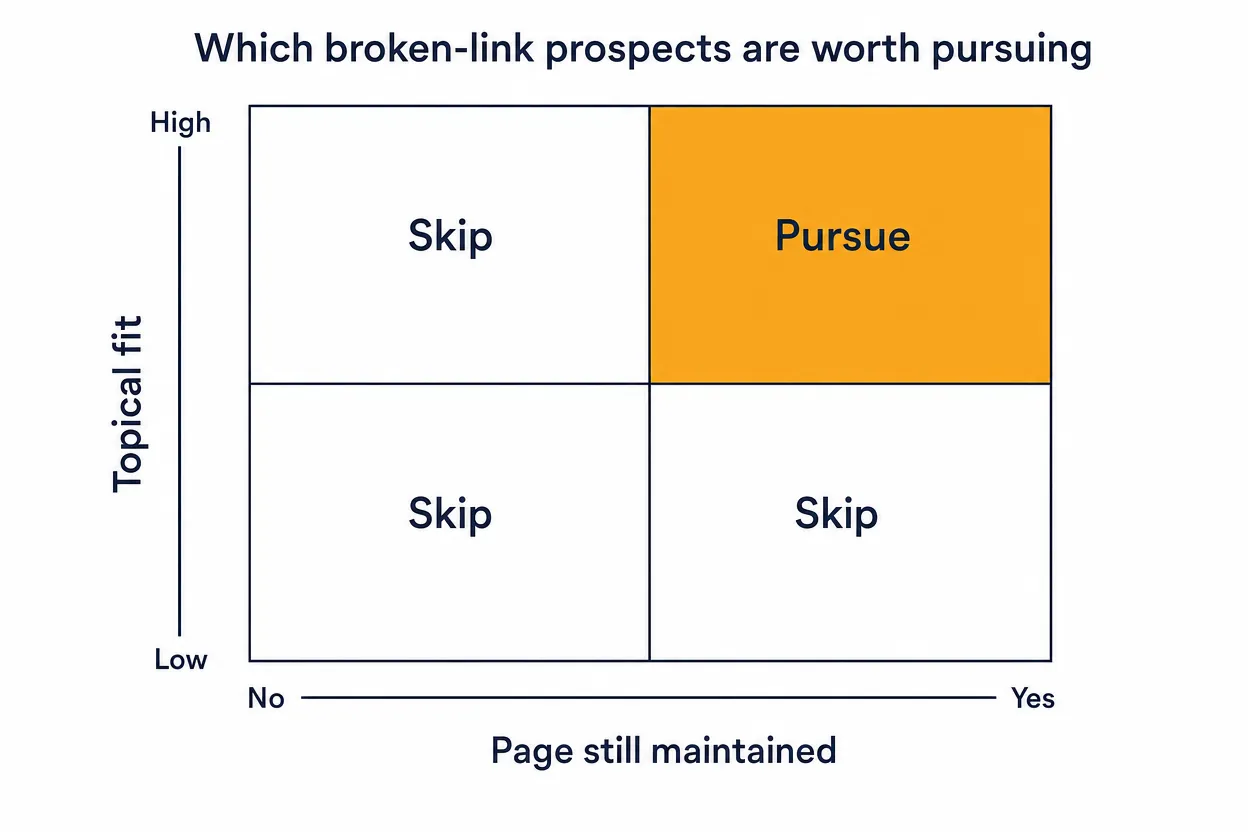
We start with pages that already have backlinks. A random dead outbound link on a tiny page is unlikely to earn you much; a dead page with several relevant referring domains gives you multiple pages to contact with one replacement asset.
Use competitor backlink tools
The exact labels change over time, but the workflow is stable:
- Enter a competitor domain or a competing page.
- In Ahrefs Site Explorer, open the Broken backlinks report, or open Best by links and apply the HTTP code 404 not found filter; in Semrush, go to Backlink Analytics → Indexed Pages → Broken Pages.
- Sort by referring domains to find dead pages that attracted links.
- Open the linking pages and read the surrounding context.
- Check that the dead page's topic fits your site and that the linking page is worth contacting.
If you use Ahrefs, our guide to using Ahrefs for link building covers the basic toolset, and a basic search for keywords is enough to build the first competitor list.
Search for resource pages
Resource pages exist to point readers towards useful references, and they are often old, lightly maintained and full of outbound links, which creates plenty of dead citations. Try search operators such as:
topic intitle:resourcestopic intitle:linkstopic inurl:resourcestopic inurl:linkstopic "useful resources"topic "recommended reading"
Check the outbound links with a browser extension: Check My Links is still listed in the Chrome Web Store (version 8.1.5, updated August 2026), and the Ahrefs SEO Toolbar checks outgoing link status while you review a page.
Look for outdated citation pages
Old "best tools", "statistics", "templates" and "guides" pages can attract links long after the original URL dies. Use archived-page tools and anchor text to see what the old page covered, then answer the same need more clearly.
Use Wikipedia for discovery only
Wikipedia marks dead references with its {{dead link}} template, and those dead citations can point to resources that other sites also cited. Wikipedia also repairs its own link rot: as of 2026 a bot called InternetArchiveBot runs continuously, checks articles for dead links and replaces dead references with Wayback Machine archives. A dead Wikipedia citation is therefore a discovery signal that other sites may have cited the same URL, not a placement opportunity. Wikipedia's external-links guideline tells editors to remove or replace dead links themselves, and a separate guideline treats SEO-motivated replacements as link spam. Editing Wikipedia is not the route. The route is discovery only: take the dead URL to a backlink tool and find the other pages that cited it. If you work this method, read the rules around Wikipedia links first.
Check your own lost backlinks
Broken link building is usually framed around other people's dead pages, but your own lost links deserve attention first. If a publisher once linked to your page and the URL now fails, a redirect or a short update request may recover the value. We put that closer to link reclamation than new prospecting, but it belongs in the same maintenance routine.
How to assess a prospect
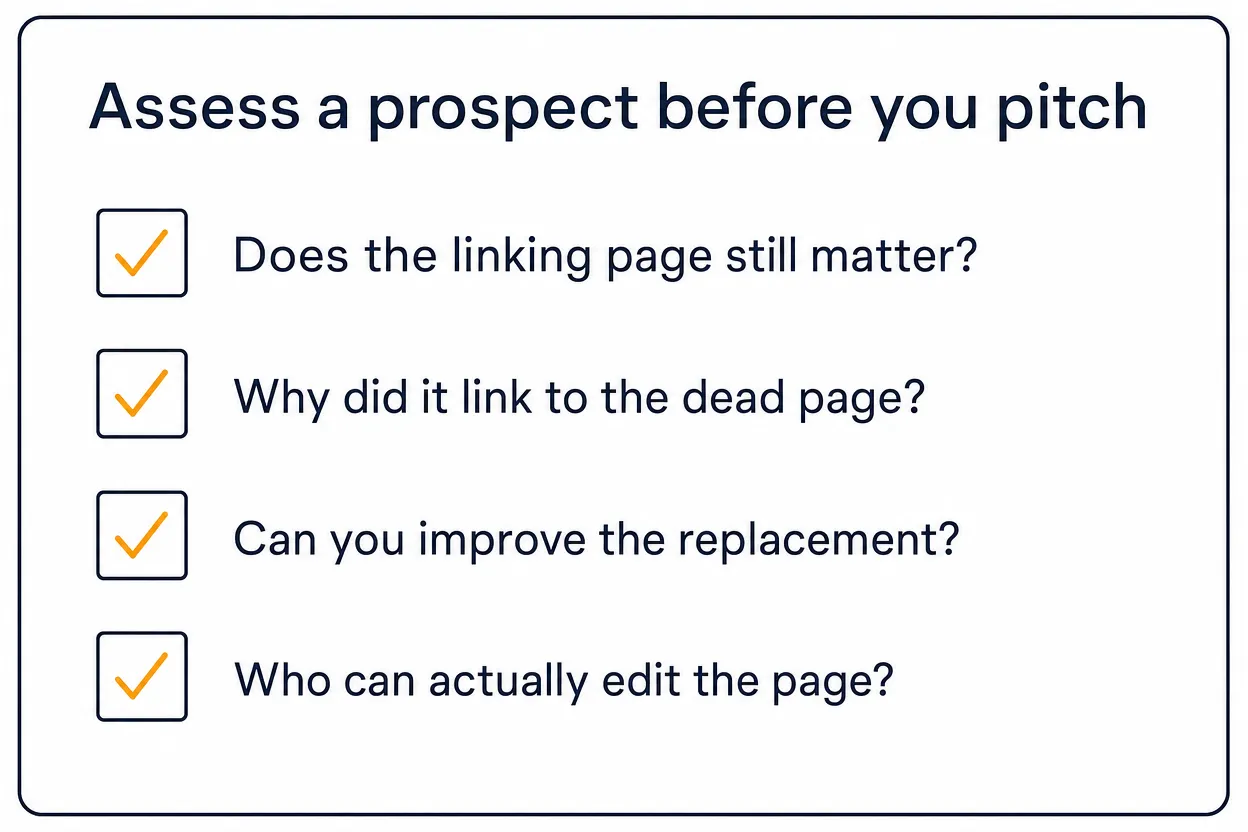
Before you create content or send email, ask four questions about the broken-link prospect.
Does the linking page still matter?
Check whether the page is indexed, updated, visible in search, linked internally and written for a real audience. A neglected page can still pass value, but an active page has a better chance of being edited.
Why did it link to the dead page?
Read the sentence around the link. The dead URL may have been used as:
- a definition
- a statistic
- a tutorial
- a tool
Your replacement has to match that reason: if the old link supported a statistic, a broad opinion piece will not do the same job.
Can you improve the replacement?
A near-match is not always enough, so give the editor a reason to prefer your page: a clearer structure, current examples, fresher data or a working download.
Who can actually edit the page?
Find the person most likely to own the content: the author on a small blog, the content manager on a company site, a department administrator on a university or association page. Generic inboxes can work, but they are slow.
A worked example
The four questions sound slow, but on a real prospect they take minutes. Say a marketing resource list cites a dead SEO glossary. The linking page is indexed and was updated this year, so the first question passes. The dead URL was cited as a definition, which answers the second question. Our glossary page defines the same terms with current examples, so the third passes. The page has a named content editor, so the fourth passes, and the pitch goes out. The mirror case: the same dead glossary cited on a page last updated years ago, with no contact route, fails the first question. We skip it, however good the replacement.
How to create the replacement page
You have two options: use an existing page that already fits, or create a new asset for a set of similar dead links.
An existing page is faster when the dead resource covered a topic you already answer well; check the heading, search intent, depth, examples and freshness, and update the page before pitching if the fit is close but not perfect.
A new page is worth it when one dead URL has several good linking pages, or when the topic sits close to a page you want to grow. Build it around the job the old resource did: if the old page was a checklist, make a better checklist, and if it held a data point, use a verified current source or leave the number out.
Use the dead page as a clue, not a template to copy, and point the link at a focused guide, tool, glossary page or case study rather than a homepage. For existing-content placements, Curated Links (Niche Edits) are a separate route to relevant in-page links, but broken link building needs the replacement page to make sense on its own.
What real outreach looks like
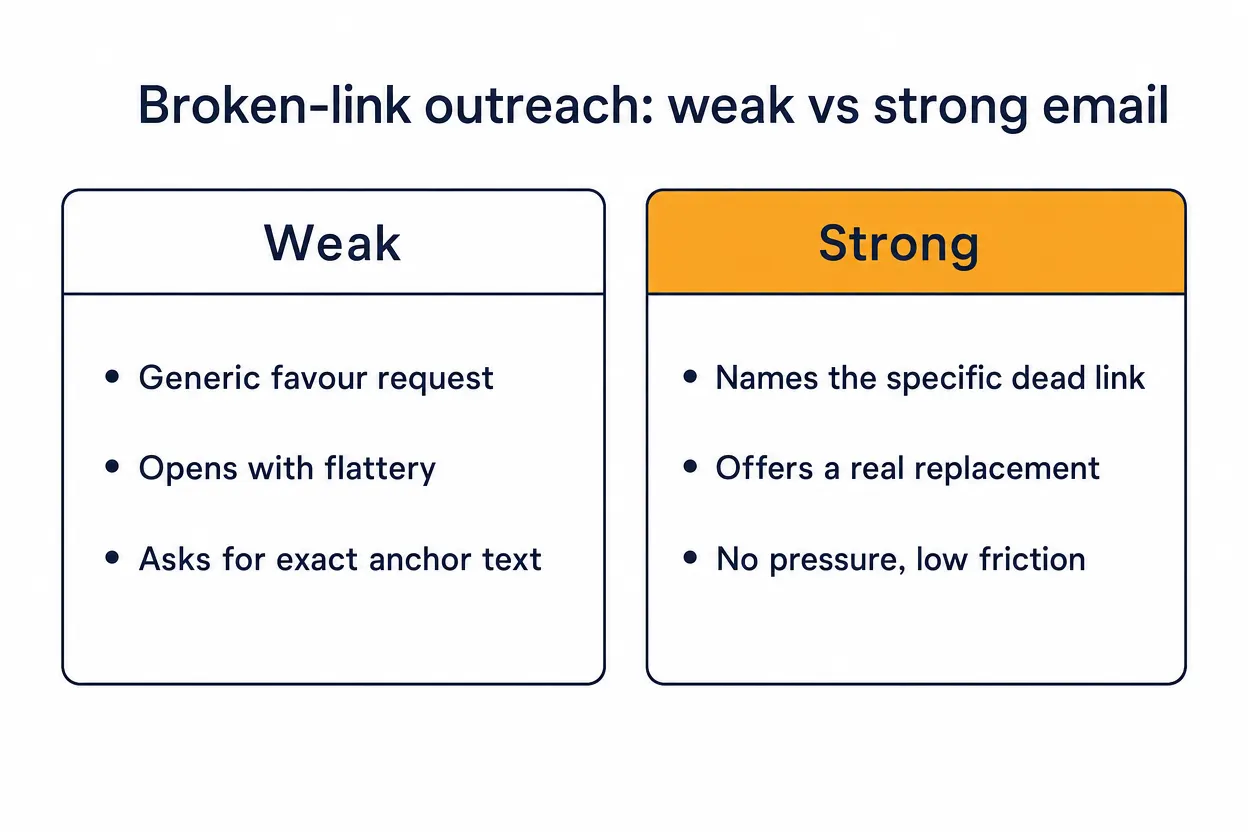
Broken link outreach should be short, specific and useful: the site owner needs to understand the problem, verify the URL and decide whether your replacement helps.
A simple first email can look like this:
Subject: Broken resource on your topic page
Hi Name,
I was reading your page title resource page and noticed the link to dead page title no longer works. It currently leads to dead URL.
This live page covers the same topic and may be a useful replacement: your URL.
No pressure either way. I thought it was worth flagging because the page is still a helpful resource.
Thanks,
Name
If the link context is specific, add one line explaining why your page matches it: "Your article cites the old resource in the section about specific point; this replacement explains the same point and includes specific useful element." Do not open with flattery, ask for exact anchor text or attach files; stick to the observable point that the old link no longer works for readers.
Follow up once if the prospect is strong, and wait long enough that you are not nudging someone who has not had lunch yet. A short follow-up can say:
Hi Name, quick follow-up on the dead old resource link on page title. The replacement is here if helpful: your URL. If you prefer to remove the old citation instead, no worries.
Then stop. If there is no reply, move on: the cost of chasing one silent page is usually higher than finding the next strong prospect.
Broken link building best practices
Seven practices decide most of the outcome of a broken link building campaign.
1. Start with relevance, not metrics
Metrics help you sort a list, but relevance decides whether the email makes sense. A lower-metric niche page can beat a high-metric page where your replacement feels bolted on.
2. Group prospects by dead URL
If one dead page has several referring domains, you can create one replacement and tailor each email. That is usually more efficient than building a different asset for every broken link.
3. Match the link reason
If the old link was a definition, give a definition; if it was a stats source, provide a current verified number or do not pitch it. If it was a downloadable file, consider whether a downloadable asset is needed.
4. Keep the email low-pressure
You are helping with a page issue, not demanding a favour. Make the edit easy, let the owner choose, and avoid language that implies their SEO is doomed if they decline.
5. Use alternatives when they fit better
Sometimes the better route is a guest contribution, a digital PR pitch or a content partnership, and guest posting fits when the host site wants original content rather than a replacement citation. Old Help a Reporter Out (HARO) playbooks also need care: Cision shut Connectively, the platform that had absorbed HARO, on 9 December 2024: "As of December 9, 2024, the Connectively (HARO) platform has been permanently discontinued." (Cision.) Featured.com bought HARO in April 2025 and runs it as a free journalist-request email with three daily editions at helpareporter.com, with paid Featured tiers on top; treat HARO as digital PR, not a broken-link substitute.
Alternatives to broken link building
Broken link building is useful, but it is not always the best route for the budget.
Curated links and niche edits

Curated links, often called niche edits, place a relevant link into an existing article where the citation adds value. They do not require you to recreate a dead page first. The difference is intent: broken link building starts with a dead citation, while a curated placement starts with a live page that could be improved by a relevant addition. Both require editorial fit. Rhino Rank's Curated Links start from $60 per link and are delivered in 14–21 days (checked 12 September 2026). If you want the broken-link tactic run for you, our guide to broken link building services covers what to look for.
Guest posts

Guest posting gives you more control over the topic and the surrounding context. It can be useful when the site wants fresh content rather than a resource replacement. A guest post earns its link when the host site has real readers and the article is a proper 750+ word editorial piece on a relevant site. That is the standard Rhino Rank's guest posts are built to, with human sign-off and post-publication checks on every placement. The link sits in the body of the article, not the bio.
Link reclamation
Link reclamation recovers links you have already earned. Common jobs include fixing backlinks to deleted URLs, asking for a brand mention to be linked and updating links that point to old assets.
Content repurposing
If you already have a strong guide, dataset, video, checklist or visual resource, repurposing it can create more natural citation points. The aim is to make the useful part easier to cite.
A simple broken-link-building workflow
We run broken link building as a compact process:
- Pick a topic close to a page you want to strengthen.
- Find competitor pages, old resources and resource pages in that topic.
- Use Ahrefs, Semrush, browser extensions or crawlers to find 404 and 410 URLs.
- Sort dead pages by referring domains, topical fit and editorial quality, skipping abandoned sites with no working contact route.
- Open the linking pages and read why they linked to the dead URL.
- Build or update a replacement that matches the old link reason.
- Find the right editor or site owner.
- Send a short, specific email with the dead URL and your replacement.
- Follow up once on strong prospects, then stop.
- Record the dead URL, linking page, contact, replacement, dates, reply and result, and cut the prospect types that never move.
Run a small test batch before committing weeks of content work: some niches have plenty of maintained resource pages, and some have almost none.
Frequently asked questions
What is broken link building?
Broken link building is the process of finding dead links on other websites, creating or offering a relevant live replacement, and asking the site owner to update the link.
Does broken link building still work?
Yes, but broken link building is not an easy-win tactic: BuzzStream measured a 3.59% reply rate across 51 million link-building emails in May 2025, and a reply is not a live link. It works when the dead page has relevant backlinks, the replacement is genuinely useful and the site owner still maintains the page. The same study found that campaigns with fewer than 100 emails had significantly higher reply rates than thousand-email sends, so small, precise batches are part of the fix.
What are the benefits of broken link building?
The main benefits of broken link building are contextual backlink opportunities, a cleaner outreach angle, content ideas from dead resources and publisher discovery.
What are some common causes of broken links?
Common causes of broken links include deleted pages, renamed URLs without redirects, site migrations, expired domains, removed downloads and formatting errors.
How do you find broken links for outreach?
Use a backlink tool to find competitor pages that return 404 or 410 errors, then review the pages that still link to those URLs. In Ahrefs Site Explorer, use the Broken backlinks report or Best by links with a 404 filter; in Semrush, use Backlink Analytics, Indexed Pages, then Broken Pages. You can also check resource pages in your niche with a browser extension.
What should a broken link outreach email include?
A broken link outreach email should include the page you found, the dead URL, your replacement URL and one short reason the replacement fits. Keep it helpful and low-pressure, and do not demand exact anchor text.
Is Domain Authority the same as Google authority?
No. Domain Authority is Moz's third-party 1–100 predictive metric, and Moz states that Google does not use DA to determine rankings. Use DA as a quick filter, then judge page relevance and quality manually.
Should you recreate the dead page exactly?
No. Use the dead page to understand the reader need, then create a better current resource, because copying the old page can create legal and quality problems.
Is broken link building cheaper than buying links?
Sometimes. If you already own the replacement asset and one dead page has several relevant referring domains, broken link building can beat buying links on cost; otherwise the prospecting, content and outreach hours usually cost more than a $60–$210 Curated Link delivered in 14–21 days.
related Blog Posts



Join 7,000+ Clients Growing with Rhino Rank
Sign Up


Stay ahead of the SEO curve
Get the latest link building strategies, SEO tips and industry insights delivered straight to your inbox.