
 Back to all posts

HTTP status codes are three-digit server responses that tell a browser, crawler or API client what happened to a request. They fall into five classes: 1xx informational, 2xx success, 3xx redirection, 4xx client error and 5xx server error. Read the class first, then the exact code, to separate normal responses from redirects, missing resources and server failures.
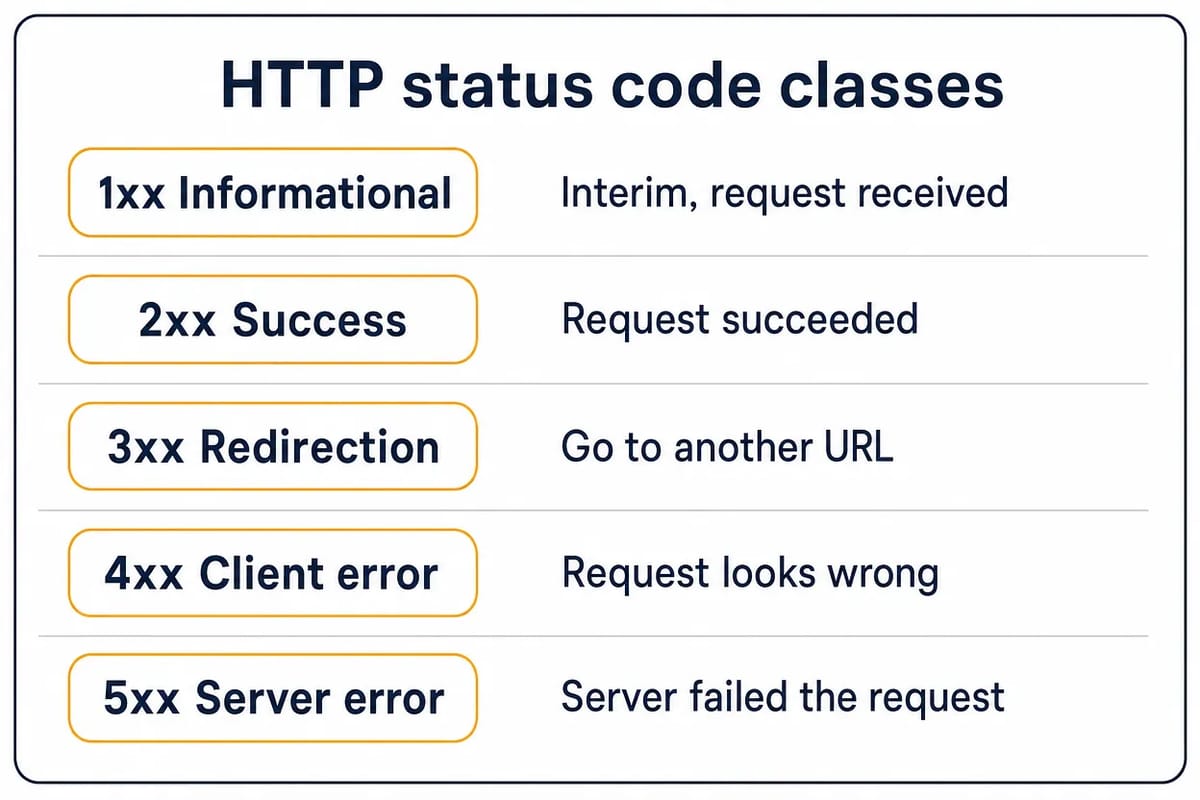
The names below are the ones in the IANA registry and RFC 9110 (June 2022), the current HTTP semantics standard. MDN's status reference (last modified 17 September 2026) prints the same names, with two differences noted where they occur. Google's handling comes from its crawler status-code guide (last updated 4 February 2026), Search Central's redirects documentation (last updated 14 April 2026) and Search Console Help on 404 and soft 404 errors.
How Google treats the main HTTP responses
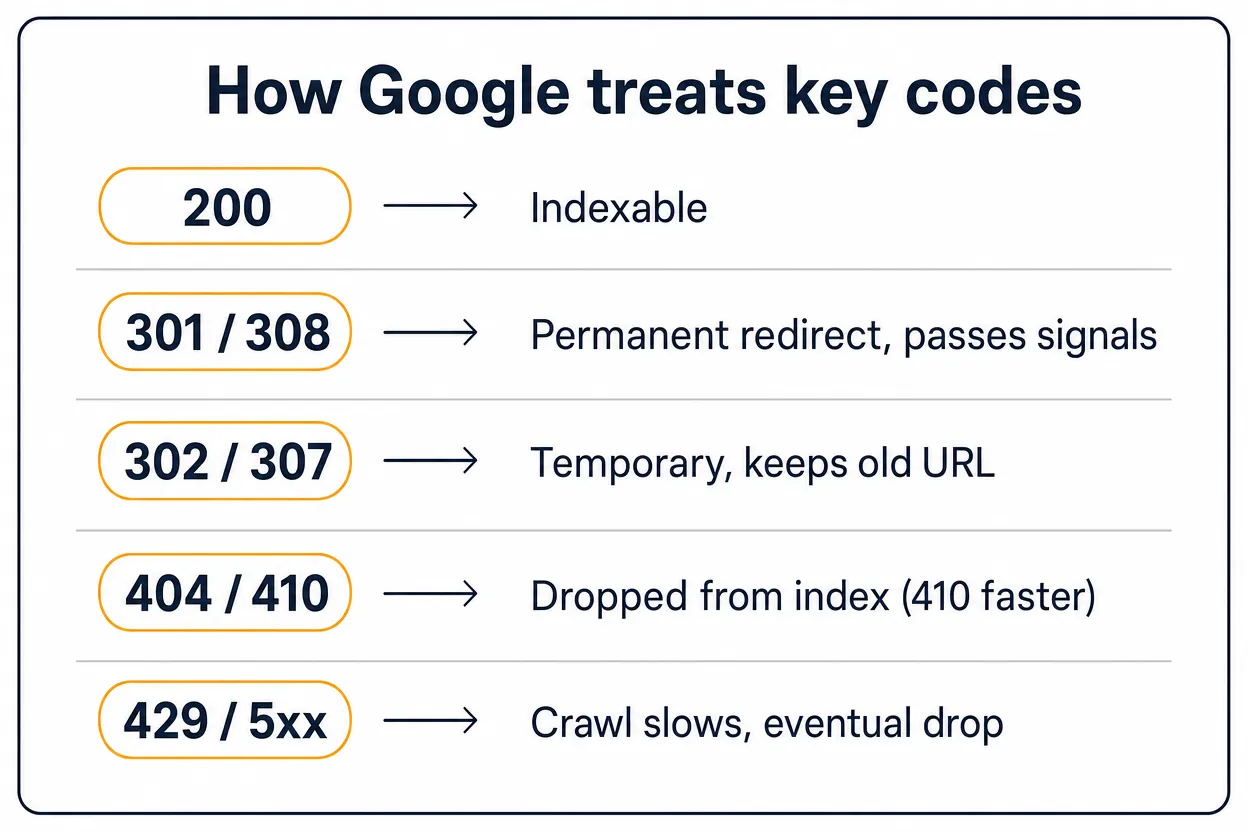
Google can process a 2xx response for indexing, but a successful response does not guarantee indexing. If a page returns 200 OK while showing an empty page or error message, Google may treat it as a soft 404 rather than useful content.
For redirects, Google Search Central says permanent redirects such as 301 and 308 signal that the target should become canonical. Temporary redirects such as 302, 303 and 307 are followed, but Google generally keeps the source URL as the result it should show unless other canonical signals point elsewhere. Google's crawler guide says: "By default, Google's crawlers follow up to 10 redirect hops." The same guide calls a permanent redirect "a strong signal that the redirect target should be processed" and a temporary one "a weak signal".
For missing pages, Google does not index URLs that return 4xx codes other than 429, and already indexed URLs are removed over time. Search Console Help says: "Currently Google treats 410s (Gone) the same as 404s (Not found)." Use 410 when you know the removal is permanent, not because it has a separate ranking benefit.
For overloaded servers, Google treats 429 as a server-error signal. Persistent 5xx and 429 responses can slow crawling, and URLs that keep returning server errors can eventually be dropped from Google's index.
What each status code does to a link
The code that matters most to anyone buying or earning a link is the one their own target URL returns, and the one the host page returns once the link is live. Those two responses decide whether the link counts, keeps counting, or points at nothing.
A permanent redirect keeps the link's value moving. Google's redirects documentation says of a permanent one: "Googlebot follows the redirect, and the indexing pipeline uses the redirect as a signal that the redirect target should be canonical." Of a temporary one it says the pipeline "doesn't use the redirect as a signal that the redirect target should be canonical", and Google's Gary Illyes said on 26 July 2016, as reported by Search Engine Roundtable: "30x redirects don't lose PageRank anymore." So a target that moves behind a 301 or 308 keeps the link equity moving to the new URL; a 302 left on a permanent move does not send the canonical signal.
A dead target throws the placement away. Google's crawler guide states that a URL returning 404 or 410 is not indexed, and one already indexed is removed, so every link pointing at it points at nothing. The repair is to reclaim the links you already have or to redirect the dead URL to the closest live page, and a redirect audit before the placement catches targets that have already moved.
Link rot is measured, not guessed. In a Pew Research Center analysis published 17 May 2024, covering just under 1 million pages from 2013 to 2023: "Some 38% of webpages that existed in 2013 are not available today, compared with 8% of pages that existed in 2023." The same analysis found "23% of news webpages contain at least one broken link, as do 21% of webpages from government sites." These figures count pages and on-page links, not a backlink index, but they show how often a once-live URL dies.
The HTTP Archive Web Almanac 2025 SEO chapter (published 15 January 2026, updated 9 June 2026) measured the status codes that robots.txt files return. Authors Amaka Chulwuma, Chris Green and Sophie Brannon write: "In 2025, 85% of requests for robots.txt files returned valid 200 status codes, up from 84% in 2024." The chapter's chart records a 404 for that file on 13.3% of desktop sites and 13.2% of mobile sites. The chapter reads those 404s as missing files, and adds that a 200 "only confirms that a file exists", which is why a live status code is where a link check starts, not where it ends.
What each response from a URL does to a link that points at it.
Code the URL returns | What Google does | What it does to a link pointing there |
|---|---|---|
| Considered for indexing | The link counts toward a live page |
| Canonical signal for the target | The value moves with it |
| Followed, not a canonical signal | The original URL stays the one Google keeps |
| Not indexed, removed if indexed | The link points at nothing |
That is why we check the status code a target URL returns before any placement goes out, so a link is never pointed at a dead page or a redirect chain, and why our post-publication check on every Curated Link and Guest Post ends only when the host page passes four checks. We do not report a delivered URL until the article is live, the link sits in body copy, the anchor and target URL match the order, and the page can be indexed with nothing in its robots rules or a noindex tag in the way. Every delivered link carries 12-month replacement cover, so a delivered link that is removed, or whose page is taken down, within that window is replaced like for like.
1xx informational responses
1xx responses are interim messages. They tell the client that the request has been received or that protocol-level work is happening before the final response.
100 Continue
100 Continue means the first part of the request has been received and the client can keep sending the rest. It is most useful when a client wants confirmation before sending a large request body.
101 Switching Protocols
101 Switching Protocols means the server has accepted an Upgrade request and is switching to the protocol named in the response. Keep this tied to the HTTP upgrade mechanism; it is not a general performance signal.
102 Processing
102 Processing was defined by RFC 2518 as a WebDAV interim response for a request the server was still working on. RFC 4918 removed it: "the HTTP status code 102 (Processing) has been removed in this specification; its IANA registration should continue to reference RFC 2518." MDN marks it deprecated, so it is a historical entry, not a current WebDAV pattern.
103 Early Hints
103 Early Hints lets a server send preliminary Link headers before the final response. It is used so clients can start preloading or preconnecting while the server prepares the main response.
2xx successful responses
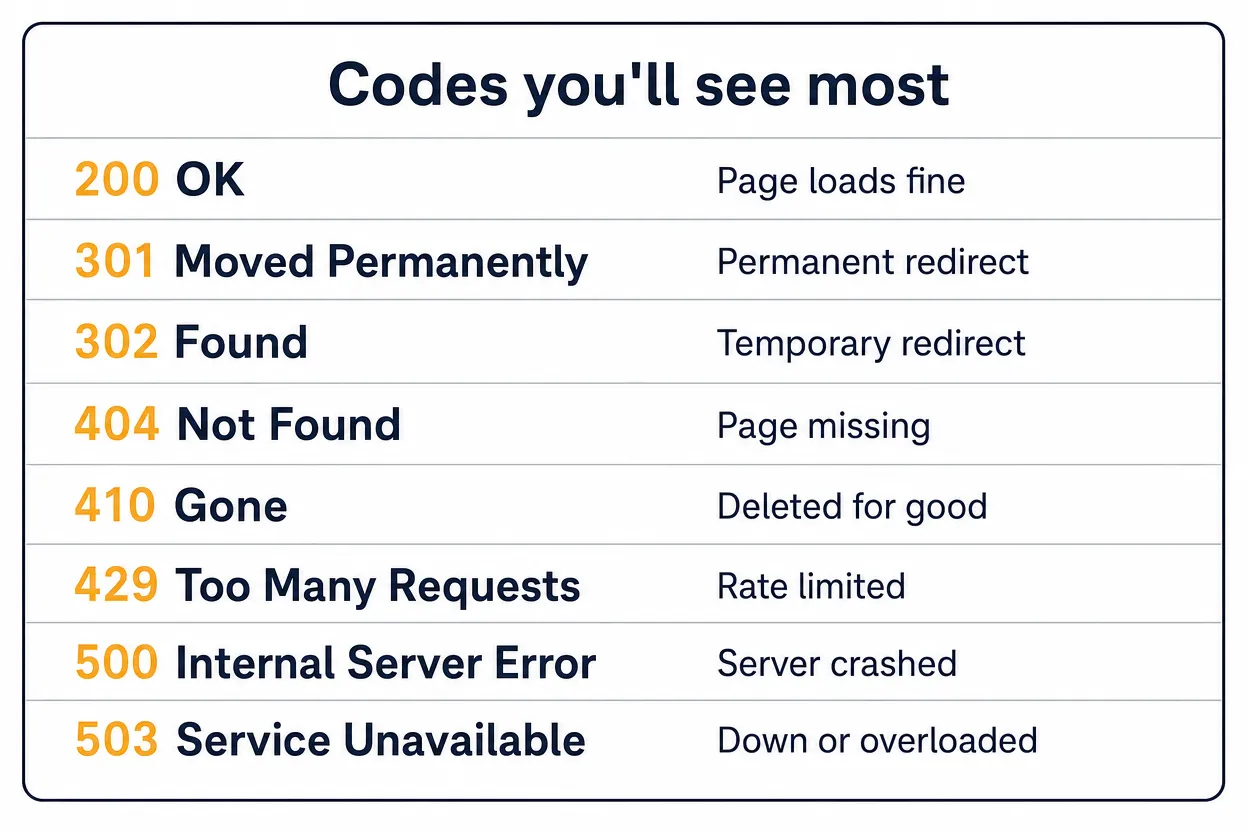
2xx responses mean the request was received, understood and accepted. For SEO, a 2xx page can be considered for indexing, but Google still evaluates the content it receives.
200 OK
200 OK means the request succeeded. For a normal GET request, the response body contains the requested resource, such as an HTML page, image or JSON payload.
201 Created
201 Created means the request succeeded and created one or more new resources. APIs often use it after a successful POST, usually with a Location header or body pointing to the new resource.
202 Accepted
202 Accepted means the request has been received but has not yet been completed. It is common for queued jobs, batch processes and asynchronous APIs where the final outcome will be handled elsewhere.
203 Non-Authoritative Information
203 Non-Authoritative Information means the response metadata has been modified by a proxy or copy rather than returned exactly from the origin server. It is uncommon, but it is part of the standard success class.
204 No Content
204 No Content means the request succeeded and there is no response body to send. It is often used after an update or delete action where the client does not need a fresh representation.
205 Reset Content
205 Reset Content means the request succeeded and the client should reset the document view that sent the request. It is designed for forms or interfaces that should be cleared after a successful action.
206 Partial Content
206 Partial Content means the server is returning only the requested range of a resource. It is common for media files, downloads and resumable transfer behaviour.
3xx redirection messages
3xx responses tell the client to take another action, usually by requesting a different URL or using cached content. Use the permanent or temporary version that matches the real move.
300 Multiple Choices
300 Multiple Choices means more than one representation is available and the user agent or user should choose one. It is standard but rarely used because HTTP does not define a single automatic choice mechanism.
301 Moved Permanently
301 Moved Permanently means the resource has a new permanent URL. For Google, a permanent redirect is a canonicalisation signal for the target URL; in SEO language, this is often discussed through link equity, but the HTTP code itself only says the move is permanent.
302 Found
302 Found means the resource is temporarily available at a different URL and clients should keep using the original URL for future requests. Google follows it, but treats it as temporary rather than as a permanent canonical move.
303 See Other
303 See Other tells the client to retrieve another URI with a GET request. It is often used after form submissions or API actions when the response should point to a separate result page.
304 Not Modified
304 Not Modified is a caching response. It tells the client that the cached version can be reused because the resource has not changed since the conditional request.
307 Temporary Redirect
307 Temporary Redirect is the method-preserving version of a temporary redirect. A client that sent a POST should repeat the redirected request as POST, not silently change it to GET.
308 Permanent Redirect
308 Permanent Redirect is the method-preserving version of a permanent redirect. Google treats it like 301 for redirect handling, while HTTP clients also know not to change the request method.
4xx client error responses
4xx responses mean the request appears to be wrong, unauthorised, blocked or aimed at a resource that cannot be served. For Google Search, 4xx responses other than 429 tell Google not to use the content from that URL.
400 Bad Request
400 Bad Request means the server cannot or will not process the request because it appears malformed or invalid. Common causes include bad syntax, invalid framing or deceptive routing.
401 Unauthorized
401 Unauthorized means authentication is required or has failed. Despite the label, its practical meaning is "unauthenticated", and the response should include the authentication challenge the client needs.
402 Payment Required
402 Payment Required is reserved for payment-related uses, but no broad standard convention exists. You may see it in APIs, but it is rarely used for ordinary web pages.
403 Forbidden
403 Forbidden means the server understood the request but refuses to authorise access. Unlike 401, retrying with basic authentication is not the expected fix unless the server tells the client otherwise.
404 Not Found
404 Not Found means the server cannot find a current representation for the requested resource, or does not want to reveal that one exists. Google says ordinary 404s do not harm the whole site's indexing or ranking; if a URL should not exist, returning 404 is valid.
405 Method Not Allowed
405 Method Not Allowed means the server knows the request method, but the target resource does not allow it. For example, an endpoint may allow GET but reject DELETE.
406 Not Acceptable
406 Not Acceptable means the server cannot produce a response matching the client's Accept headers. It usually appears when content negotiation fails.
407 Proxy Authentication Required
407 Proxy Authentication Required is like 401, but the authentication is required by a proxy. The client must authenticate with the proxy before the request can proceed.
408 Request Timeout
408 Request Timeout means the server did not receive a complete request within the time it was prepared to wait. A client may repeat the request, usually over a fresh connection.
409 Conflict
409 Conflict means the request conflicts with the current state of the resource. APIs often use it for edit conflicts, duplicate records or version mismatches.
410 Gone
410 Gone means the resource is no longer available and the condition is likely permanent. Google groups 410 with 404 for index removal behaviour; choose 410 when the deletion is intentional and permanent.
411 Length Required
411 Length Required means the server refuses the request because it requires a Content-Length header. The client can retry with a valid length value.
412 Precondition Failed
412 Precondition Failed means one or more conditional request headers evaluated to false. It protects updates from being applied when the resource state is not what the client expected.
413 Content Too Large
413 Content Too Large means the request body exceeds the size the server is willing or able to process. Upload limits and oversized API payloads are common causes. "Content Too Large" is the name RFC 9110 and the IANA registry use today.
414 URI Too Long
414 URI Too Long means the target URI is longer than the server is willing to interpret. It often comes from excessive query-string data that should be moved into the request body.
415 Unsupported Media Type
415 Unsupported Media Type means the request body uses a format the server or resource does not support. APIs return it when the Content-Type is wrong or the uploaded file type is not accepted.
416 Range Not Satisfiable
416 Range Not Satisfiable means the requested byte range cannot be served. This can happen when a client asks for a range outside the size of the resource.
417 Expectation Failed
417 Expectation Failed means the server cannot meet the expectation given in the request's Expect header. It is most often connected with Expect: 100-continue.
418 I'm a Teapot
418 I'm a Teapot comes from the RFC 2324 joke protocol. IANA registers the code as "(Unused)", and RFC 9110 §15.5.19 says it "has been deployed as a joke often enough for the code to be unusable for any future use". MDN still prints "I'm a teapot", and Google's crawler guide says exotic codes such as 418 aren't covered.
421 Misdirected Request
421 Misdirected Request means the request reached a server that is not configured to produce a response for the scheme and authority in the request URI. It is most relevant with connection reuse and HTTP/2-style routing.
422 Unprocessable Content
422 Unprocessable Content means the request is syntactically valid but cannot be processed because of semantic errors. It is common in APIs for validation failures where 400 would be too broad. MDN still prints "(WebDAV)" after the name; IANA and RFC 9110 §15.5.21 do not.
425 Too Early
425 Too Early means the server is unwilling to process a request that might be replayed. It is tied to early data and replay-risk handling.
426 Upgrade Required
426 Upgrade Required means the server refuses the request under the current protocol but may accept it after the client upgrades. The response should name the required protocol in an Upgrade header.
428 Precondition Required
428 Precondition Required means the origin server requires the request to be conditional. It is designed to prevent lost updates when multiple clients might edit the same resource.
429 Too Many Requests
429 Too Many Requests means the user or client has sent too many requests in a given time window. For Googlebot, 429 is treated as a server-overload signal and can reduce crawl rate if it persists.
431 Request Header Fields Too Large
431 Request Header Fields Too Large means the server refuses the request because one header field, or the header section as a whole, is too large. Reducing cookies or custom headers can make the request valid.
451 Unavailable For Legal Reasons
451 Unavailable For Legal Reasons means the server cannot legally provide the requested resource. It is used when access is blocked because of a legal demand or legal restriction.
5xx server error responses
5xx responses mean the server failed to fulfil an apparently valid request. Short outages happen, but persistent 5xx responses can slow crawling and eventually remove affected URLs from Google's index.
500 Internal Server Error
500 Internal Server Error is a generic server-side failure. It means the server hit an unexpected condition and does not have a more specific 5xx response to use.
501 Not Implemented
501 Not Implemented means the server does not support the functionality required to fulfil the request. It is commonly tied to unsupported methods, though servers must still support GET and HEAD.
502 Bad Gateway
502 Bad Gateway means a server acting as a gateway or proxy received an invalid response from an upstream server. It often points to proxy, load balancer or upstream application failure.
503 Service Unavailable
503 Service Unavailable means the server is temporarily unable to handle the request, often because of overload or maintenance. If possible, send a Retry-After header so clients and crawlers know when to try again.
504 Gateway Timeout
504 Gateway Timeout means a gateway or proxy did not receive a timely response from an upstream server. It is the timeout counterpart to 502.
505 HTTP Version Not Supported
505 HTTP Version Not Supported means the server does not support the HTTP version used in the request. It should be rare on normal websites, but it is still a standard server-error response.
511 Network Authentication Required
511 Network Authentication Required means the client must authenticate to gain network access. It is mainly intended for intercepting proxies such as captive portals, not for ordinary website login pages.
Registered codes not covered above
The IANA registry lists twelve more codes that rarely appear on a public website.
Registered HTTP status codes that rarely appear on a public website, with the standard that defines each one.
Code | Registered name | Defined in |
|---|---|---|
104 | Upload Resumption Supported (temporary registration, registered 13 November 2024, expires 13 November 2026) | An Internet-Draft, not an RFC |
207 | Multi-Status | RFC 4918 |
208 | Already Reported | RFC 5842 |
226 | IM Used | RFC 3229 |
305 | Use Proxy | RFC 9110 (deprecated) |
306 | (Unused) | RFC 9110 (reserved) |
423 | Locked | RFC 4918 |
424 | Failed Dependency | RFC 4918 |
506 | Variant Also Negotiates | RFC 2295 |
507 | Insufficient Storage | RFC 4918 |
508 | Loop Detected | RFC 5842 |
510 | Not Extended | RFC 2774 (obsoleted) |
Codes 452 to 499 are unassigned in the registry. Cloudflare's 520 to 526 errors (520 "web server returns an unknown error", 521 "web server is down", 522 "connection timed out", 523 "origin is unreachable", 524 "a timeout occurred", 525 "SSL handshake failed", 526 "invalid SSL certificate") are Cloudflare's own and are not registered.
How to check HTTP status codes
Use browser developer tools for a single URL: open the Network tab, reload the page and inspect the first document request. For a full site, use a crawler and fold the results into your SEO audit checklist so redirects, missing pages and server errors are reviewed together.
Use Google Search Console to see which status problems Google has actually encountered. Search Console is especially useful for submitted URLs, soft 404s, server errors and redirect issues that affect crawl and indexing.
Before pointing a placement at a URL, confirm the destination returns 200 OK and does not sit behind a redirect chain: Google follows up to 10 hops, and each hop in a chain is one more URL that can break. This applies to curated links, which go into pages that already exist and are indexed, and to guest posts, where a broken target wastes the placement. The same check helps when you write: find a live replacement for dead pages you could not cite, the same move broken link building uses to earn placements.
Common fixes by status class
For 2xx, check that successful pages return useful content rather than empty templates or error copy. A thin error page served as 200 OK can become a soft 404.
For 3xx, match the redirect to the intent. Use 301 or 308 for permanent moves, 302 or 307 for temporary moves, and avoid long redirect chains.
For 4xx, leave genuine dead URLs as 404 or 410. Redirect only when there is a close replacement; sending every deleted URL to the homepage creates soft 404 risk.
For 429 and 5xx, fix server capacity, application errors or upstream dependencies before they become persistent, because Google slows crawling on 5xx and 429 and eventually drops URLs that keep returning them; the crawl-budget guide covers what that does to crawling.
FAQs
What is the most common HTTP status code?
200 OK is the normal successful response for a page, file or API resource that can be served. It means the request succeeded, though Google may still decide not to index the content.
What status code should a deleted page return?
Use 404 Not Found if the page does not exist or you do not know whether the removal is permanent. Use 410 Gone when the page was intentionally removed and is not coming back.
What happens to backlinks when a page returns 404?
Google removes the URL from its index, so the page can no longer appear in search. The backlinks still exist on the referring pages, but they point at nothing. The fix is a permanent redirect to the closest live replacement, or reclaiming the link with the referring site.
Is a 302 bad for SEO?
No. A 302 Found response is correct for a temporary move. It becomes a problem when it is used for a permanent URL change, because Google treats permanent and temporary redirects differently.
Do 404 errors hurt the whole site?
No. Google's Search Console Help says 404 errors do not harm the site's indexing or ranking when the URLs should not exist. Fix submitted URLs, important backlinks and user-facing mistakes; ignore irrelevant dead URLs.
Which codes slow Google crawling?
Persistent 5xx responses and 429 Too Many Requests slow crawling, because Google treats them as server-overload or server-error signals, and the crawl-budget guide explains how that reduces crawling across the site. Google's crawler guide adds: "Once the server starts responding with a 2xx status code, Google gradually increases the crawl rate for the site."
related Blog Posts



Join 7,000+ Clients Growing with Rhino Rank
Sign Up



Stay ahead of the SEO curve
Get the latest link building strategies, SEO tips and industry insights delivered straight to your inbox.