
 Back to all posts

Automated link building tools should automate the work around the link, not fake the link itself. Use them to find prospects, crawl sites, locate email addresses, personalise outreach, manage follow-ups and track placements. Avoid software that auto-generates backlinks or posts on other sites without editorial control.
The useful scope of the software is the admin around a real pitch. Remove repetitive admin, improve prospect quality, and keep campaigns organised. Keep a human in charge of whether the link is relevant, editorial and worth pursuing.
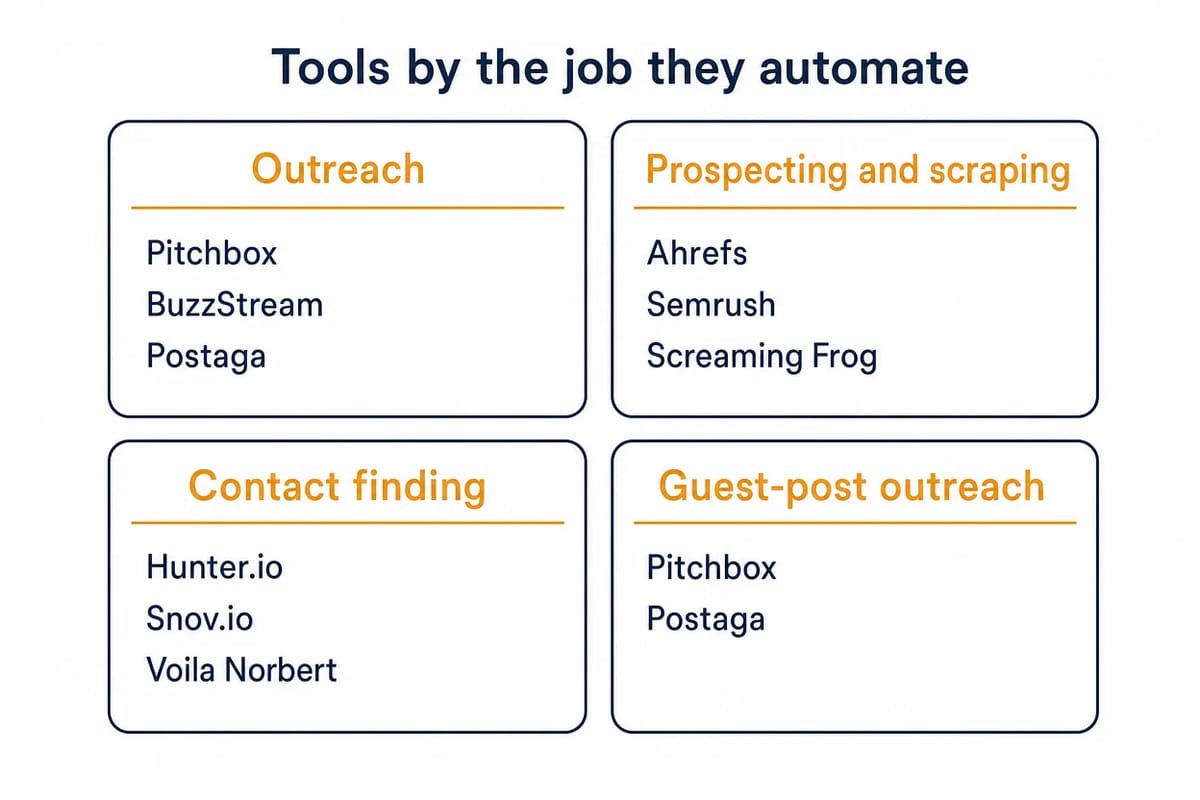
This guide groups the tools by the job they automate. Start with the workflow problem you have, then choose the software that fits it.
Quick comparison
Job automated | Best-fit tools | Use when | Public starting point |
|---|---|---|---|
Outreach management | Pitchbox, BuzzStream, Postaga | You need CRM, sequences and follow-ups | $210, $49, trial/$99 |
Prospecting and crawling | Ahrefs, Semrush, Screaming Frog, Majestic | You need link gaps, crawls and site checks | $129, $117.33, free/EUR245, $49.99 |
Contact finding | Hunter.io, Snov.io, Voila Norbert | You need verified editor emails | Free/$49, trial/$39, 50 leads/$49 |
Guest-post outreach | Pitchbox, Postaga, BuzzStream | You pitch editors and track placements | Same outreach plans |
Managed placements | Respona | You want pay-per-result placement support | From $100/placement |
Prices above are the public entry points on the vendors' own pages, useful for shortlisting, not for procurement. The same pricing page can show dollars, euros or pounds depending on where you open it, so treat the dollar figures here as the listed USD rates and confirm your local price before buying. Check limits, users, credits, sender accounts and annual billing before you buy.
What counts as legitimate automated link building?
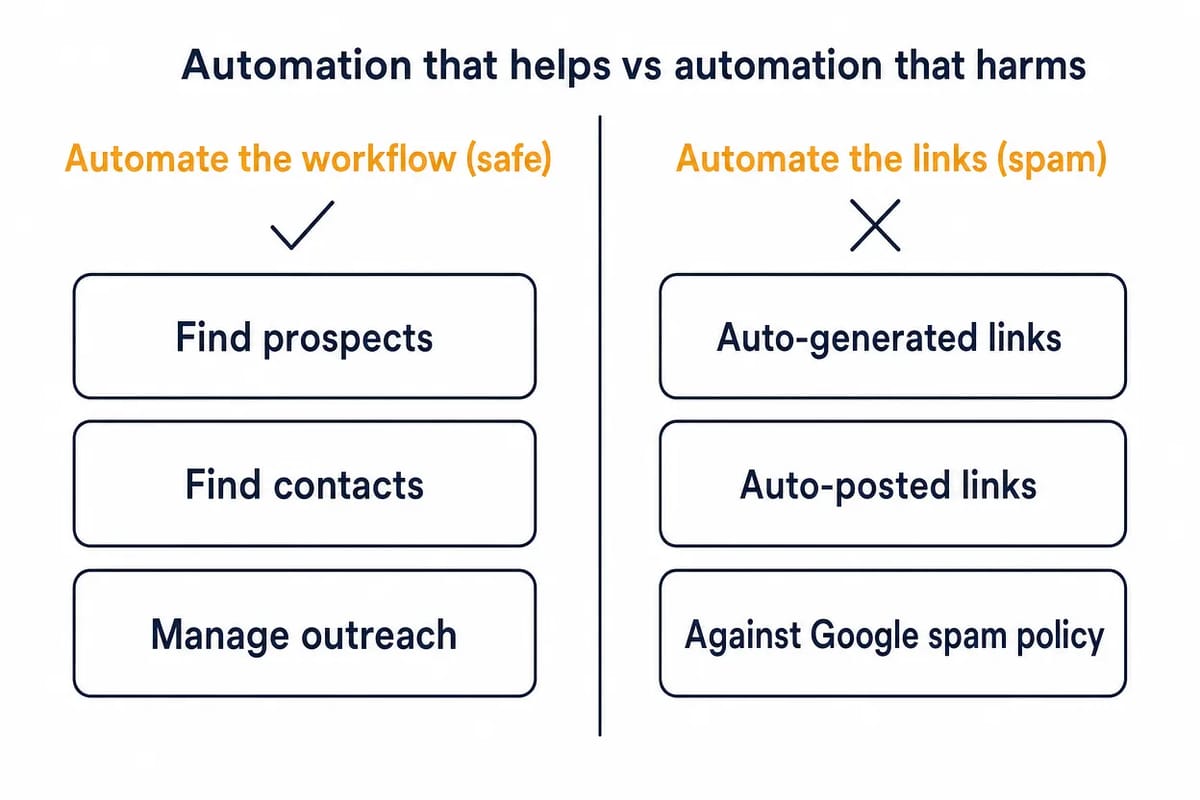
Legitimate automated link building means using software to speed up a real link-building workflow. It covers:
- finding relevant sites that might link to you;
- crawling pages for broken links, resource lists, mentions or competitor links;
- finding and verifying contact details;
- building a clean outreach list;
- sending personalised pitches and follow-ups within sensible limits;
- tracking replies, approvals, live links and lost links.
The link still has to make sense. A publisher must choose to add it. A journalist must cite the source. An editor must accept the guest post, or a page owner must agree that your resource improves the page. Tools can make that process faster, but they cannot turn a weak offer into a link worth having.
The other kind of tool is different. Some promise to create backlinks automatically or post links across third-party sites. Others generate profile links in bulk, comment on forums or spin guest posts. None of that is a pitch an editor reads, and every one of those links lands in your backlink profile with no reader behind it. Live traffic is one of the things we check on every host site before a Curated Link or Guest Post goes out. If the pitch is "set it once and links appear", it is not a workflow.
Outreach and campaign management tools
Outreach tools automate the campaign layer. They help you organise prospects, find contacts, write and send personalised emails, stop follow-ups when someone replies, track conversations and report on outcomes. They do not remove the need to choose good prospects or write a pitch an editor would accept. Dharti Joshi, an assistant manager in search client operations at the agency Mavlers, described her team's Pitchbox set-up on 17 December 2025: "Every email still sounds like a human wrote it, because a human did." That is the standard the software has to serve.
Pitchbox
Pitchbox is a link-building outreach platform for teams that need prospecting, contact discovery, campaign management and reporting in one place. Its public pricing page lists Prospecting Searches, an Email Finder & Verifier, Outreach & Follow Up, Multi-Drip Outreach, a CRM, a Unified Inbox, AI Personalization, Reporting and Link Monitoring across its plans.
Use Pitchbox when outreach is already a repeatable operation and you need process control. It fits agency or in-house teams running blogger outreach, digital PR, resource-page outreach, broken-link campaigns or guest-post pipelines. Use it where each prospect needs status, owner, email history and follow-up rules.
Pricing starts at the Pro plan at $210 per month when billed annually, with $300 shown as the monthly price. The same page lists Advanced at $420 per month and Scale at $825 per month on annual billing, or $600 and $1,200 billed monthly, so it is not a light tool for occasional outreach.
BuzzStream
BuzzStream is an outreach CRM built around research, email, relationship management and reporting. It covers prospect research, list building, pitching, automated follow-ups, conversation tracking and campaign reporting.
Use BuzzStream when you want a lighter campaign-management layer than Pitchbox but still need a database of publishers, contacts and conversation history. It works well for link builders who care about long-term relationships as much as one campaign.
BuzzStream starts at $49 per month for Starter. Growth is $174 per month, Professional is $424 per month and Custom starts from $999 per month. Check the contact, user and prospecting-search limits before deciding which tier fits your list size.
Postaga
Postaga is an AI-assisted outreach platform that combines opportunity discovery, contact finding, campaign templates and follow-up sequences. Its public site listed campaign types such as skyscraper outreach, podcasts, guest posts, mentions, reviews, link roundups and resources, with follow-ups that stop when someone replies.
Use Postaga when you want guided campaign types rather than a blank outreach CRM. It fits smaller teams that need help turning a tactic into a list, a contact set and a sequence without building the whole system from scratch.
Postaga's last published prices were a 14-day free trial, Pro at $99 per month and Agency at $299 per month. Its website was returning a 404 error when this guide was updated, and a search turned up no shutdown notice, so confirm the product is live before you plan a campaign around it.
Prospecting, scraping and crawling tools
Prospecting tools automate the search for possible link opportunities. They do not email anyone by themselves. Their job is to show which sites link to competitors and which pages attract links. They also show which resources are broken, which authors cover the topic and which domains are worth moving into outreach.
Ahrefs
Ahrefs is a backlink and competitor research platform. Site Explorer shows a site's backlink profile, its backlink changes, its most linked-to pages and the competitor pages that already attract links. Ahrefs also highlights top authors for outreach contacts and guest-blogging opportunities on its Site Explorer page.
Use Ahrefs at the start of a campaign. It is strongest when you need to turn competitor backlinks into a prospect list or find linkable page ideas. It also helps you inspect anchors and decide which domains are worth qualifying before outreach.
Ahrefs pricing currently lists Lite at $129 per month, Standard at $249 per month and Advanced at $449 per month. Enterprise is $1,499 per month. There is also a $29 Starter route and Ahrefs Free, but serious backlink prospecting usually depends on paid limits.
Semrush
Semrush is a broad SEO platform with backlink analysis, competitor research, backlink gap work and backlink monitoring. For link building, the useful layer is not "automatic links"; it is the ability to find referring domains, compare competitors, audit links and prioritise outreach targets.
Use Semrush when your link-building work sits beside keyword tracking, site audit, content planning and competitor reporting. It is a good fit for teams that want link prospecting inside a wider SEO stack rather than a dedicated backlink-only tool.
Semrush's current SEO + AI Search pricing shows the SEO plan at $117.33 per month when billed annually, with $139 shown as the monthly price. Higher public tiers add more projects, tracking and AI visibility limits, so do not assume the entry plan covers every agency workflow.
Screaming Frog SEO Spider
Screaming Frog SEO Spider is a desktop crawler, not a link outreach platform. It automates site crawls, finds broken links and server errors, and exports source URLs. It also checks redirects, analyses page titles and metadata, extracts custom data, schedules crawls and can run from the command line.
Use Screaming Frog when the link opportunity comes from a page-level audit. It helps with broken-link building, resource-page checks, unlinked internal references, redirect cleanup, external-link exports and technical QA before you pitch a page owner.
The free version crawls up to 500 URLs. The paid licence is £199, €245 or $279 a year depending on the region you buy from, with the maximum crawl size depending on memory and storage. Version 24, released on 19 May 2026, added an MCP server so the crawler can be driven from an AI assistant. Founder Dan Sharp's note on the same release covers scheduled and command-line crawls: "You’re now able to select ‘Auto Compare Crawls’ for scheduled (and CLI) crawls."
Majestic
Majestic is a backlink intelligence tool built around Site Explorer, Trust Flow, Topical Trust Flow and referring domains. It also covers new and lost links, Link Context, Related Sites, Link Graph and competitor comparison tools. It does not send outreach emails. It gives you another index and another way to judge link patterns.
Use Majestic when you want to screen domains, compare backlink profiles, inspect topical relevance or find sites that link to several competitors. Clique Hunter is especially useful for finding shared referring domains that may be more likely to cover your category.
Majestic pricing currently starts with Lite at $49.99 per month or $41.67 per month as an annual equivalent. Pro is $99.99 per month or $83.33 per month as an annual equivalent and adds wider comparison tools, including Clique Hunter.
Contact and email finding tools
Contact-finding tools automate the part of outreach that many teams still do by hand. They locate the right editor, author, owner or marketer and check that the address is likely to work. They should improve list quality and reduce bounces. They should not be used to blast unqualified prospects.
Hunter.io
Hunter.io finds and verifies professional email addresses by name and domain. The Email Finder page describes using public web data, email formats and verification status to return contact information. Bulk lookup, API, Google Sheets and browser-extension routes are also available.
Use Hunter.io after you have already qualified the site. It fits the contact layer of link building. Find the editor, verify the address, add the contact to your outreach CRM, and avoid sending to stale or guessed emails.
Hunter's free plan includes 50 credits per month. Starter is listed at around $49 per month, or $34 per month billed yearly. Credits are used across Email Finder, Email Verifier and Domain Search.
Snov.io
Snov.io combines email finding, verification, prospect search, outreach campaigns, email warm-up, CRM and integrations. Its Email Finder page focuses on verified B2B emails, bulk search, LinkedIn collection, API access and Chrome extension prospecting.
Use Snov.io when you want contact data and outreach in the same sales-style platform. For link building, it fits blogger, journalist and site-owner prospecting, but only after you have reviewed topical fit and permission to contact.
Snov.io's public pricing lists a free Trial and Starter at $39 per month with 1,000 credits. Credits can be spent on prospect search, email search and email verification, so the real cost depends on list size and verification volume.
Voila Norbert
Voila Norbert is an email finder, verification and enrichment tool. Its public pages position it around finding corporate emails, verifying lists, enriching contacts and running email sequences. Bulk actions, CRM integrations and an API are also listed.
Use Voila Norbert when you need a simple contact-finding layer for a known prospect list. It is a good fit when Ahrefs, Semrush, Majestic or Screaming Frog have already produced the sites and you now need names, addresses and verification.
Voila Norbert offers 50 free leads. Prospecting pricing starts with Valet at $49 per month, or $39 per month with yearly billing, for up to 1,000 leads per month.
Guest-post outreach tools
Guest-post automation should manage the pitch process, not mass-produce articles or force links into any site that will publish. A good guest-post workflow still needs relevant sites, real editorial standards, useful topics, natural anchors and a clear record of what went live.
Pitchbox fits guest-post outreach when you need a managed pipeline across many sites or clients. Its pricing page explicitly lists Guest Posting and Blogger Outreach among campaign types. The CRM and inbox help teams track negotiations, approvals, content status and live links.
Postaga fits guest-post outreach when you want a guided campaign builder. Its public site listed Guest Post as a campaign type and framed it around finding relevant blogs, building rankings and getting promotion. Use that structure to find and contact editors, then write the pitch yourself.
BuzzStream fits guest-post outreach when the relationship record matters. It helps you avoid pitching the same editor twice, keeps publisher notes in one place, tracks replies and supports link monitoring after a placement is live.
Tools can help you find and reach prospects, but you still have to earn or place the real link. If the campaign needs editorial placements rather than pure software, compare Guest Posts from Rhino Rank, $75 a placement upwards on DA 10+ sites with a 750+ word article written for you, with doing the outreach in-house.
Where Respona fits now
Respona used to be discussed mainly as link-building outreach software. Its current public pricing is framed differently. It now shows placement-based packages where content, outreach and publishing are included. Public tiers include Starter at $100 per placement, Standard at $160, Authority at $240, Power at $400 and Elite at $500.
That makes Respona hard to compare directly with Pitchbox, BuzzStream or Postaga. Treat it as a managed or pay-per-result placement option unless you have confirmed the exact self-serve software access you need.
It is a different job, and the difference is who does the work. If you want to run prospecting, contact finding, outreach and approvals yourself, use the workflow tools above. If you want the placement delivered with the content and outreach included, compare Respona with other managed providers on the same three questions: who picks the site, who writes the content and how the anchor is handled.
The Rhino Rank route is the managed service from $250 a month, or single Curated Links from $60, priced by the host site's referring domains. Either way we check the status code of your target URL before a placement goes out. After publication we check that the page is live, that the link sits in the body copy, that the anchor and target match your order and that the page is indexable, before the URL is reported to your dashboard. Our price guide sets out what placements cost across the market.
How to choose the right automated link building tools
In practice: start with the bottleneck, not the brand. Most teams do not need one huge platform. They need one reliable tool for each painful part of the workflow.
If you have no prospect list, start with Ahrefs, Semrush, Majestic or Screaming Frog. Pull competitor referring domains, broken pages, resource pages, linked author names, lost links or sites covering your topic. Then qualify the list before you spend time on contact data.
If you have sites but no contacts, add Hunter.io, Snov.io or Voila Norbert. Verify emails before sending. Remove catch-all, unverifiable or irrelevant contacts where the tool gives you that signal. A smaller verified list beats a large scraped list that damages sender reputation.
If you have contacts but no process, add Pitchbox, BuzzStream or Postaga. Use campaign stages, templates, follow-up rules and reply tracking so every prospect has a status and a next step. Keep human review in the loop before any email goes out. Follow-ups add to the reply rate, though the first email does most of the work. Mentiohunt's outreach log, updated 4 September 2026, covers 1,873 emails to 2,742 tracked prospects for 63 products between 13 July and 4 September 2026. The first email drew a 7.3% reply rate, the first follow-up added 1.9 points and the second another 0.6, to 9.8% of the 1,042 prospects contacted, with bounces and auto-replies excluded.
If you run guest-post outreach, make the pipeline explicit. Track target site, editor, topic, pitch angle, link destination, anchor, content owner, approval status, publish date and live URL. Without that record, automation only speeds up the confusion.
What each category should produce
A good tool stack leaves you with usable campaign assets, not just more dashboards. Before you buy software, decide what each category must produce for your team.
A prospecting tool should leave you with a qualified domain or URL list. Each row should include the source page and the reason the site is relevant. Add the competitor or page that revealed the opportunity and the link angle you might use. If a backlink tool exports thousands of domains but nobody can explain why those sites should link to you, the automation has only moved the hard work into a spreadsheet.
A good crawler hands you page-level evidence. Screaming Frog is useful because it can show the exact broken URL, redirect, external link, page title, source page or custom extraction result. A page owner is more likely to respond when the pitch names the precise issue and gives a useful replacement.
From a contact finder, expect a reachable person, not a bare address. A generic inbox can work for small sites, but editor, author, partnerships, content or marketing contacts usually make stronger outreach routes. Verification matters because high bounce rates damage future campaigns, even when the prospect list itself is relevant.
Outreach software should produce campaign memory. It should show who was contacted, who replied and which follow-up is next. It should also show which sites rejected the offer, which sites asked for content and which links went live. If you cannot audit those states later, your outreach tool is acting like a mail sender rather than a link-building system.
The reporting layer has one job: produce decisions. Lost-link reports should tell you what to reclaim. Response-rate reports should tell you which pitch angle works. Placement reports should show live URL, destination URL, anchor, rel attribute where visible, publish date and page quality notes. Do not accept vanity reporting that only counts emails sent.
Campaign examples by automation job
Broken-link building starts with crawling and backlink intelligence. Use Screaming Frog to find broken external links on relevant resource pages. You can also use Ahrefs, Semrush or Majestic to spot competitor pages that have attracted links. Look for pages that now redirect, 404 or no longer answer the query well. Then use a contact finder and outreach platform to send a short note that names the broken page and offers a better replacement.
Resource-page outreach starts with prospecting. Use search, backlink gaps and crawler exports to find curated lists that already link to similar resources. The tool can help you collect URLs and contacts, but the pitch must explain why your page improves the list for readers.
Guest-post outreach starts with site fit. Use Ahrefs or Semrush to find authors, competing guest articles and blogs that already cover the topic. Use Pitchbox, Postaga or BuzzStream to track pitches, topics, draft status and live URLs. The automation should keep the process tidy; the content still needs an editor-worthy idea.
Unlinked mention work starts with discovery. A monitoring or search workflow finds brand, product or expert mentions that do not link. The contact finder identifies the author or editor, and the outreach platform tracks a short request. This only works when the mention is real and the link would help the reader.
Competitor link-gap outreach starts with overlap. Ahrefs Link Intersect, Semrush Backlink Gap or Majestic Clique Hunter can show domains linking to several competitors but not to you. That overlap is a clue, not a guarantee. Review the page, work out the link reason, then contact only the sites where your page genuinely belongs.
Digital PR support starts with the asset. Tools can find journalists, authors and publishers that cover a topic, then organise outreach around a report, survey, data point or expert comment. They cannot make a thin asset newsworthy. If the hook is weak, automation only sends a weak hook to more people.
A clean workflow for using automation
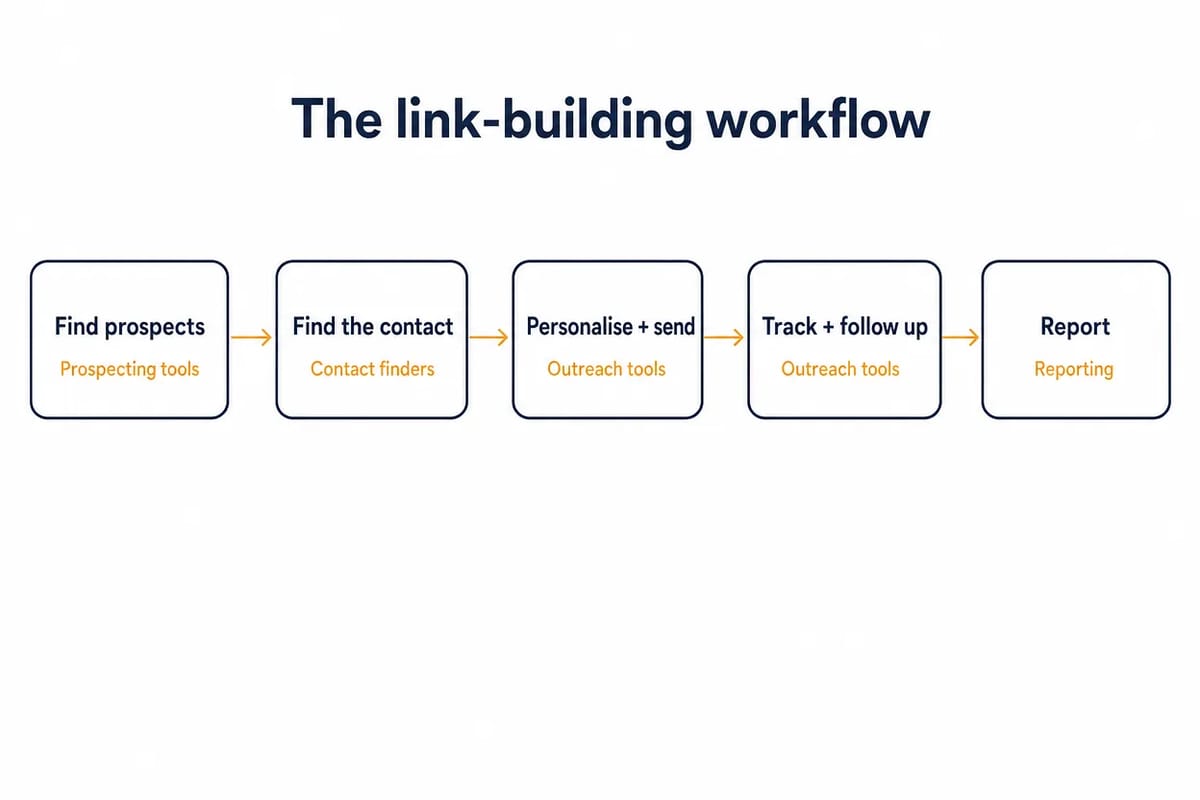
Use this sequence when you are building a campaign from scratch.
- Define the link reason. Decide whether you are offering a resource, statistic, expert quote, broken-link replacement, guest post, product mention, comparison page or local citation.
- Build the prospect source. Use Ahrefs, Semrush, Majestic or Screaming Frog to find domains and pages that already show a reason to care.
- Qualify the page by hand. Check relevance, editorial quality, outbound links, traffic potential, anchor context and whether a reader would benefit.
- Find the right contact. Use Hunter.io, Snov.io or Voila Norbert to locate and verify the editor, author or site owner.
- Write the pitch. Use templates only as a starting point. Add the page, reason, offer and specific edit you are asking for.
- Send and follow up. Use Pitchbox, BuzzStream or Postaga to schedule sensible follow-ups, stop on reply and track outcomes.
- Record the result. Mark won, lost, ignored, live, removed or revisit later. Monitor the link after publication.
That workflow keeps automation in its proper place. It speeds up research, admin and reporting, while the quality decision stays with the link builder.
What to avoid
Avoid any tool, service or marketplace that claims it can build links while you sleep without editorial review. That usually means automated profile links, comment links, spun guest posts, directory blasts or widget links. It can also mean low-quality bookmark links or placements on a private network, and a network fails the host-site checks on every Curated Link and Guest Post we place.
Also avoid using good tools badly. A real outreach platform still produces junk if you upload scraped lists, send generic emails or ignore opt-outs, and the same applies when you pitch sites with no topical link reason. Automation does not turn a weak pitch into a good one.
Review the pattern, not only the tool. If your campaign produces irrelevant placements, repeated exact-match anchors or thin guest posts, stop and audit it. Do the same for links on sites built mainly to sell links, because those pages have no readers. The problem is not that the work is automated; the problem is that nobody chose the link. The checks we run on every Curated Link and Guest Post are written up on our quality assurance page: an organic traffic floor, DA cross-checked against DR, no PBNs or networks, the link in the body copy and a human sign-off.
If you inherit a messy campaign, separate prospecting data from live links. A bad prospect in a spreadsheet is just waste. A bad link on the web may need removal, documentation or a wider spam link audit.
Recommended stacks by team type
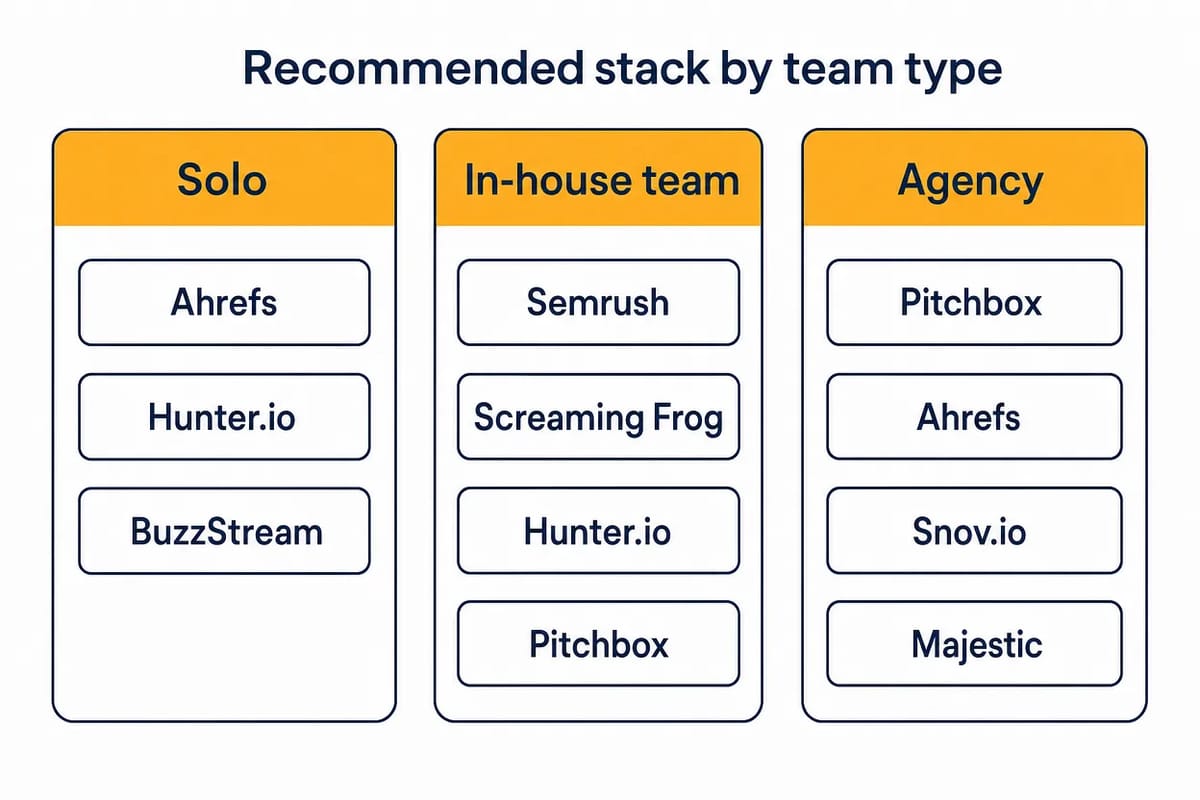
Small in-house team: use Ahrefs or Semrush for prospecting, Hunter.io for contacts, and BuzzStream for outreach. This gives you enough coverage without buying a heavy agency stack on day one.
Agency running several client campaigns: use Pitchbox for campaign management, Ahrefs or Semrush for prospecting, Hunter.io or Snov.io for contact verification, and Majestic for extra backlink screening. The value is centralised status, user ownership and cleaner reporting.
Technical SEO team: use Screaming Frog with Ahrefs, Semrush or Majestic. The crawler finds broken links, redirects, external-link patterns and page-level issues; the backlink platform helps you decide whether those findings are worth outreach.
Guest-post team: use Pitchbox, Postaga or BuzzStream for the pipeline, plus a contact finder if the platform does not cover enough addresses. Add a content status field so the outreach record and article workflow do not drift apart.
Managed-placement buyer: compare Respona's placement model with specialist link-building providers. Ask who chooses the sites, who writes the content and how anchors are handled. Also ask whether you pre-approve domains, what happens when a link is removed and how quality is reported. For Curated Links and Guest Posts from Rhino Rank, a removed link is replaced like for like within 12 months and every placement URL is reported to your dashboard; site pre-approval for Curated Links is available on request.
FAQ
Are automated link building tools safe?
Yes, if they automate prospecting, crawling, contact discovery, outreach admin, follow-ups and reporting. The tools to avoid are the ones that create links automatically or publish at scale without editorial control, because no editor chose the link and no reader will see it. Keep the quality decision human.
What is the best automated link building tool?
There is no single best tool because each one automates a different job. Pitchbox is strong for managed outreach campaigns, Ahrefs and Semrush are strong for prospecting, Screaming Frog is strong for crawling, and Hunter.io, Snov.io and Voila Norbert are contact-finding tools.
Can automated link building tools create backlinks for me?
The legitimate tools in this guide do not create good backlinks by themselves. They help you find opportunities, contact the right person and manage the campaign. The link still has to be earned, approved, written or placed through a real editorial process.
Which tool is best for guest-post outreach?
Pitchbox is the strongest fit for large guest-post pipelines. Postaga is useful for guided guest-post campaigns. BuzzStream is useful when publisher relationships and conversation history matter. Choose based on campaign volume and how much structure your team needs.
Do I need both a prospecting tool and an email finder?
Usually, yes. A backlink tool can show which sites and pages are worth contacting, but it may not give you the best current editor address. A contact finder verifies the outreach route after the site has passed qualification.
How many tools should I use at once?
Use the fewest tools that cover the workflow. One prospecting source, one contact finder and one outreach manager is enough for most teams. Add more only when you have a clear gap, such as technical crawling, extra backlink index coverage or managed placement support.
related Blog Posts




Join 7,000+ Clients Growing with Rhino Rank
Sign Up



Stay ahead of the SEO curve
Get the latest link building strategies, SEO tips and industry insights delivered straight to your inbox.