
 Back to all posts

A backlink profile is the full set of links from other websites that point at your site, or at one page of it, together with what those links look like: who links to you, from where in the page, with what words, to which of your pages, and how the set has grown.
A profile is something you read, not a score you look up. This page covers what a backlink profile includes, the order we read one in, what a profile looks like in numbers, and where to see your own.
Quick answer
- A backlink profile is the full set of links from other websites pointing at your site, or at one page of it, plus what those links look like.
- It includes referring domains, backlinks, anchor text, linked pages, link attributes, and new and lost links.
- Read it in five steps: referring domains, where in the page the links sit, which pages receive the links, the anchor mix, and the new-and-lost line.
- For numbers to compare against: Linkody's June 2026 sample of more than 865,000 monitored backlinks was 77% dofollow, had 18% branded anchors, and 56% of the links were still live and correct.
- To see yours: the Links report in Google Search Console shows a sample, and a backlink tool shows more.
What a backlink profile includes
A backlink profile includes the links themselves and the detail attached to each one. SE Ranking's Daria Chetvertak, writing on 25 May 2023, defines it fully: "A backlink profile refers to the list of all incoming links that are directed towards a specific website. It encompasses all the domains that have been linked to it." BrightEdge's glossary keeps it to one line: "Your collection of external backlinks is referred to as a backlink profile."
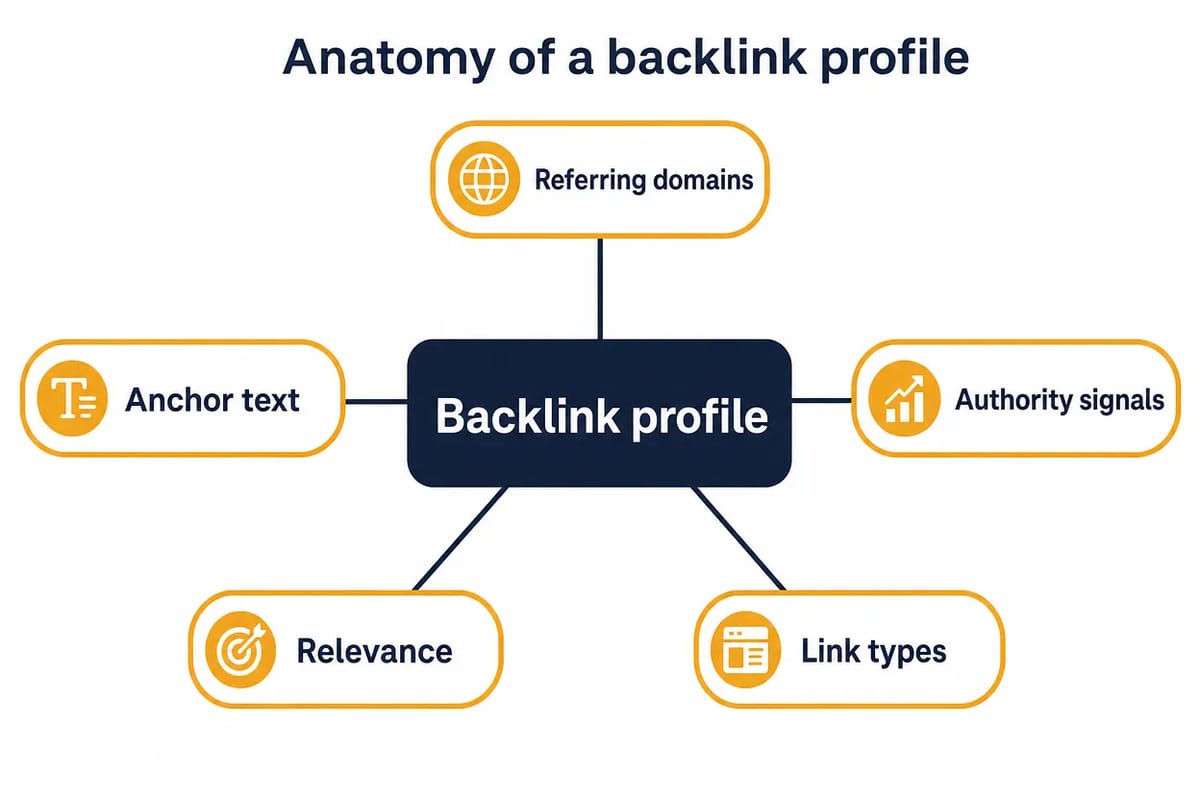
The parts of a profile:
- Referring domains: the unique websites that link to you.
- Backlinks: the individual links. One referring domain can account for many backlinks.
- Anchor text: the clickable words of each link.
- Linked pages: the pages on your site that receive the links.
- Link attributes: whether a link is followed or nofollowed, covered in our guide to followed and nofollow links.
- First-seen and lost dates: when each link was first found and when it disappeared.
A profile can be read at two levels. The domain-level view shows what the whole site has earned. The page-level view shows whether the pages that need to rank have relevant support of their own.
Size is not the point. A small site can have a strong profile with a modest number of relevant mentions. A large site can hold thousands of links that add little because the pages behind them are thin or unrelated.
How to read a backlink profile
Before we place a link, we open the host's backlink profile and read it in the same order each time. A score can move a site into the review pile. It does not replace reading the page. The same order works on your own profile.
1. Referring domains before backlinks
Referring domains are the unique websites that link to you. If one publisher links to your guide from five pages, that is five backlinks but one referring domain. If five separate publishers link once each, that is five referring domains.
Majestic's guide to assessing a backlink profile, published 30 June 2025, puts the value question plainly: "Ten links from the New York Times could count as one referring domain, but could be worth far more to your business than hundreds of links from a variety of unrelated sites."
Our reading: count the domains, then ask who they are. A supplier directory, a trade publication and a partner article all appear as referring domains, but they do not mean the same thing.
2. Where in the page the links sit
A link in the body of an article that people read is the placement we look for. The sentence around the link, the topic of the page and the reason a reader would click all come from that position.
Majestic's glossary describes its Link Context view as showing "where in a page a link may be, how many other links are close to it, and how many other links are on the source page". That is the right level of detail for a placement check.
Pages that exist only to hold links are a separate subject, covered in what a link farm is.
3. Which of your pages receive the links
Links rarely spread evenly across a site. A blog post may attract links while a commercial page has none, and that changes the next action: the commercial page needs mentions of its own, not more links to the post.
Moz Link Explorer shows this view as Top Pages. Google Search Console's Links report shows it as Top linked pages.
4. The anchor mix
Anchor text is the clickable text of the link. A typical profile mixes branded anchors, page titles, partial-match phrases, plain URLs and generic anchors such as "this guide" or "source", because different writers link in different ways.
In Linkody's June 2026 sample, 56% of anchors were keyword or phrase anchors and 18% were branded. There is no fixed ratio to hit. Anchors need to make sense in the article where they appear.
5. The new-and-lost line
The new-and-lost view shows both movements in a profile over time: new links arriving, and old ones disappearing when pages are rewritten or removed.
Moz Link Explorer's Discovered & Lost report tracks discovered and lost linking domains over the last 60 days. SE Ranking's Backlink Checker splits it into "New and lost referring domains" and "New and lost backlinks". The pace at which a profile gains links is known as link velocity.
After the five-step read, we run the checks in our quality assurance standard: a traffic floor, a DR/DA cross-check that is not a gate, no PBNs or networks, in-body placement, a human sign-off, a post-publication check, and 12-month replacement cover if the link drops.
What a backlink profile looks like in numbers
On 16 June 2026, Linkody's François Mommens published link building statistics drawn from more than 865,000 backlinks that Linkody users monitor, pulled in June 2026. These are links people chose to track, not a census of the web.
Measure | Linkody's sample |
|---|---|
Dofollow links | 77% |
Nofollow links | 23% |
Keyword or phrase anchors | 56% |
Branded anchors | 18% |
Naked URL anchors | 15% |
Empty or image anchors | 10% |
Generic anchors | 1% |
Links still live and correct | 56% |
Removed while the page stayed up | 17% |
Linking page returns an error | 14% |
Links decay. Of the links in the sample that died, 21% went within 3 months, 34% within 6 months and 52% within a year, with an average lifespan of about 20 months. Measured by how long a link had been watched, 89% were still live after 3 months, around 63% after a year, 46% after 2 to 5 years, and 31% after 5 years or more.
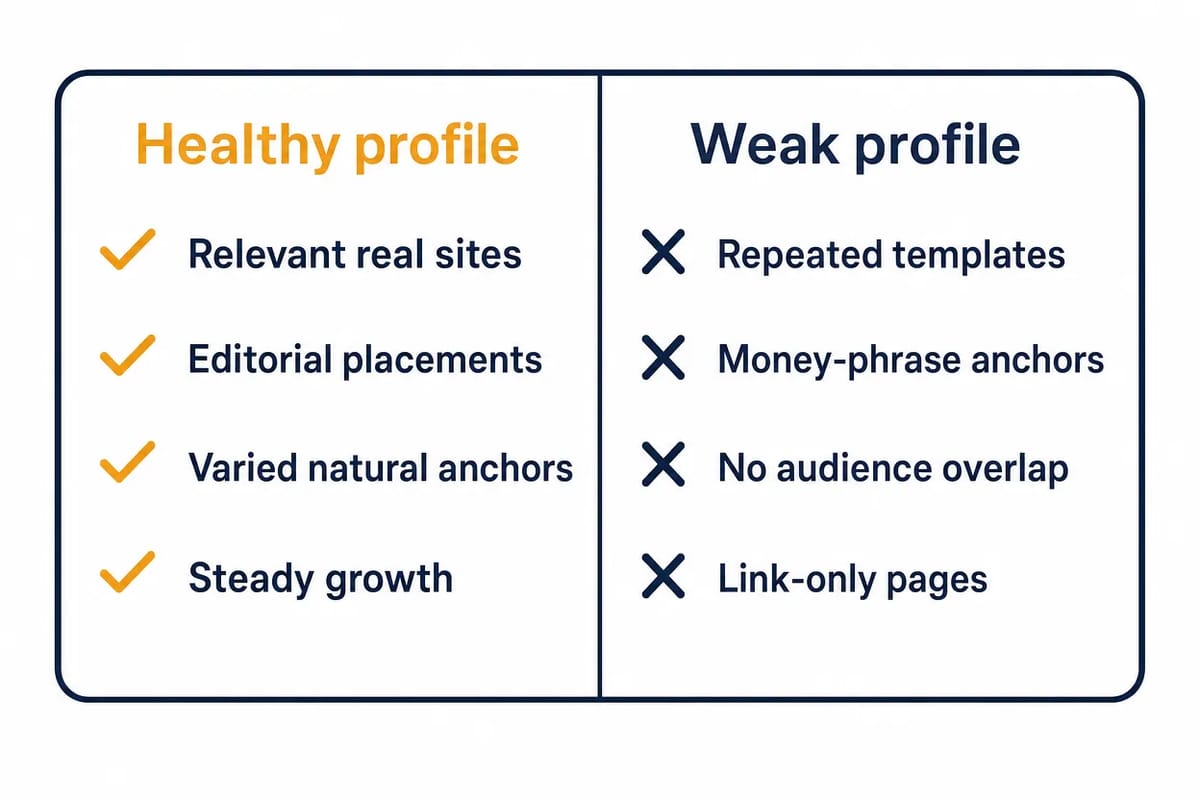
Our reading: a profile is never finished, and no percentage here is a target. There is no magic ratio either. A SaaS profile, an ecommerce profile, a local business profile and an affiliate profile all look different, because the market, the content and the link opportunities differ. In our view, the profiles worth matching are boring in the right way: relevant sources, mixed anchors, and growth that matches the site.
Scores are the tools' yardsticks
Domain Authority, Domain Rating and Authority Score belong to the tools that built them, not to Google. Moz describes Domain Authority as its own predictive metric and says Google does not use it to determine rankings.
The other tools describe their numbers the same way. Ahrefs: "Domain Rating (DR) shows the strength of a website's backlink profile compared to the others in our database on a 100-point scale." Majestic says its Flow Metric scores "do not directly influence search engines". Semrush: "Authority Score is our compound metric that grades the overall quality of a website or a webpage."
Tool scores help you compare sites inside one tool. They mislead when treated as Google's view of a link. Use one tool consistently when comparing, then read the page before you decide. For the detail, see how DA, DR and Authority Score work.
How to view your backlink profile
Start with Google Search Console. Its Links report lists External links in three views: Top linked pages, Top linking sites and Top linking text. Google's help page notes that the report "isn't a comprehensive list of every link" and "shows a sample", and that "Tables are limited to 1,000 rows". Exports of latest links and more sample links go up to 100,000 rows.
Backlink tools keep their own indexes and show more of the picture. The views to look for, by their current names:
- Majestic Site Explorer: External Inbound Links, Referring Domains, Anchor Text, Link Context.
- Moz Link Explorer: Linking Domains, Inbound Links, Anchor Text, Top Pages, Discovered & Lost.
- SE Ranking Backlink Checker: Referring Domains, Top backlink anchors, New and lost referring domains.
- Ahrefs Site Explorer has Backlinks, Referring domains, Anchors and Best by links. Semrush Backlink Analytics has Backlinks and Anchors, and Semrush keeps Referring Domains as a separate tool.
Two tools rarely agree on a number. Majestic gives one reason in the same guide: "Majestic has a tight definition of what constitutes a referring domain. This definition deliberately excludes a large number of “private domain suffixes” from counts. Other SEO tools may take a different interpretation, and this makes comparing numbers between tools difficult." Index size and freshness differ too. SISTRIX says its link crawler scans over 10 billion web pages every month and updates data on more than 250 billion links per month.
For a practical backlink audit, export the main data points and group them by question:
- Which pages on your site attract the most links?
- Which referring domains appear most often?
- Which anchors are used, and do any look forced?
- Which sources are relevant to your topic or audience?
- Which links were gained or lost during the period you are checking?
Then read samples manually. A spreadsheet shows patterns, but it cannot tell whether a link belongs in the sentence around it.
Why the profile matters to rankings
Google says links still feed its assessment of quality. Its How Search Works page states that "one of the factors used to determine quality is understanding if other prominent websites link or refer to the content. This is generally a good sign that the information is trustworthy." The ranking systems guide says of PageRank: "it continues to be part of our core ranking systems."
Our position: followed links in the body of relevant, indexed pages that people read are one of the strongest ranking levers a site has.
A profile is still judged against the page's job. A homepage, a category page, a statistics page and a local service page will not attract the same types of links. The question is whether the profile looks credible for that page and that market.
How to strengthen a thin profile
Start by reading a competitor's backlinks to see which publications cite the pages you compete with. A backlink gap analysis then lists the sites that link to them and not to you.
Next, build pages worth citing and pitch them to people who publish on that subject: data pages, useful guides, comparison resources, original commentary.
Or commission the placement. A Guest Post is a new article with the link in its body, on a publication we have checked. A Curated Link is a mention added to the body of an existing, indexed page with readers. Either way, the same five-step read applies to the host.
Links you did not build
Every established site collects links it never asked for: scrapers, auto-generated pages and unread directories. Those are unread pages, and they are background noise in a profile. Read patterns, not single links, because one odd domain means nothing on its own. If you inherited a site, read the profile in the five-step order before you add to it, so you know what is already there.
How often to review it
Our judgement: monthly while a link building campaign runs, quarterly otherwise. The reason is decay. In Linkody's sample, 52% of the links that died went within a year, so the new-and-lost view is the one to check each time.
Frequently asked questions
What is a backlink?
A backlink is a link from one website to another. In this context, it means another site links to your site or to one of your pages.
What is a backlink profile?
A backlink profile is the full set of backlinks pointing at your site, or at one page of it, together with what those links look like: referring domains, anchor text, linked pages, link attributes, and new and lost links.
What does a good backlink profile look like?
Relevant links from real publications, placed in the body of pages that people read, with anchors that fit the sentence and growth that matches the site. It is not defined by a fixed dofollow percentage, anchor split or DA/DR mix.
Are DA and DR Google ranking factors?
No. Moz describes Domain Authority as a predictive metric of its own that Google does not use to determine rankings, and Ahrefs describes Domain Rating as a comparison of backlink profile strength inside its own database. Both are tool scores for comparing sites, not Google scores.
Are backlinks still relevant in 2026?
Yes. Google's How Search Works page names links from other prominent websites as one of the factors it uses to judge quality, and its ranking systems guide says PageRank continues to be part of its core ranking systems. In our view, followed links in the body of relevant, indexed pages that people read remain one of the strongest ranking levers a site has.
How do I check my backlink profile?
Open the Links report in Google Search Console for a sample: Top linked pages, Top linking sites and Top linking text. For a fuller view, use a backlink tool such as Majestic Site Explorer, Moz Link Explorer or SE Ranking Backlink Checker, which add referring domains, anchors, and new and lost links.
How many backlinks do I need?
There is no universal number. Compare your profile with the pages that already rank for the queries you care about, and judge quality, relevance and intent rather than copying a link count.
related Blog Posts



Join 7,000+ Clients Growing with Rhino Rank
Sign Up


Stay ahead of the SEO curve
Get the latest link building strategies, SEO tips and industry insights delivered straight to your inbox.