
 Back to all posts

Crawl budget is the set of URLs on a site that Google can crawl and that Google wants to crawl. It has two parts: the crawl capacity limit, how much Googlebot can fetch without straining your server, and crawl demand, how much Googlebot wants to fetch. Google states that low demand alone reduces crawling even when the capacity limit is never reached. Google's live guide is written for three site profiles: sites with over a million unique pages that change about weekly, sites with 10,000 or more unique pages that change daily, and sites where a large share of URLs sit in Search Console as Discovered - currently not indexed. If your pages are crawled the same day they publish, Google says you do not need the guide. Google also states that popular URLs tend to be crawled more often; Rhino Rank's read of that sentence, not Google's wording, is that earning links is how a URL earns that popularity.
Key takeaways
- Google's crawl budget documentation defines crawl budget as what Google can crawl (capacity) plus what Google wants to crawl (demand).
- Google's crawl budget guide names three site profiles that need to manage crawl budget, and Google calls the numbers a rough estimate, not exact thresholds.
- Google's crawl budget documentation says popular URLs are crawled more often; Google does not say backlinks raise crawl demand.
- Google's crawling myths page states that crawling is not a ranking signal. The honest link to rankings is index lag.
- Four Search Console surfaces older guides still teach are retired or renamed: the crawl rate limiter, the URL Parameters tool, the robots.txt Tester and the Coverage report.
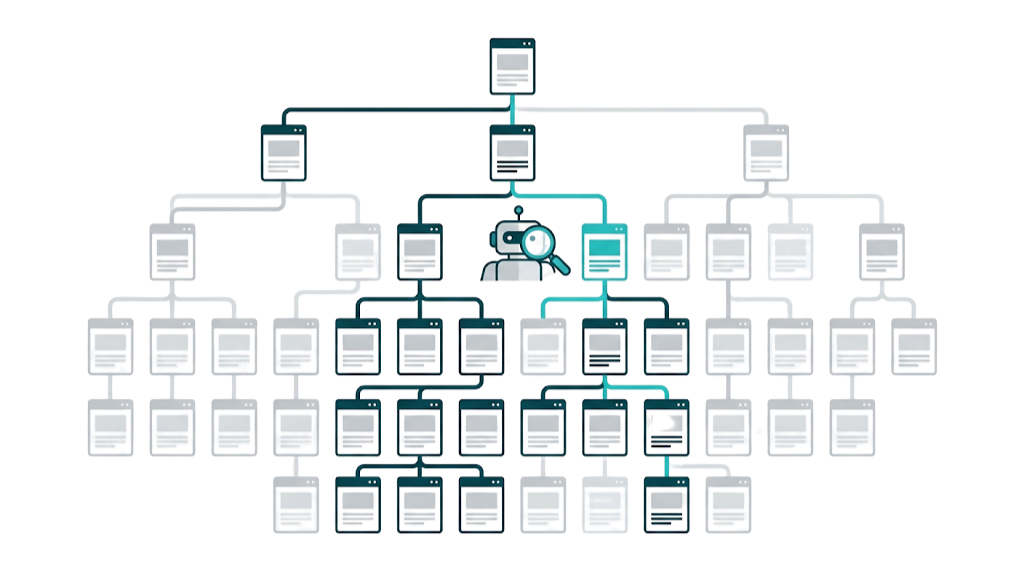
What Is Crawl Budget? The Definition Google Actually Uses
In Google's crawl budget documentation, Google puts it this way: "Taking crawl capacity and crawl demand together, Google defines a site's crawl budget as the set of URLs that Google can and wants to crawl."
An older phrasing, which defined crawl budget as the number of URLs Googlebot can and wants to crawl, comes from a Google Search Central blog post published in January 2017. The two mean the same thing, but the live documentation is the source to cite.
The two parts do different jobs. The crawl capacity limit, sometimes called hostload, is the ceiling on how aggressively Googlebot fetches pages, and that ceiling is shared across Google's crawlers. Crawl demand is set per crawler and reflects how much Google wants each URL. A site in this model is a unique hostname, so www.example.com and code.example.com count as separate sites with separate budgets.
The practical consequence: even with spare capacity, low demand means Google crawls less. When a site wants more crawl budget, Google points to added server resources if hostload is exceeded, and for Search Google factors popularity, overall user value, content uniqueness and serving capacity. Google also flags perceived inventory, the duplicate and unwanted URLs a site generates, as the factor a site can positively control the most.
Most guides mash the two parts into one fuzzy idea, which is why their advice stops at server speed. A fast site with low-demand pages still gets crawled lightly, and a slow site with high-demand pages still gets throttled.
Crawl Capacity Limit: How Your Server Speed Shapes What Google Crawls
The crawl capacity limit rises when a server responds quickly and consistently, and it falls when responses slow down, time out or return errors. Googlebot adjusts how hard it crawls so the site stays fast for real users.
Google states that if a site slows down, or responds with server errors (5xx) or rate-limiting signals (429), the limit goes down and Google crawls less. Google's crawling myths page adds that a significant number of 5xx errors or connection timeouts slows crawling. Because the limit is shared across Google's crawlers, smartphone, desktop, image and video fetching all draw on the same ceiling.
Google publishes no millisecond response-time threshold. Any fixed number quoted in other guides does not come from Google. What Google does say is that stable or improving latency and time to first byte push the limit up.
Search Console once offered a crawl rate limiter. Google deprecated it on 8 January 2024, and crawl rate is now governed by server response behaviour rather than a Search Console setting.
Crawler traffic is also growing across the web. Cloudflare's analysis of who is crawling your site found that Googlebot requests rose 96% from May 2024 to May 2025, overall crawler traffic rose 18%, and GPTBot requests rose 305% over the same window. If server health has not been reviewed recently, running a technical SEO audit first shows where the bottlenecks sit before crawl budget work begins.
Crawl Demand: Why Google Decides Your Pages Are Worth Revisiting
Google's crawl budget documentation states: "URLs that are more popular on the Internet tend to be crawled more often to keep them fresher in our systems." The second demand factor is staleness: Google's systems try to recrawl documents often enough to pick up any changes.
Read the popularity sentence carefully. The word links does not appear in it, and nowhere does Google state that pages with more high-quality backlinks receive higher crawl demand. Some vendor guides, Semrush among them, treat popularity as backlinks plus traffic. That is their reading, not Google's wording, and this page will not repeat it as fact.
The jump from popularity to links is Rhino Rank's inference, not Google's: links are the main way a URL becomes more popular on the internet, so earning links to a page is the practical route to higher crawl demand. We draw that inference from Google's sentence. Google did not write it.
Site moves can raise demand for a while, and duplicate or unwanted URLs soak up crawl time Google could spend on pages that matter. For a priority page that rarely changes, demand is the lever: something about the page's standing has to grow before Googlebot comes back more often.
Does Crawl Budget Actually Matter for SEO? (And for Which Sites)
For most sites, no. Google's own guide names three site profiles that genuinely need to manage crawl budget, and Google describes the numbers behind them as a rough estimate, not exact thresholds.
Who Google's crawl budget guide is for, and what Google says each profile should do.
Site profile | What Google says to do |
|---|---|
1 million+ unique pages, with content changing about once a week | Read the crawl budget guide |
10,000+ unique pages, with content changing daily | Read the crawl budget guide |
A large portion of URLs shown in Search Console as "Discovered - currently not indexed" | Read the crawl budget guide |
Pages are crawled the same day they publish | Skip the guide; an up-to-date sitemap and the Page indexing report are enough |
Everyone else can skip the topic. Google also says sites with fewer than a thousand pages should not need the Crawl Stats report at all. You may still read that sites with more than a few thousand URLs should worry. That line comes from Google's January 2017 blog post, and the live documentation has replaced it with the profiles above.
The third profile needs translating. Discovered - currently not indexed means Google found the URL but has not crawled it yet, typically because crawling was expected to overload the site, so Google rescheduled and the last crawl date stays empty. A large cluster of URLs in that state is Google's clearest public signal that demand or capacity is the constraint.
For sites that do qualify, the cost is index lag. A URL cannot be indexed until Googlebot crawls it, and a page that is rarely recrawled shows stale content in search results: old prices, missing schema, outdated copy. Crawling itself is not a ranking signal, Google states that explicitly, so the honest way crawl budget touches rankings is through how fast changes reach the index. Understanding how link building helps SEO separates the two effects: links move rankings through authority, and any crawl-frequency lift is a secondary benefit.
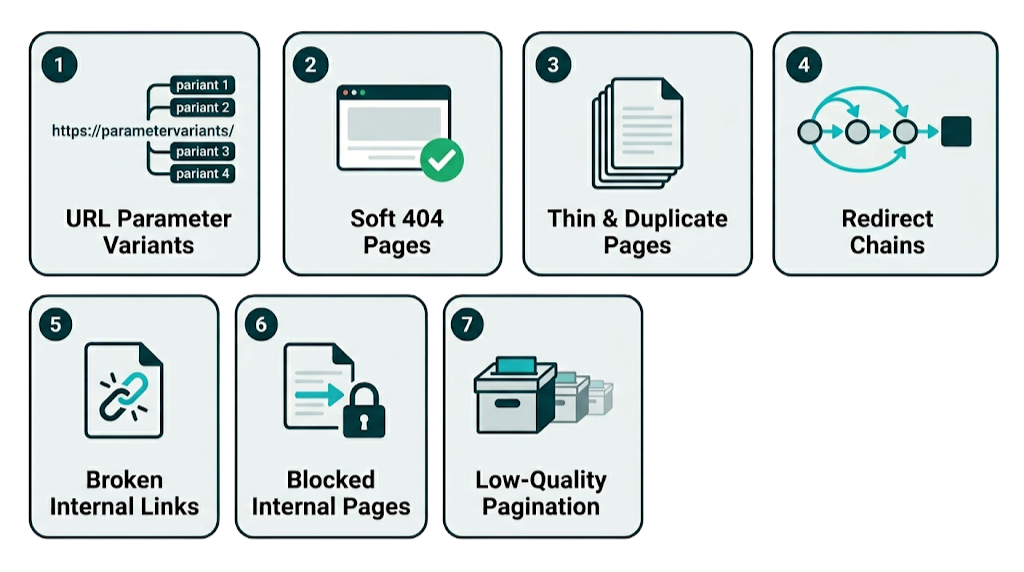
The 7 Biggest Crawl Budget Killers (And How to Diagnose Each One)
Google calls perceived inventory, the duplicate and unwanted URLs a site generates, the factor you can positively control the most. These seven patterns account for most of the waste we find in technical audits at Rhino Rank. Each item is the symptom and how to spot it. The fixes sit in the optimisation techniques section below.
1. URL parameter variants. Sort orders, filters, session IDs and tracking parameters each create unique URLs that serve near-identical content, and every variant Googlebot fetches counts toward crawl budget. Spot them in server logs: parameter URLs fetched over and over while canonical pages wait.
2. Soft 404 pages. A soft 404 returns a 200 status code with content that amounts to not found: empty search results, no-products states, placeholder pages. Google states that soft 404s waste crawl budget, and the Page indexing report lists them.
3. Thin and duplicate content. Tag pages with one post, near-empty author archives, boilerplate landing page variants. Googlebot still crawls and evaluates each one, and that crawl time comes out of the same budget as the pages that earn money.
4. Long redirect chains. Google's instruction is plain: avoid long redirect chains. Each hop is another fetch, and chains usually appear after migrations that never received a redirect audit. Any crawler will surface them.
5. Server errors and rate limiting. A significant number of 5xx responses or connection timeouts makes Google slow its crawling, and 429 rate-limiting responses push the capacity limit down. One correction to common advice: 4xx responses other than 429 do not waste crawl budget, because Google received a status code and moved on. Broken internal links are still worth fixing as maintenance, but they are not a budget leak. Knowing what each HTTP status code means separates real crawl problems from tidy-up work.
6. Blocked URLs that are still linked. Robots.txt stops the fetch, not the discovery: internal links to a disallowed URL still lead Googlebot to the door. Google also states it will not shift budget freed by a block to other pages unless it is already hitting your capacity limit.
7. Low-value paginated series. Deep pagination on thin archives pulls Googlebot into dozens of near-identical listing pages. A blog with 800 posts paginated at ten per page generates 80 archive URLs, most offering little worth recrawling.
How to Use Google Search Console's Crawl Stats Report to Find Waste
The Crawl Stats report lives under Property settings, then Crawl stats, and Google aims it at advanced users. Google's own help page says that if your site has fewer than a thousand pages, you should not need this report.
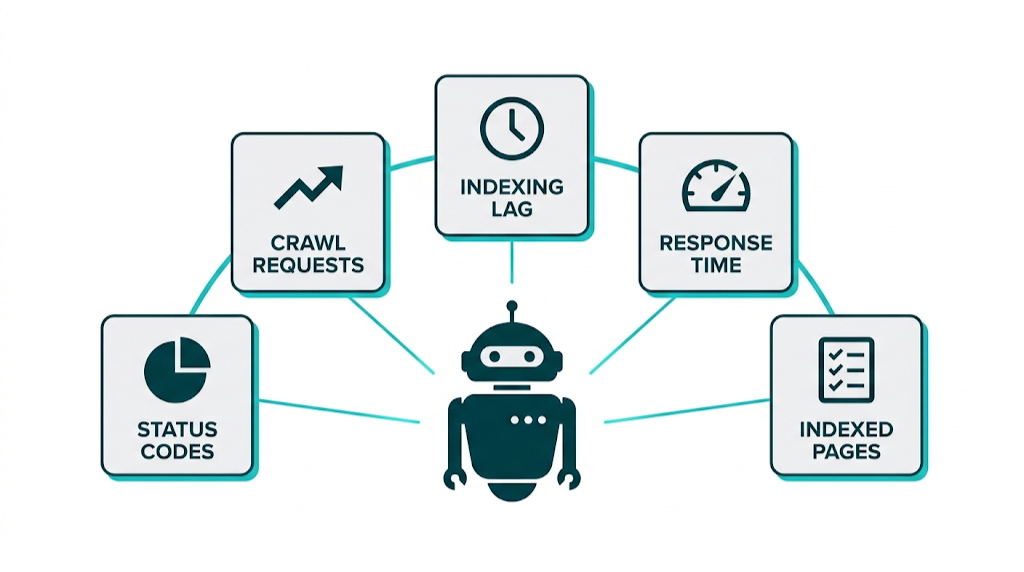
The report breaks Googlebot's activity into eight groups: total crawl requests, total download size, average response time, host status, crawl responses, file type, crawl purpose and Googlebot type. The Googlebot type split covers Smartphone, Desktop, Image, Video and Page resource load, and host status and top child hosts show a 90-day window.
Waste shows up in two places. The crawl responses split shows the share of requests that returned something other than a 200. If redirects make up a large slice, check for chains, because Google's instruction is to avoid long redirect chains. The file type and crawl purpose splits show whether Googlebot spends fetches on CSS, JavaScript and images or on HTML pages you want indexed. Watch the average response time trend as well. Google sets no target number, but a rising line usually comes before a falling crawl rate.
Using Server Log Analysis to See Exactly What Googlebot Is Crawling
Crawl Stats gives the summary. Server logs give the receipts. Logs record every Googlebot request with the exact URL, timestamp, status code and response time, which lets you pin waste on specific URL patterns instead of guessing from aggregates.
A log file analyser such as Screaming Frog's Log File Analyser filters by user agent, segments by URL pattern and shows which sections burn the most fetches. Look for parameter patterns fetched thousands of times, error URLs Googlebot keeps retrying, sections that pull heavy crawl attention without pulling traffic, and new pages still uncrawled weeks after launch. The gap between the pages Googlebot crawls most and the pages you want crawled is the crawl budget problem statement. Every fix below points back to closing it.
Search Console Tools Google Has Retired (And What Replaced Each One)
Four Search Console surfaces that older crawl budget guides still teach are gone or renamed, and one related markup signal is retired too. The dates matter, because advice built on dead tools wastes audit time.
Retired Search Console surfaces, when each one went, and what to use now.
Surface | When it went | What to use now |
|---|---|---|
Crawl rate limiter | Deprecated 8 January 2024; announced 24 November 2023 by Gary Illyes and Nir Kalush | Server response behaviour: speed and reliability now set the crawl rate |
URL Parameters tool | Announced 28 March 2022 with one month's notice; reported turned off 26 April 2022 | robots.txt for parameter patterns, and hreflang for language variants |
robots.txt Tester | Sunset in late 2023, reported 15 November 2023 | The robots.txt report in Search Console; URL Inspection or Google's open-source robots.txt library for a single URL |
Coverage report | Renamed | The Page indexing report |
rel=next/prev markup | Retired as a Google indexing signal on 21 March 2019 | Nothing; Google no longer uses it as an indexing signal |
The pattern across all five: Google has moved crawl control out of Search Console settings and into server behaviour and on-page signals. If a guide tells you to set a preferred crawl rate or open the robots.txt Tester, that guide is out of date.
How Internal Linking and Link Building Directly Influence Crawl Budget
Google's crawl budget documentation names URL popularity as a demand factor, and Rhino Rank's inference, not a Google statement, is that links are how popularity is usually earned. The distinction matters enough to state plainly: nowhere does Google say that pages with more high-quality backlinks receive higher crawl demand. The nearest Google-staff wording is Gary Illyes on the Search Off the Record podcast in 2022, reported by Search Engine Roundtable: other sites linking to URLs in a pattern is a signal about the site or section in general. That is a site-level quality signal, not a per-URL crawl-budget formula.
Internal links are the part you control today. Google's crawling myths page says pages linked from the homepage may be seen as more important and therefore crawled more often. We see the mirror image in audits: pages buried deep with few internal links get crawled less. A deliberate internal link building structure pulls priority pages closer to the surface and keeps crawl demand flowing to the URLs that pay.
When a client tells us a placed link is not showing up, the first thing our QA team checks is whether the page that carries the link has itself been recrawled since the placement went live. On older host pages it often has not, and the link cannot act as a popularity signal for anything until Googlebot has seen it. That is why our QA checks that the host page is indexed before a placement is signed off, and why we tell clients to look at the linking page's last crawl before they judge the link.
If a linking page is stuck, our guide to getting the linking page indexed covers the practical steps.
Off-site, our read is that earning links to a priority URL is the practical way to grow its popularity and, with it, the page's crawl demand. Before building anything, auditing the link profile of a priority page shows whether that page has any external support at all.
At Rhino Rank, our Managed Service aims links at commercially important, under-crawled pages, because those are the URLs where every signal has to work hardest.
Faster recrawls of the target page are a side effect of links, not a reason to buy them. Buy links for the ranking case and take the crawl-frequency lift as a bonus. And if a priority page shows Discovered - currently not indexed, fix internal linking and server response first. An external link cannot pull Googlebot through a door the site keeps shut.
Crawl Budget Optimization: 8 Proven Techniques to Maximise Googlebot Efficiency
Perceived inventory is the factor Google says a site can positively control the most, so most of these eight techniques remove unwanted URLs. The rest steer Googlebot toward the pages that drive revenue. Each technique is action only; the symptoms sit in the killers section above.
1. Audit and consolidate URL parameters. Pull the parameter variants Googlebot keeps fetching from server logs. If a parameter creates duplicate pages, canonical the variants to the clean URL; Google's canonical documentation lists avoiding crawl time on duplicates as a reason to use canonicals. If a parameter has no indexing value, block the pattern in robots.txt. The old URL Parameters tool was retired in April 2022, and Google's named replacement is robots.txt, with hreflang for language variants, not canonicals.
2. Collapse long redirect chains. Google's instruction is to avoid long redirect chains. Run a redirect audit, turn chains into single direct redirects, and point internal links at the final URL. That cuts the fetches per visit.
3. Resolve soft 404s. Pull the soft 404 list from the Page indexing report, the renamed Coverage report. For each URL, choose one: return a real 404 or 410, redirect to the closest relevant parent, or build the page out with content that earns indexing. What you never do is leave a placeholder serving a 200.
4. Keep the XML sitemap clean. Include only URLs you want crawled and indexed, keep the sitemap up to date, and use lastmod for updated content so Google can prioritise fresh pages. Drop redirected, noindexed and parameter URLs.
5. Stabilise server response times. Capacity rises when latency and time to first byte stay stable or improve. Google publishes no millisecond threshold, so work the trend rather than a number: a CDN for static assets, server-side caching, database tuning on slow templates, and better hosting when the baseline stays high. Track the average response time line in Crawl Stats after each change.
6. Surface priority pages with internal links. Two rules you may have read do not exist in Google's wording: there is no three-internal-links rule and no three-clicks-from-the-homepage rule. Google said in 2008 that important pages should sit within several clicks of the homepage, and its myths page says homepage-linked pages may be seen as more important and crawled more often. Our practice, and it is our practice rather than a Google rule: map the commercial priority pages, add contextual links from high-traffic pages, and keep those pages shallow in the architecture.
7. Block genuinely low-value patterns in robots.txt. Admin paths, internal search results, login pages and staging belong behind disallows. Remember two Google caveats: a disallowed URL can still be indexed if other sites link to it, and Google will not shift freed budget to other pages unless it is already hitting your capacity limit. The robots.txt Tester is gone. Use the robots.txt report in Search Console, and test single URLs with URL Inspection or Google's open-source robots.txt library.
8. Build external links to under-crawled priority pages. This is the technique most guides skip, and it rests on our inference, not a Google rule: Google's crawl budget documentation says popular URLs are crawled more often, Google does not say backlinks raise crawl demand, and we treat link earning as the practical route to popularity. Start by finding priority URLs with weak crawl frequency in Crawl Stats and server logs, then check how many referring domains point at those URLs.
For clients, we do this with Curated Links placed on relevant, indexed pages and aimed at the exact URLs that need support. The ranking case justifies the spend on its own. Faster recrawls are the bonus, not the pitch.
Robots.txt vs. Canonical Tags vs. Noindex: Choosing the Right Crawl Control Tool
Robots.txt is not a mechanism for keeping a page out of Google, noindex does not stop Google crawling, and canonical tags block nothing at all. The three tools are not interchangeable, and the wrong choice creates problems that are harder to diagnose than the original issue.
What Google says robots.txt, noindex and canonical tags actually do.
Tool | Stops Google crawling the URL? | Keeps the URL out of Google? | What Google says about using it for crawl budget | Google document |
|---|---|---|---|---|
robots.txt disallow | Yes; Google will not crawl or index the content | No; a disallowed URL can still be indexed if other sites link to it, and Google may show the URL with anchor text | Do not use it to temporarily reallocate crawl budget; Google will not shift freed budget to other pages unless it is already hitting your capacity limit | robots.txt introduction |
noindex meta tag | No; Google has to crawl the page to find the noindex rule | Yes, but Google still requests the page first, then drops it | Do not use noindex to save crawl budget; the request still happens | Robots meta tag documentation and the crawling myths page |
Canonical tag | No; variant URLs can still be crawled | No; a canonical is a strong signal about the preferred URL, not a command | Google lists avoiding crawl time on duplicate pages as a reason to use canonicals | Canonical consolidation documentation |
The decision tree:
- Stop Googlebot crawling a pattern entirely, and accept the URL may still appear in the index: robots.txt disallow.
- Keep a page crawlable but out of the index: noindex, and do not block the page in robots.txt, because Google has to crawl the page to find the noindex rule.
- Consolidate duplicate signals without blocking anything: canonical tag.
- Remove a URL from the index completely: noindex plus an accessible crawl. Robots.txt cannot do this job.
Crawl Budget for E-Commerce Sites: Managing Faceted Navigation and Parameter URLs
Every URL variant Googlebot fetches counts toward crawl budget, and faceted navigation generates variants faster than any other pattern we audit. Each filter combination is a unique URL, so a modest catalogue can produce millions of crawlable addresses.
Take a clothing retailer with 5,000 products across 20 categories. Add eight filter dimensions with ten options each and the combinations run into the millions. Googlebot cannot tell which combinations map to useful pages, so without instructions it crawls broadly and spends budget on filter URLs nobody searches for.
The control mix is the same three tools from the table above. Canonical faceted URLs to the base category, unless a combination has real search demand of its own and deserves indexing. Block valueless parameter patterns in robots.txt: session IDs, sort orders, tracking parameters. Noindex facets that help users navigate but should not rank. Do not rely on nofollow to save budget, because Google states the saving disappears if another page links to the URL without nofollow. And do not rely on rel=next and rel=prev for pagination. Google retired them as indexing signals on 21 March 2019.
The proof comes from logs. Segment Googlebot's requests by URL pattern, and when parameter URLs pass roughly 30% of requests on a shop, we treat it as a budget leak that cuts crawl coverage on product pages. That 30% line is our working heuristic, not a Google threshold.
The prioritisation mirrors ecommerce link building: decide which pages drive commercial outcomes, then make sure Googlebot can find and recrawl those pages efficiently.
How to Measure Crawl Budget Optimization Progress Over Time
Measure progress with the metric groups that actually exist, because Google publishes neither a response-time target nor a timeline for improvement. Search Console's Crawl Stats report provides total crawl requests, total download size, average response time, host status, crawl responses, file type, crawl purpose and Googlebot type. Progress is measured against your own baseline.
Track monthly:
- Total crawl requests and the crawl responses split: do not read a high non-200 share as waste on its own, because Google's crawling myths page states that 4xx responses other than 429 do not waste crawl budget. Soft 404s do waste budget, and the Page indexing report lists them.
- Average response time: watch the trend, because a falling line usually comes before a rising crawl rate.
- The Page indexing report: the gap between submitted and indexed URLs, and how many URLs sit at Discovered - currently not indexed, the status that means Google found the page but rescheduled the crawl to avoid overloading the site.
- New-page indexing lag for priority URLs, tracked manually from publish date to index appearance.
- Crawl frequency of priority URLs, taken from server logs.
Host status and top child hosts show a 90-day window, so review on that cadence. Baseline before changes ship, roll changes out in batches so attribution stays clean, then compare. Faster indexing of new priority pages is the clearest sign the crawl budget work is paying.
Frequently Asked Questions About Crawl Budget
Short answers to the crawl budget questions Rhino Rank hears most often in technical audits.
What is crawl budget and how does Google calculate it?
Crawl budget is the set of URLs Google can and wants to crawl on your site. Google calculates it from two systems: the crawl capacity limit, set by how your server responds under load, and crawl demand, set by how popular and how fresh Google considers your pages.
What is the difference between the crawl capacity limit and crawl demand?
The crawl capacity limit, which older guides call the crawl rate limit, is the ceiling on how hard Googlebot crawls, set by server speed and reliability. Crawl demand is how much Google wants each URL, driven by popularity and staleness. Google states that low demand alone reduces crawling even when the capacity limit is never reached.
Do most sites need to worry about crawl budget?
No. Google's crawl budget guide is written for sites with over a million pages changing weekly, sites with 10,000 or more pages changing daily, and sites with many URLs stuck at Discovered - currently not indexed, and Google calls those numbers a rough estimate. If your pages are crawled the day they publish, Google says you do not need the guide.
How do I check how much crawl budget my site is using?
Open Search Console and go to Property settings, then Crawl stats: total requests, response codes, file types, crawl purpose and Googlebot variants, with a 90-day window on host status. For URL-level detail, run server logs through a tool such as Screaming Frog's Log File Analyser to see exactly which URLs Googlebot fetches and what they return.
Does getting more backlinks increase crawl budget?
Google's crawl budget documentation says popular URLs tend to be crawled more often; Google does not say backlinks raise crawl demand. Gary Illyes, on Search Off the Record in 2022, described other sites linking to a URL pattern as a signal about the site in general, not a per-URL formula. Rhino Rank's inference, not Google's: links are the practical route to that popularity, so earning links to under-crawled priority pages is likely to lift how often Googlebot returns.
Should I use robots.txt or noindex to manage crawl budget?
Use robots.txt to stop crawling of low-value patterns; a blocked URL can still be indexed if other sites link to it. Do not use noindex to save crawl budget, because Google has to crawl the page to find the noindex rule. Google's crawl budget documentation adds that freed budget is not shifted to other pages unless Google is already hitting your capacity limit.
How long does it take to see improvements after crawl budget optimization?
Google publishes no timeline, so treat any fixed number of weeks with suspicion. The dated view that does exist is the Crawl Stats report's 90-day window: baseline before you change anything, then compare on that view. In Rhino Rank's experience, indexing lag on priority pages is the first metric to move.
related Blog Posts



Join 7,000+ Clients Growing with Rhino Rank
Sign Up



Stay ahead of the SEO curve
Get the latest link building strategies, SEO tips and industry insights delivered straight to your inbox.