
 Back to all posts

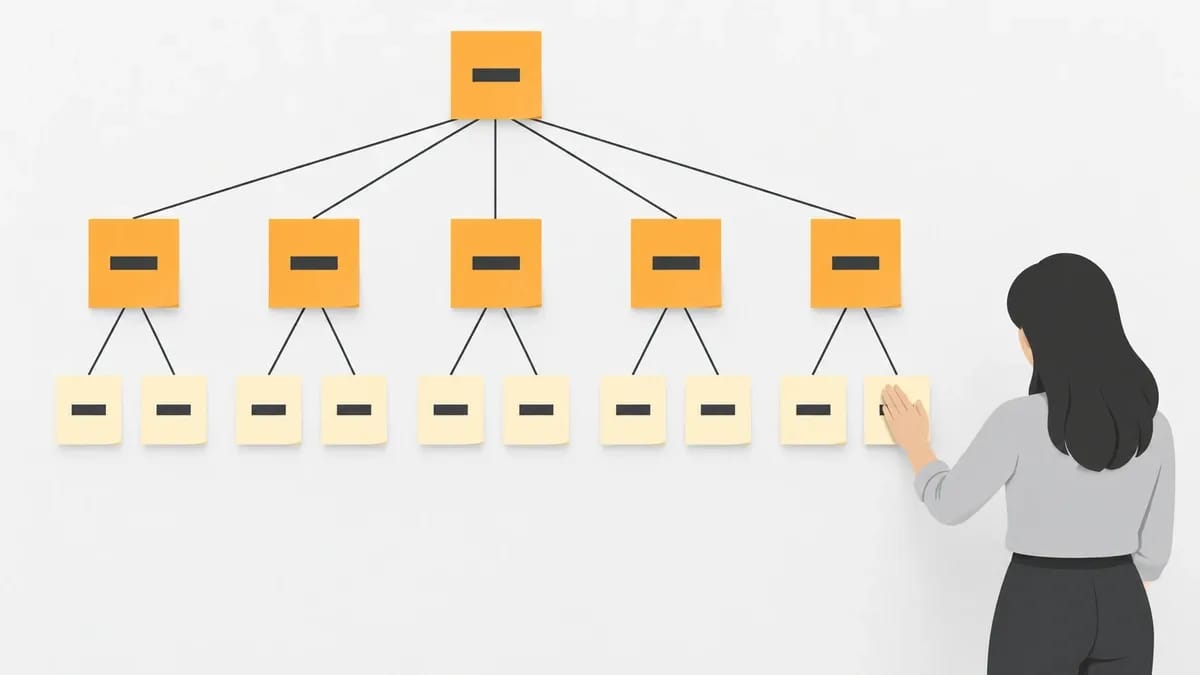
In SEO, a topical map is the plan of every page a site needs to cover one subject, grouped into a core topic, its subtopics and the pages under each, with the internal links between them drawn before the pages are written. It turns one broad subject into a fixed list of pages to write, and an order to write them in, before any writing starts.
This guide covers what the people who use the term mean by it, one map built in the open on a made-up subject and the build steps as two practitioners wrote them. It then covers what one counted build looked like, the free tools and their limits, which pages of the map external links should point at, and how to check the result.
What a topical map is
A topical map is a plan drawn at the level of a whole subject rather than a single page, and topical mapping is the work of drawing one. Three published definitions, each from someone who works with the term, say the same thing in different words.
Despina Gavoyannis, writing for Ahrefs on 30 January 2025, calls a topical map the roadmap for a site's content strategy, whose core function is to organise the site's content into a clear hierarchy of topics and subtopics. Sam Kloeth of TamRank, a topical-map software vendor, wrote on 12 June 2026 that it is the full plan for covering one subject, every subtopic, question and angle, grouped and ordered before an article is written. Floyi, another topical-map software vendor, gives the shortest version in its 2026 report: "Topical map is the structured set of topics a brand needs to cover to serve its target audience."
The first is about the map's job in a content strategy, the second about covering the subject in full, the third about the set of topics itself. Read together, the three describe the same thing: a list of pages grouped by topic, drawn up before the writing starts, so covering a subject becomes a job with an end point. A site holding such a list knows what to write next and what it has already covered.
Where the "topical authority" formula comes from
Writing on topical maps and topical SEO runs into the term "topical authority", and one practitioner gave it a formula. Koray Tuğberk Gübür, founder of Holistic SEO & Digital, wrote in OnCrawl on 11 February 2021 and gave the formula "Topical Authority = Topical Coverage * Historical Data". He explained each part in the same article: "Topical graph is a graph that shows which topics connect each other within which connections. Topical coverage means how well you cover this graph. Historical data refers to how long you have been covering this topical graph at a certain level." The formula puts two things together: how well the graph is covered, and for how long it has been covered at a certain level.
That article is from 2021. In a Medium post on 5 February 2024, the same author added a limit: he told readers not to believe anyone who claims to measure topical authority with a tool. The formula is his. This page uses "topical map" for the plan and leaves the scoring alone.
A worked example: one subject, one map
The map below is a made-up example, not a client and not a result. The subject is coffee at home. The core topic becomes the hub page, each subtopic becomes a page, and each entry under a subtopic is one article. Read the list from the top down: the hub first, then the five subtopic pages, then the articles under each.
- Coffee at home (the hub page)Brewing methodsFrench press
- Pour-over
- Cold brew
Beans and roasts
- Light against dark roast
- How to store beans
Grinders and grind size
- Burr against blade
- Grind size by method
Water and ratios
- The coffee-to-water ratio
- Water temperature
Cleaning and maintenance
- Descaling a machine
- Cleaning a grinder
Every page links up to its subtopic page, and the subtopic pages link to the hub. A page links sideways only where the text needs it, so the grind-size page links to the pour-over page. Nothing on the map points at a page that does not exist yet.
If the site already has a pour-over page, that entry is marked as a page to improve rather than a page to add; step 4 below comes back to this. Swap coffee at home for your own subject and the shape stays the same: one hub, a small set of subtopic pages, and two or three articles under each.
How to build a topical map: six steps
The six steps are: pick the core topic, list the keywords from the seed topic, group the keywords by the page that ranks for them, give each group one page and mark which pages exist, publish one cluster at a time, and add the internal links once a cluster is published. They combine the method Despina Gavoyannis published for Ahrefs on 30 January 2025 with the process Riley Krutza published on his own site in 2024, and each step names the person who wrote it.
1. Pick the core topic
Ahrefs' method starts with the site's main topic. Writing on 30 January 2025, Gavoyannis then has the builder list the supporting topics and subtopics and weigh each one's brand relevance and business value. The core topic is the subject the whole map serves, so it has to be one the site can cover in full and one that earns its place in the business. On the coffee example, the core topic is coffee at home, and every other entry on the map hangs off it.
2. List the keywords from the seed topic
Riley Krutza, an SEO who publishes his process at rkseo.xyz, wrote on 8 May 2024 that he starts from one seed topic and exports a keyword list for it from a keyword tool. He works in a spreadsheet. Krutza's own example in that post is coffee too. For the coffee map above, the seed topic is coffee at home, and the export is the keyword list the tool returns for that seed. That list is the raw material the rest of the map is built from.
3. Group the keywords by the page that ranks for them
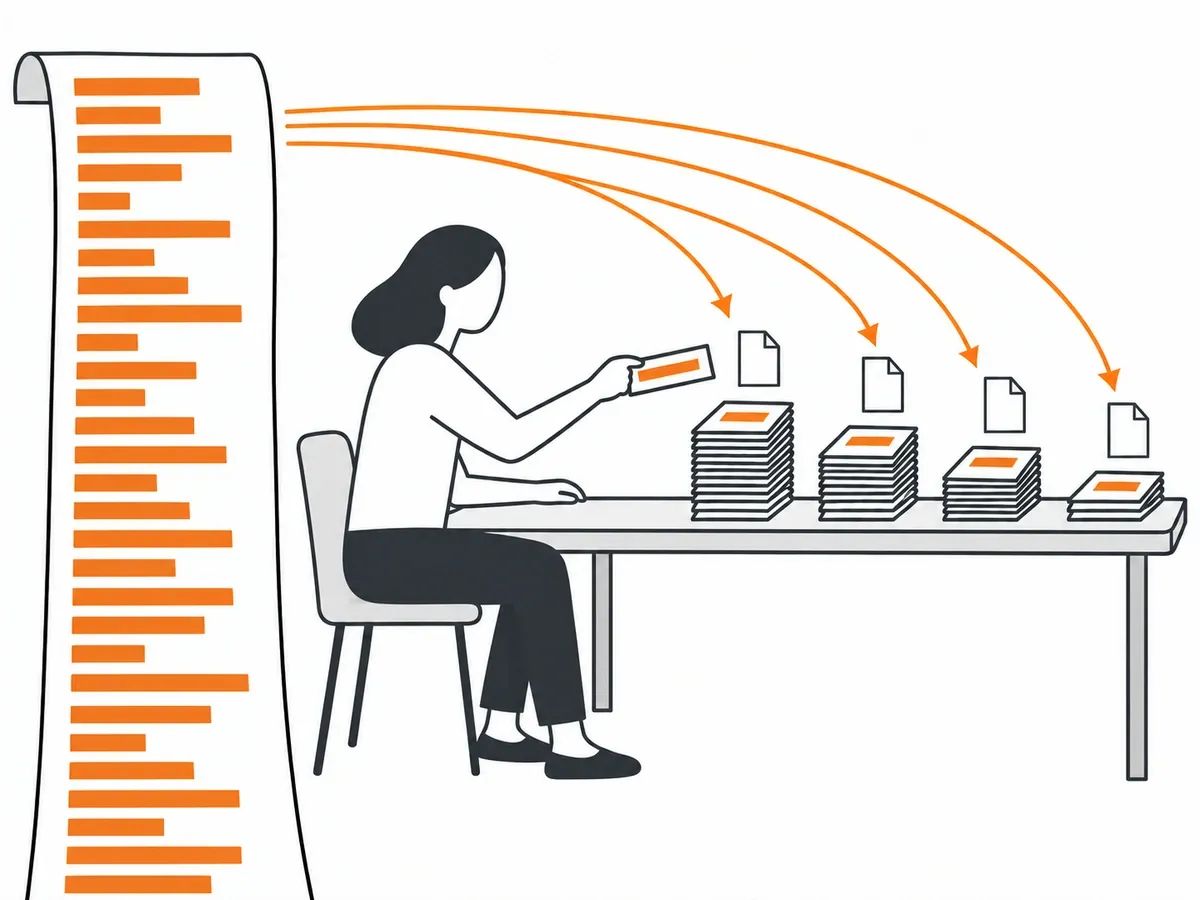
Krutza's next step, in his own words: "Group this output by URL". He looks up the first result for each keyword, and keywords that share a result are grouped together. The grouping turns a long keyword list into a short list of pages. The clustering tool thruuu does the same job by grouping keywords on shared ranking URLs, and its page, read on 4 October 2026, says "Cluster 500 keywords for free".
4. One page per group, and mark which pages already exist
Ahrefs' method then maps existing pages and new URLs to each topic. Each group of keywords becomes one page on the map. A group whose keywords an existing page already answers is a page to improve, not a page to add. On the coffee map, a site that already has a pour-over page marks that entry as existing. The map is complete when it ends as two lists: pages to write and pages to revise.
5. Publish one cluster at a time
Krutza's case study of 26 July 2024 describes completing and publishing every page of one topic before moving to the next. The pages still go live one by one: Krutza wrote on 2 July 2024 that he cannot publish a cluster all at once. The subtopic page and its articles are all live before the next cluster starts. On the coffee map above, that order means publishing the brewing-methods cluster in full before starting on beans and roasts.
6. Add the internal links once a cluster is published
Krutza, 2 July 2024: "I only make the internal linking updates for a cluster once the cluster has been fully published." He adds that he does it by hand, and that when he refreshes a post later he keeps its internal links in place. The order matches the worked example: nothing links to a page that does not exist yet. On the coffee map, that is the moment the grind-size page gains its sideways link to the pour-over page. The method for placing internal links is set out in our guide on the subject.
What one counted build looked like
Riley Krutza published a case study on 26 July 2024 about building topical maps on one site: "from Dec 15 2023 - June 31 2024 we published or refreshed 81 pieces of content across 5 distinct topics on this website." The date is as he wrote it.
That is one site, one person's account and about six months of work. The work ran one cluster at a time, the order described in step 5 above. Krutza reports the rises in clicks and ranking keywords as percentages without starting figures, and he notes that the March 2024 core update fell inside the same window. Read the post, which is from 2024, as the count of one build, not as a result to expect.
The tools to start from, and their free limits
The topical map tools below cover the jobs of the build: listing keywords, grouping them, drawing the map and checking the result. Some of the jobs need no tool at all: the 2024 process in the steps above groups the keywords in a spreadsheet and adds the internal links by hand. Every limit below was read on 4 October 2026, on the tool's own page, and applies to that tool only.
- thruuu, the clustering tool from step 3, clusters 500 keywords for free.
- Crawlix, a crawler, has a free tier of 100 pages per project with no time limit. A larger site needs a paid plan.
- Miro gives 3 editable boards on its free plan, and Xmind gives 10 online maps on its free plan. Both are for drawing the map. A sheet of paper does the same job.
- Google Search Console reports on your own site, and the checking section below puts it to work.
- Ahrefs and Semrush export keyword lists, the raw material for step 2.
A first map can be grouped, drawn and checked within the free limits on this list.
Which pages of the map external links should point at
A finished map marks, for each subtopic, the page you want to rank. Those are the pages to put forward when you ask another site for a link or order a placement. The hub page is one of them, not the only one: any page the map marks can be the target, and the choice is yours. The map is what makes the choice deliberate: every subtopic has a named page, so a link always has an intended destination.
For a competitor's map, Koray Tuğberk Gübür's 2021 article lists this among its quick checks: "Crawl your competitors’ sitemaps to understand their topical maps." Once their pages are listed, you can check your competitors' backlinks to see which of those pages hold links from other sites. Before asking any site for a link, it is worth reading up on what makes a site worth asking and judging the sites you approach against it.
When you order one of our Curated Links (links added to articles that are already published) or our Guest Posts (new articles written in-house and published on real, independently owned websites), you supply the target URL and the anchor text. The target URL is yours to choose; the checks are ours to run. Before a placement goes out we check the HTTP status code the target URL returns, so a hub page that sits behind a redirect chain or returns an error is found before the link is placed. After publication we check that the page is live, that the link is in the body copy, that the anchor and target URL match the order and that the page is indexable, and only then is the URL reported to the dashboard. That is our quality assurance step, and delivered links carry 12-month replacement cover.
A target page has to exist and answer before anything points at it, which is the same order Krutza keeps for internal links.
How to check the result

Google Search Console's Performance report is the first place to look. From its help page, read on 4 October 2026: "The default view of the report shows click and impression data for your site in Google Search results for the past three months." The report's fields, in the help page's words: "Clicks: The number of times a user clicked your site from Google Search results.", "Impressions: How many times your site appeared in Search results." and "Average position: The average position of the topmost result from your site."
Open the report's Pages tab and count how many of the map's pages have impressions. A page that has been live for the whole three-month default view and still has none is a page to look at. Run the count per subtopic and the map shows which of its parts have pages appearing in search results and which do not.
Floyi's 2026 report gives its own measure for the same job: "Ranked coverage is the share of a map’s topics where a website holds a top-20 Google position." Floyi says of its sample: "Every number here is aggregated and anonymized from 42 topical maps created in Floyi." The measure is Floyi's, and the sample is its own customers' maps.
A crawler does the other half of the check. Crawl the site from its home page with a crawler such as Crawlix, from the list above, and compare the pages the crawl reaches by following links with the map. A page on the map that the crawl never reaches is one that no other page links to. For the wider list of numbers worth watching, our guide to SEO metrics sets them out, and a link audit checks the links the map's pages already hold from other sites.
Frequently asked questions
What is a topical map in SEO?
A topical map is the plan of every page a site needs to cover one subject: a core topic, its subtopics, the pages under each subtopic and the internal links between them, drawn before the pages are written. It turns one broad subject into a fixed list of pages and an order to write them in.
How do I create a topical map?
Pick the core topic, then list the keywords from that seed topic. Group the keywords by the page that ranks for them, give each group one page and mark which pages already exist. Publish one cluster at a time, and add the internal links once each cluster is published.
What is topical authority?
Topical authority is a term Koray Tuğberk Gübür gave a formula for in 2021: topical coverage multiplied by historical data. He wrote in 2024 that no tool can measure it. This page uses the map, not the score.
How do I get a competitor's topical map?
Crawl the competitor's sitemap to list their pages, a step Koray Tuğberk Gübür suggested in 2021, then group those pages by subject. A backlink tool then shows which of those pages hold links from other sites.
related Blog Posts




Join 7,000+ Clients Growing with Rhino Rank
Sign Up



Stay ahead of the SEO curve
Get the latest link building strategies, SEO tips and industry insights delivered straight to your inbox.