
 Back to all posts

Check Google ranking: 8 Google ranking checker tools
To check Google ranking, run a manual incognito search for a quick spot-check, then use Google Search Console for your own site. It is free and uses Google’s own data. Use a dedicated Google ranking checker when you need scale: daily keyword tracking, competitor checks, device and location splits, historical movement, and AI Overview monitoring.
For a link-building campaign, check the target page, the keyword, the country, and whether another page has started ranking instead.
That last point matters. A ranking gain is useful only if the right page moved for the right query.
Key takeaways
- Check your own Google rankings first with Google Search Console and a clean manual search.
- Use paid rank tracking tools when you need repeatable checks across many keywords, locations, devices, competitors, or clients.
- Treat ranking data as directional. Personalisation, location, device type, data centres, and tracker methodology can all shift the number you see.
- Pricing below was checked from official vendor pages on 7 July 2026.
Google ranking checker tools compared
Tool | Best for | Free tier | Paid pricing checked on 7 July 2026 |
|---|---|---|---|
Own-site Google ranking data | Free for verified properties | Free; Search Console API usage is free subject to limits | |
Low-cost rank tracking for small SEO teams | Free account and free mini tools; rank tracking sits in paid plans | Basic is US$49/month, or US$358.80/year billed annually | |
Simple rank tracking inside a wider SEO suite | 7-day free trial | Lite is EUR26/month monthly, or EUR18/month billed annually | |
Deep SERP tracking by keyword, device, language, and location | Free trial | Not publicly listed in fetched pricing text; plans are SERP-usage based | |
WordPress owners who want rankings inside WordPress | Free plugin tier | PRO offer shown at US$5.99/month billed annually; renewal US$8.99/month plus taxes | |
Organic SEO and backlink-led rank monitoring | Ahrefs Free for verified sites; not the full Rank Tracker | Lite is US$129/month | |
Agencies needing rankings, competitors, and reports | Free plan plus trial | SEO plan is US$139/month, with a discount billed annually | |
Straightforward rank tracking with Moz SEO metrics | Free trial; limited free Moz account tools | Starter is US$49/month; Standard is US$99/month |
Why checking your Google rankings matters
Rankings tell you whether Google is giving the right page a chance to earn clicks. They are not the whole SEO story, but they are one of the fastest checks when traffic, leads, or enquiries move.
At Rhino Rank, we look at rankings after links go live because links do not create value in a vacuum. The practical check is simple: did the target page move, did a different page take the keyword, did the SERP change, and did an AI Overview start citing another source? If you only record “position up” or “position down”, you miss the reason.
You also need ranking checks before you rewrite content. If organic traffic drops, check whether rankings dropped, search volume changed, or the same clicks moved into AI-overview results.
How to check your Google ranking
Use three checks in this order: manual search, Google Search Console, then a rank tracker if the job needs scale.
Manual search
Manual search is the quickest way to see the live SERP. Open an incognito or private browser window, search the keyword, and check where your page appears in the organic results.
Set the country and language as closely as you can. If you are checking a local keyword, search from the right location or use a tool that can simulate it. A manual search from London is a poor check for a local keyword in Leeds.
The catch: manual searches are not clean enough for reporting. Google can still adjust results by location, device, language, recent behaviour, and SERP testing. Use manual checks for quick diagnosis, not client ranking reports.
Google Search Console
Google Search Console is the first tool to use when you own the website. It shows clicks, impressions, click-through rate, and average position for queries and pages.
Use the Performance report, filter by query, then compare the page that ranks. If more than one page is getting impressions for the same query, you may have cannibalisation. That is common after content updates, internal-link changes, and old blog posts covering similar terms.
For setup details, use our Google Search Console guide. If you are comparing ranking data with analytics sessions, this guide to Google Analytics and Search Console is the better companion.
Rank tracking tools
Rank tracking tools are built for repeatable monitoring. They track keywords over time, split desktop and mobile results, compare competitors, and show SERP features that a manual check misses.
They also disagree with each other.
That is not always a fault. One tracker may check a different location, time, device, language setting, or result type. Another may refresh daily while a cheaper tool refreshes weekly. Before you argue over the position, check the settings.
In practice, we care about direction and diagnosis: movement by URL, keyword group, market, and SERP feature. A single daily rank is less useful than a pattern that explains what changed.
Top free tools to check Google rankings
You can check Google rankings for free when you own the site or only need light research. Free tools become limiting when you need history, competitors, many keywords, or clean reporting.
Google Search Console
Google Search Console gives you the most trustworthy ranking data for your own site because it comes from Google. It is also free.
Use it to find queries where you already get impressions but low clicks. Those are often the fastest wins: improve the title tag, match intent more closely, add useful sections, or strengthen internal links before chasing a brand-new keyword.
It will not show competitor rankings. It also reports average position, not a fixed live rank. That means position data can look odd when one query triggers different URLs, countries, devices, or SERP layouts.
Best for: your own site, query diagnosis, page-level ranking checks, and free performance monitoring.
Free Google rank checker tools
Free Google rank checker tools are useful for one-off checks when you do not want a full SEO suite. The original article mentioned Mangools, SEO Tester Online, and Nozzle, and all three still exist.
Mangools is the most familiar lightweight option here because SERPWatcher sits inside a simple SEO package. SEO Tester Online is more of an all-round SEO toolkit with rank tracking included. Nozzle is more advanced and SERP-data heavy, so it is better suited to deeper tracking than quick beginner checks.
The trade-off is limits. Free accounts and trials can help you test the interface, but they are not a long-term substitute for a tracker if rankings are part of weekly reporting.
Best for: light checks, small websites, and teams comparing tools before paying.
Browser extensions and plugins
Browser extensions and WordPress plugins work well when rankings are only one part of your workflow. Rank Math is the main example from the original list.
Rank Math pulls ranking and analytics-style data into WordPress, which is useful if you manage your own site and do not want to move between dashboards. It is less useful for competitor research or agency reporting because it is tied to sites you control.
Use plugins for convenience, not as your only source of truth. If a plugin reports a change, confirm it in Google Search Console or a rank tracker before you make a big content decision.
Best for: WordPress site owners who want rankings close to their publishing workflow.
Top advanced Google rank tracking tools
Paid rank trackers earn their keep when you need history, segmentation, competitors, and reporting. If you only check one keyword once a month, you probably do not need one.
Ahrefs’ Rank Tracker
Ahrefs Rank Tracker is strongest when rankings need to sit next to backlink and organic keyword data. That makes it useful for link-building analysis, competitor checks, and content opportunities.
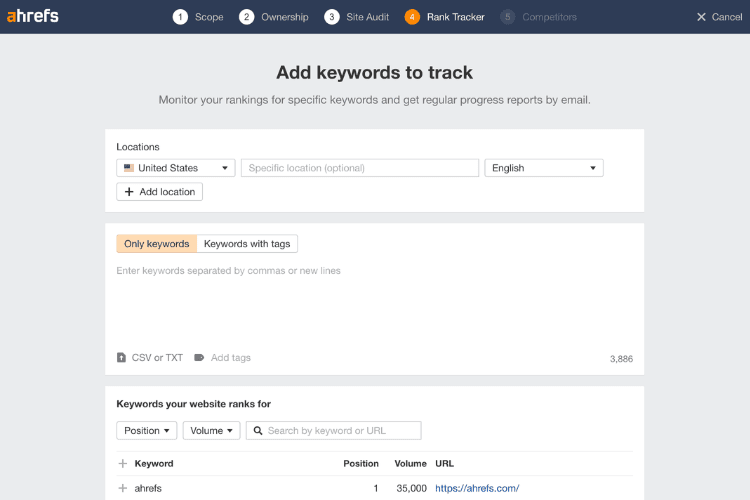
Use Ahrefs when you want to see whether a page’s ranking movement lines up with link growth, new referring domains, or changes in the competing pages. It is less attractive if you only want cheap daily rank checks, because the full platform pricing is not light.
Best for: organic SEO teams that already use Ahrefs for links, keyword research, and competitor analysis.
Semrush Position Tracking
Semrush Position Tracking is built for monitoring keyword sets, competitors, devices, and locations. It is also one of the easier tools to turn into client-ready reporting.
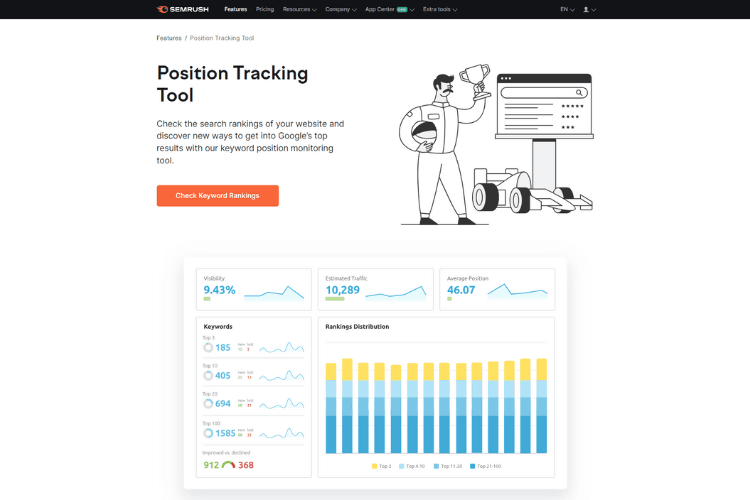
The useful part is segmentation. You can group keywords by topic, intent, location, or campaign, then check whether movement is broad or isolated. That is better than staring at one keyword and guessing.
For agencies, Semrush is often worth it when rank tracking is only one part of the workflow. Site audit, keyword research, competitor analysis, and reports all sit in the same suite.
Best for: agencies and in-house teams that need tracking plus wider SEO workflows.
Moz Pro Rank Tracker
Moz Pro Rank Tracker is a straightforward option for monitoring rankings across search engines and seeing movement alongside Moz’s wider SEO metrics.
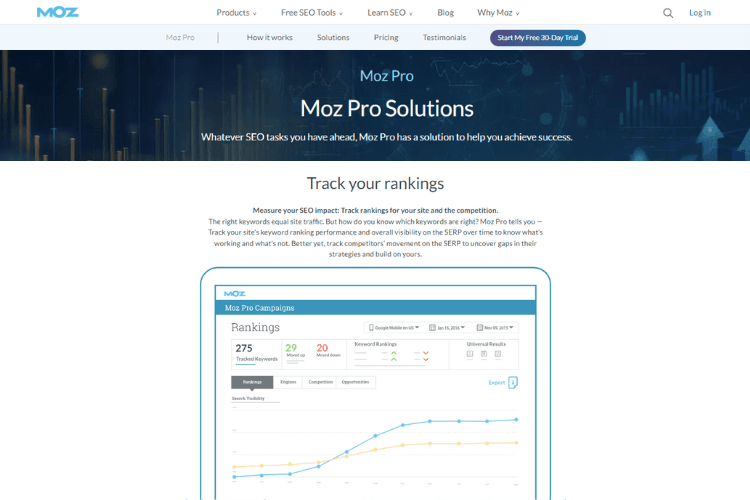
Moz is not the deepest tool for every advanced workflow, but it is easy to understand. That counts when clients or non-SEO stakeholders need to read the data without a long explanation.
Use it when you want rank tracking, site crawl, keyword research, and simple reporting in one place. If you need heavier link analysis or huge keyword sets, compare it with Ahrefs, Semrush, and dedicated trackers before choosing.
Best for: small teams that want a clean SEO suite without a steep learning curve.
How to interpret ranking results
Search visibility is how often your site appears for the queries that matter. Higher visibility usually means more chances to earn clicks, but only if the query has demand and your result is attractive enough to click.
Do not read a ranking report as a scoreboard. Read it as a diagnosis.
If rankings rise and traffic does not, check search volume, click-through rate, SERP features, and whether the result sits below ads, maps, shopping results, or AI answers. If traffic rises but enquiries do not, the page may be ranking for weak intent.
Cannibalisation is another common issue. If two pages keep swapping positions for the same query, Google may not know which page best answers the search. Fix the intent split, internal links, and page targeting before adding more content.
Tips to improve your Google rankings
If you want to improve your Google rankings, start with the page that already has impressions. Improving a page Google already understands is usually faster than starting from zero.
Focus on quality content
Useful, high quality content gives Google a stronger page to rank and gives other sites a better reason to mention you.
For this topic, quality means answering the ranking-check question quickly, explaining when each tool is accurate enough, and warning readers where the data can mislead them. Generic tool descriptions are not enough.
Refresh pages when the SERP changes, pricing changes, or your own ranking data shows a new weakness. Do not update just to change the date.
Optimise on-page SEO
On-page SEO tells Google what the page is about and helps users decide whether to click. Tighten the title, H1, headings, metadata, internal links, and query coverage.
For a ranking-check page, the title should make the job obvious. The page should answer “how do I check my Google ranking?” before it starts reviewing tools.
Use the principles of E-E-A-T where they fit: cite official tool pages for pricing, explain what you have checked yourself, and avoid pretending a tool is more accurate than it is.
Build high-quality backlinks
Backlinks still help strong pages compete, but they do not rescue weak intent matching. Build links after the page deserves to rank.
Useful approaches include publishing link-worthy resources, earning social media shares and backlinks, contributing expert content to relevant sites, and working with a trusted link building agency when you need a controlled outreach process.
The practical check after link building is not just “did rankings improve?” It is “did the right page improve for the right keyword group, and did traffic quality follow?”
For smaller teams choosing a toolkit around this work, our guide to SEO tools for small businesses may be a better place to compare wider use cases.
Common issues with ranking accuracy
Ranking accuracy gets messy because Google results are not one fixed page. They change by country, city, device, language, search history, time, and SERP layout.
Incognito mode helps remove some personalisation, but it does not make the result universal. A rank tracker can be more consistent because it uses set locations and devices, but each tracker still has its own method.
Where this goes wrong: teams treat the rank as a perfect number. It is not. A position change from fourth to fifth may mean little if traffic is stable. A drop from third to sixth can matter a lot if the keyword drives qualified enquiries.
For reporting, use the same tool, same settings, and same keyword set each time. Then explain the movement with traffic, conversions, page changes, links, and SERP features.
Summary
Start free. Use manual incognito searches for quick checks and Google Search Console for your own site. Add a Google ranking checker when you need scale, competitors, locations, history, or client reporting.
For day-to-day SEO work, the best tool is the one that makes the next decision clearer. If it cannot tell you whether the right page is moving for the right query, it is just another dashboard.
Frequently asked questions
What is search visibility and why is it important?
Search visibility is how often your website appears in search results for the queries you care about. It matters because visibility creates the chance to earn clicks, traffic, leads, and sales.
Can manual searches accurately reflect my Google rankings?
Manual searches can show a quick live result, but they are not accurate enough for reporting. Location, device, language, personalisation, and SERP testing can all change what you see.
How often should I check my Google rankings?
Check rankings weekly for normal SEO work, daily during launches or migrations, and after important link placements or content changes. Daily checks are useful only when they change a decision.
Are paid rank tracking tools worth the investment?
Yes, if you track many keywords, locations, competitors, or clients. If you only need to check your own site occasionally, Google Search Console and manual searches are usually enough.
How can I improve my Google rankings without spending money on tools?
Use Google Search Console to find pages with impressions, improve the content and title, fix obvious on-page SEO issues, strengthen internal links, and earn relevant backlinks. Free tools can show the opportunity; the page still has to deserve the rank.
related Blog Posts



Join 2,600+ Businesses Growing with Rhino Rank
Sign Up
Stay ahead of the SEO curve
Get the latest link building strategies, SEO tips and industry insights delivered straight to your inbox.