
 Back to all posts

Technical SEO is the foundation everything else sits on. You can publish exceptional content, earn high-authority backlinks, and nail your keyword targeting - and still watch competitors outrank you because Google can't crawl your pages, your site loads in 4.2 seconds, or your canonical tags point in the wrong direction. The frustrating reality: technical problems stay invisible to most stakeholders but show up loud and clear to search engines.
According to SE Ranking's analysis of 418,125 real site audits, this isn't a small problem. More than 50% of sites have pages blocked from indexing by noindex directives, and over 43% have external links pointing to broken pages. These aren't edge cases. They're common issues that suppress rankings quietly and shave ROI off every other SEO investment.
BLUF: We cover the 8 highest-impact technical SEO issues, anchored in real prevalence data from SE Ranking's large-scale audit study. Each issue includes a specific, actionable fix. If you're an SEO manager, marketing director, or agency owner who wants a precise diagnostic reference rather than a generic checklist, this is the resource. We structured it to move fast - from diagnosis to fix - because that's how technical SEO work gets done.
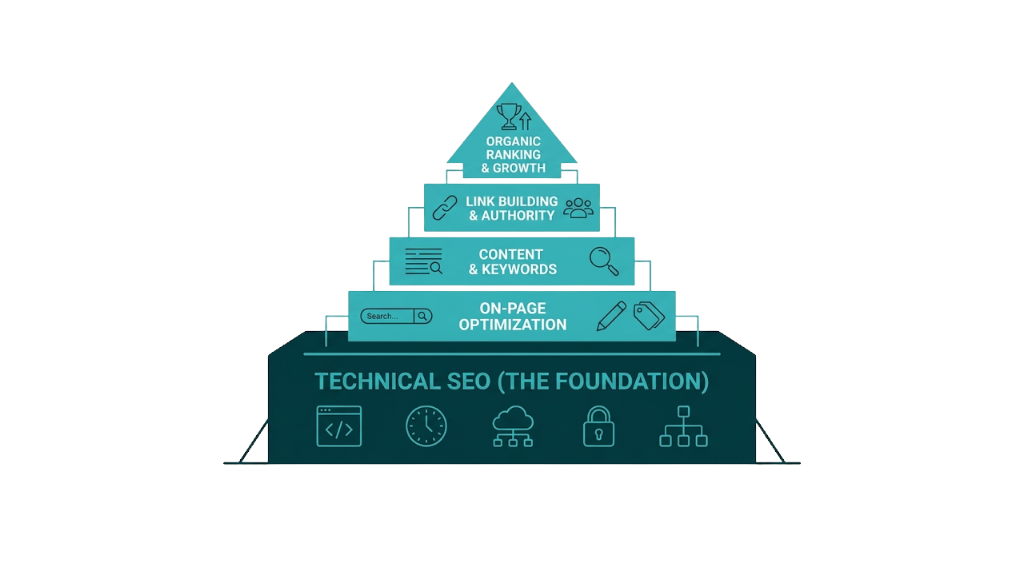
What Are Technical SEO Issues and Why Do They Kill Rankings Before Content Gets a Chance?
Technical SEO issues are problems with a website's infrastructure that prevent search engines from crawling, rendering, indexing, or ranking its pages correctly. The term covers everything from server configuration and URL structure to page speed, structured data, and mobile usability. Understanding the SEO issues meaning at this level matters because it separates cosmetic cleanup from structural fixes that change outcomes.
Google's crawling and indexing pipeline runs in order. According to Google Search Central's crawling and indexing documentation, Googlebot must first discover a URL, then crawl it, then render it, then assess it for indexing, and finally rank it against competing pages. Break any step and the process stops.
No crawl means no index. Bad rendering means Google evaluates incomplete information. And if a page loads in 5 seconds on mobile, it drops down the priority list before your other signals even enter the conversation.
That's why technical SEO issues kill rankings before content gets a chance. Content quality still matters. It just doesn't get a vote if the page never makes it through the pipeline.
For agency owners and marketing directors, the budget impact is real. A mid-market SaaS team spending $3k/month on content production and $2k/month on link building wastes a meaningful share of that spend if the site carries crawl errors, slow page speed, or canonicalization problems. Links to non-indexed pages pass no authority. Content on pages Googlebot can't render gets judged on raw HTML that might be nearly empty. The technical layer isn't a separate workstream - it's the prerequisite for everything else to work.
That prerequisite also compounds when it slips. Technical issues don't just suppress individual pages. Widespread crawl errors burn crawl budget on dead URLs, and redirect chains slow Googlebot while bleeding link equity across each hop. Duplicate content splits ranking signals across multiple URLs. These problems stack together, which is why one technical SEO audit usually surfaces a cluster of connected issues, not a neat list of isolated bugs.
The upside: technical issues are fixable. Unlike content quality or domain authority, which demand sustained investment over months, many technical fixes ship in days and show measurable ranking movement within weeks.
The 8 Most Damaging Technical SEO Issues (Ranked by Real-World Impact)
The following sections cover eight technical SEO problems that suppress rankings across real sites. We've sequenced them based on two factors: prevalence, meaning how often they show up in audits, and impact severity, meaning how hard they hit performance. Each section calls out the exact GSC or audit signals to watch, a worked example where it helps, and a concrete fix.
This is the technical SEO checklist - built on data, not assumptions.
Crawling and Indexing Errors: When Google Can't See Your Pages
Crawling and indexing errors sit at the base of technical SEO. If Google can't access and process your pages, the rest of your work won't show up in rankings. SE Ranking's audit data shows that 50.58% of sites have pages with noindex directives - making this the most common technical issue in the dataset. And noindex is only one way pages get left out of the index.
The index pipeline has a few clear breakpoints. Google Search Console surfaces them in the Coverage report, which newer GSC interfaces label as the Indexing report. You'll see four broad buckets: indexed, not indexed, crawled but not indexed, and excluded. Most SEOs already clean up 404s and sitemap errors. The subtler statuses are where the real diagnosis happens.
"Crawled - currently not indexed" is one of the easiest statuses to misread. It means Google fetched the page and chose not to index it. This isn't a traditional technical failure - it's a quality call. Google is saying the page doesn't clear the bar for inclusion. So the fix isn't just a tag change or a redirect. Review the page for unique value, thin or near-duplicate content, and topic overlap with stronger URLs on your own site. Also check rendering. If key content relies on JavaScript and doesn't load for Google, the crawler sees a thin page even when users see a full one.
That indexing decision differs from "Discovered - currently not indexed". Here, Google knows the URL exists but hasn't crawled it yet. This points to crawl budget pressure. You'll run into it on large sites with thousands of URLs, and on smaller sites where weak internal linking leaves pages buried in the architecture.
Noindex directives need their own callout. Teams ship staging settings into production. CMS plugins slap noindex on paginated URLs. Developers add <meta name="robots" content="noindex"> to a template during a build and never remove it. In every case, Google follows the directive and those pages drop out of the index. That 50.58% prevalence in SE Ranking's data is a warning: this issue shows up everywhere, including on sites that look "fine" at a glance.
The fix process for crawling and indexing errors:
- Audit your Coverage report in GSC weekly. Filter by "Not indexed", then work status by status.
- Review robots.txt for Disallow rules that block revenue pages or key sections. Run changes through Google Search Central's robots.txt tester before pushing.
- Validate noindex directives via a Screaming Frog crawl, then isolate URLs returning noindex through the meta robots tag or an X-Robots-Tag header.
- Pages stuck in "Discovered - currently not indexed" need clearer signals. Add internal links from relevant hubs and navigation so Google treats them as important.
- Submit updated XML sitemaps that contain only indexable, canonical URLs. Keep noindex pages out of the sitemap - always.
For sites with large page counts, we prioritise crawl budget by blocking low-value URLs such as filtered category pages, session parameters, and printer-friendly versions in robots.txt, then we push internal link equity toward the pages that need to rank.
Slow Page Speed and Core Web Vitals Failures: The Ranking Factor You Can Measure
Page speed has been a confirmed Google ranking factor since 2010. Core Web Vitals became a ranking signal in 2021, which moved page speed from a vague directive into a measurable set of metrics you can audit. In March 2024, Google replaced First Input Delay (FID) with Interaction to Next Paint (INP) as an official Core Web Vital - a change a lot of competing articles still haven't caught, creating an accuracy gap across search results.
The three current Core Web Vitals are:
Metric | What It Measures | Good Threshold | Needs Improvement | Poor |
|---|---|---|---|---|
LCP (Largest Contentful Paint) | Load speed of the main content element | Under 2.5s | 2.5s - 4.0s | Over 4.0s |
INP (Interaction to Next Paint) | Responsiveness to user interactions | Under 200ms | 200ms - 500ms | Over 500ms |
CLS (Cumulative Layout Shift) | Visual stability during load | Under 0.1 | 0.1 - 0.25 | Over 0.25 |
The business case is straightforward. Google's analysis shows 53% of mobile users abandon pages that take more than 3 seconds to load. Sites that hit good Core Web Vitals scores also see a 24% uplift in engagement metrics compared to non-compliant pages. That's not a rounding error. If an e-commerce site or a SaaS product already has meaningful organic traffic, a 24% engagement lift turns into real revenue once it compounds across sessions, signups, and assisted conversions.
That shift from FID to INP matters because FID only measured the delay before a browser began processing an interaction - not how long the interaction took to finish. INP tracks the full latency of interactions on a page and reports the worst one. The bar is higher. Pages that passed FID can fail INP, especially when heavy JavaScript blocks the main thread during clicks, taps, and form input.
Common causes of Core Web Vitals failures and their fixes:
LCP failures usually come from unoptimised hero images, render-blocking resources, or slow server response times. Fix this by compressing and converting images to WebP or AVIF, implementing lazy loading for below-the-fold content (but never for the LCP element itself), and using a CDN to reduce time to first byte.
INP failures often come from long JavaScript tasks on the main thread. Break up long tasks using setTimeout or scheduler APIs, defer non-critical JavaScript, and audit third-party scripts that run on interaction. Cut the scripts you don't need. Your INP score will follow.
CLS failures often trace back to images without explicit dimensions, dynamically injected content above existing content, or web fonts that trigger layout shifts during load. Fix this by setting width and height attributes on images, reserving space for ads and embeds, and using font-display: swap with size-adjusted fallback fonts.
Measurement is where teams win or waste time. Use Google PageSpeed Insights (it pulls real-world CrUX data), the Core Web Vitals report in GSC, and Chrome DevTools' Performance panel for deeper diagnosis. Don't rely on lab data alone - field data from real users is what Google uses for ranking. Moz's breakdown of how Core Web Vitals affect SEO is a useful reference for understanding how these metrics interact with broader ranking signals.
Duplicate Content and Canonicalization Problems: How Diluted Authority Suppresses Rankings
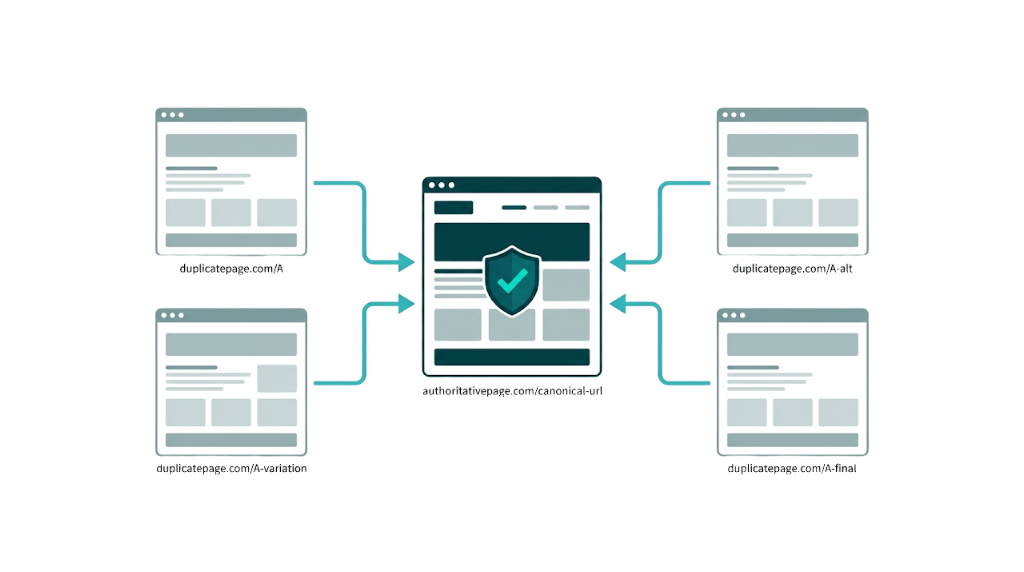
Duplicate content doesn't trigger a manual penalty. It splits ranking signals. When Google finds multiple URLs serving the same or substantially similar content, it has to pick a version to index and rank. It won't always pick the one you want - and when it picks wrong, your preferred URL misses out on link equity, crawl priority, and the ranking signals that should have consolidated on it.
SE Ranking's audit data shows duplicate content and canonicalization issues appearing across site audits, driven by a familiar set of causes: HTTP vs HTTPS versions, www vs non-www, trailing slash vs no trailing slash, URL parameters from tracking or filtering, and paginated pages that repeat the same introductory blocks.
The canonical tag (<link rel="canonical">) is the main way to tell Google which URL you consider authoritative. Google's canonical URL consolidation guide makes one point clear: canonicals are hints, not commands. Google can ignore your canonical if another URL looks like the better candidate. Most competing articles skip that detail, then teams wonder why their "correct" canonicals don't stick.
When Google ignores your canonical, it usually comes down to three issues:
- The canonical points to a non-indexable page (blocked by robots.txt or noindex). Google won't consolidate signals to a page it can't access.
- The canonical conflicts with other signals - your sitemap lists the non-canonical URL, internal links point to the non-canonical version, or redirects send Google somewhere else. Google weighs the full set of signals, not just the tag.
- The content difference is too large for Google to accept the canonical claim. If two pages are meaningfully different, Google indexes both even if you declare a canonical.
You can see canonical overrides directly in GSC. In the URL Inspection tool, the "Google-selected canonical" field shows the URL Google chose. If it doesn't match your "User-declared canonical," you have a signal conflict that needs cleanup.
For e-commerce sites, parameter-based duplication shows up fast. A product page accessible at /product/blue-widget/, /product/blue-widget/?color=blue, and /product/blue-widget/?ref=email creates three competing versions of the same page. The fix is mechanical: set canonical tags on every parameter variant to the clean URL, and use the URL Parameters tool in GSC (where available) to tell Google how to treat those parameters.
The fix framework for canonicalization:
- Implement 301 redirects for structural duplicates (HTTP to HTTPS, www to non-www, trailing slash consistency) rather than relying on canonicals alone.
- Ensure your XML sitemap contains only canonical URLs - never include parameter variants or alternate versions.
- Align internal linking so it points consistently to canonical URLs.
- Use the GSC URL Inspection tool to confirm Google's selected canonical matches your declared canonical.
- For large sites, use Screaming Frog to crawl and export all canonical tags, then cross-reference against your intended canonical structure.
Broken Links and Redirect Chains: The Silent Drain on Crawl Budget and Link Equity
Broken links and redirect chains are the kind of technical SEO issues that pile up quietly over years of site changes. Pages get deleted. URLs get restructured. Campaigns end and landing pages disappear. And each change leaves room for a broken link, or a redirect that points to another redirect that points to another redirect.
Those dead URLs create real leakage. SE Ranking's data puts it plainly: 43.40% of sites have external links pointing to broken pages. That's nearly half of audited sites bleeding link equity to URLs that return nothing. And that figure only covers external links - internal broken links usually show up at even higher rates.
That link equity loss isn't theoretical. A UK e-commerce retailer analysed in an industry case study saw a 25% drop in organic traffic tied to 404 errors after a site migration. Once they found and fixed the broken URLs - implementing proper 301 redirects and updating internal links - they recovered 40% of the lost traffic over the following months. The remaining gap reflected link equity that still sat with external sources and never made it back.
Redirects create their own version of the same problem. A redirect chain happens when URL A redirects to URL B, which redirects to URL C. Every extra hop cuts what gets passed through, and it adds crawl friction. Google crawlers also have a redirect chain limit - once a chain runs past a certain number of hops, around five, Googlebot may stop following it. When that happens, the final destination URL gets no crawl signal and no link equity from that path.
A redirect loop is worse. URL A redirects to URL B, which redirects back to URL A. Googlebot drops the path immediately, and pages that rely on that loop become invisible in practice.
How to find and fix broken links and redirect chains:
- Crawl your site with Screaming Frog. Filter for 4xx and 5xx response codes, then export broken URLs and the pages linking to them.
- Check GSC's Coverage report for "Not found (404)" and "Server error (5xx)".
- Use Screaming Frog's redirect chain report to find chains of 3+ hops, then collapse each chain into a single direct 301 from the original URL to the final destination.
- Reclaim external link equity by prioritising high-value external links pointing to broken pages (use Ahrefs or Semrush's backlink analysis). Then take the cleanest option: restore the original page, 301 redirect it to the closest live equivalent, or contact the referring site and ask for an updated URL. Ahrefs' guide to fixing broken links and reclaiming lost equity covers the outreach side of this process in detail.
- Update internal links so they point straight to the final destination URL, not to a redirect.
For sites post-migration, implement a redirect mapping document before the migration goes live. Prevention costs less than recovery. If you're also running link reclamation alongside this process, prioritise the highest-authority referring domains first to maximise equity recovery.
Mobile Usability Errors: What Mobile-First Indexing Actually Means for Your Rankings
Google completed its rollout of mobile-first indexing in 2023, meaning it now uses the mobile version of your site as the primary basis for crawling, indexing, and ranking - even if most of your users come in on desktop. Per Google's mobile-first indexing documentation, if your mobile site hides, truncates, or omits content that exists on desktop, that missing content doesn't exist in Google's index.
That "mobile version" detail is where rankings get hit. Responsive design alone won't cover it. Content parity does. If a desktop page includes a detailed product description but the mobile version tucks it behind a "Read more" control that depends on JavaScript Googlebot doesn't execute, Google indexes the truncated version. Your content, your keyword targeting, your structured data - all of it can disappear on the version that gets indexed.
SE Ranking's audit data shows mobile usability errors come up repeatedly across site audits. The most common issues include:
- Text too small to read without zooming
- Clickable elements too close together (touch targets under 48x48 pixels)
- Content wider than the screen requiring horizontal scrolling
- Viewport not configured correctly (missing or incorrect
<meta name="viewport">tag) - Intrusive interstitials that block content on mobile (a specific Google ranking penalty trigger)
The fix starts in Google Search Console's Mobile Usability report, which flags the exact URLs, warnings, and error types. For page-level checks, the Mobile-Friendly Test in Google Search Central gives a direct diagnosis.
Those flagged errors are only half the job. The other half is parity. Crawl both your desktop and mobile versions (Screaming Frog supports custom user agents) and compare content at the page level. Make sure the text content, internal links, structured data, and image alt text you ship on desktop also exist on mobile and remain accessible without a JavaScript interaction.
For sites using dynamic serving (different HTML for mobile and desktop), ensure your Vary: User-Agent HTTP header is correctly implemented and that both versions are accessible to Googlebot. Pairing mobile usability fixes with a broader SEO audit checklist helps ensure nothing gets missed across the full technical stack.
Structured Data Errors and Missing Schema: The Rich Result Opportunity Most Sites Ignore
Structured data doesn't directly influence organic rankings in the traditional sense. But it determines your eligibility for rich results - enhanced SERP features like star ratings, FAQ dropdowns, product prices, and review counts that lift click-through rates. Structured data errors show up everywhere. SE Ranking's audit data flags structured data issues across a significant share of audited sites, from missing schema on key page types to invalid markup that knocks pages out of rich results eligibility.
That eligibility has a real cost. A product page ranking in position 4 with star ratings and price shown in the SERP often beats a position 2 result with a plain blue link. More pixels win. Users also get more decision-making information before they click. Understanding what SERP features are available for your page type is the first step to knowing which schema to prioritise.
Common structured data errors and their fixes:
Missing required properties is the issue we see most. Each Google rich result type has required and recommended properties. A Product schema missing name, Image, or offers won't qualify for product rich results, no matter how clean the rest of the markup looks. Fix it by checking Google's Rich Results documentation for that schema type and filling every required field.
Incorrect property values also trips validation - using a relative URL where an absolute URL is required, or supplying a date in the wrong format. Fix it in Google's Rich Results Test, which lists errors and warnings for any URL you run.
Schema on non-indexable pages does nothing. Structured data on pages blocked by noindex or robots.txt won't get processed for rich results. Fix it by targeting only indexable, canonical pages with schema.
Mismatched content is where teams get burned. If the schema describes content that doesn't visibly appear on the page, it violates Google's structured data guidelines and can trigger manual actions. Markup has to match what users can actually see.
Implementation options include JSON-LD, Microdata, and RDFa. JSON-LD is Google's recommended format, added in a <script> tag in the page head, and it stays separate from your HTML, which makes upkeep easier. On CMS sites, plugins like Yoast SEO, RankMath, or Schema Pro cover the basics, but custom schema for specific page types like LocalBusiness, Event, and Product usually needs manual work or developer support.
Missing or Misconfigured HTTPS: The Trust Signal That Affects Both Rankings and Conversions
HTTPS has been a confirmed Google ranking signal since 2014. It also unlocks HTTP/2 and HTTP/3 support, which delivers real page speed gains. And it affects conversions - browsers label HTTP pages as "Not Secure" in the address bar, and users pay attention.
SSL/TLS mistakes still show up in audits. SE Ranking's audit data captures HTTPS-related issues across categories like mixed content warnings where an HTTPS page loads HTTP resources, expired SSL certificates, incorrect certificate configurations, and HTTP pages that haven't been redirected to their HTTPS equivalents.
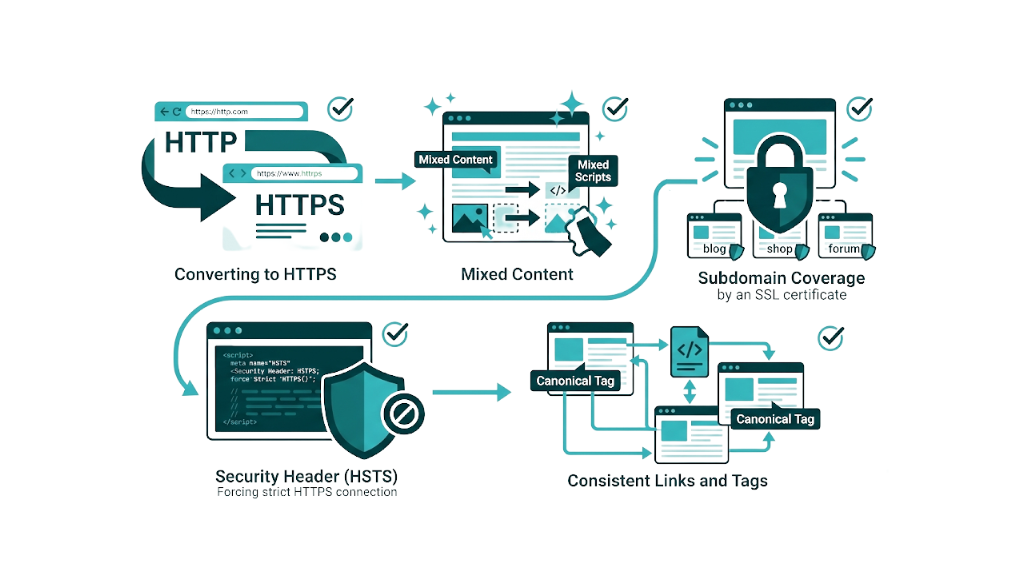
Mixed content is the HTTPS problem we run into most after an HTTP-to-HTTPS migration. The page loads over HTTPS, but images, scripts, or stylesheets still point to http:// URLs. Browsers warn, sometimes block resources, and page features break. Fix it by updating internal resource references to HTTPS and using protocol-relative URLs like // or full HTTPS URLs.
To audit your SSL configuration, use SSL Labs' free SSL test at ssllabs.com/ssltest/. Enter your domain and you'll get a grade from A+ to F with details on certificate validity, protocol support, cipher suite strength, and known vulnerabilities. Aim for an A rating at minimum. Grades usually drop below A because the server still allows deprecated TLS 1.0 and 1.1 protocols or because cipher suites are weak. Both get fixed in server or CDN settings.
The fix checklist for HTTPS issues:
- 301 redirects from every HTTP URL to the HTTPS version, including the root domain.
- Mixed content cleanup. Update internal resource references across templates and key pages.
- SSL certificate coverage for every subdomain you use - a wildcard certificate or a multi-domain SAN certificate.
- An HSTS header (HTTP Strict Transport Security) so browsers enforce HTTPS.
- Canonical tags, XML sitemaps, and internal links updated so HTTPS stays consistent across the site.
JavaScript Rendering Issues: When Search Engines See a Blank Page
JavaScript rendering is one of the hardest technical areas in SEO. It's also where the gap between what users see and what Googlebot sees gets huge.
Google's JavaScript SEO basics documentation says Googlebot renders JavaScript, but it does it later, in a separate crawl and render queue with limited resources. That delay matters. JavaScript-rendered content often lands in the index later than server-rendered content, and if rendering breaks, it doesn't land at all.
The core problem is straightforward: if your site relies on client-side JavaScript to render content that drives rankings - Title tags, body copy, internal links, structured data - Googlebot can crawl the URL and only get a thin HTML shell. The content lives inside the JavaScript bundle, but it won't exist in the DOM until the bundle runs. Google has to judge what's in front of it, and what's in front of it looks like a blank page.
This hits sites built on React, Angular, Vue, and other single-page application (SPA) frameworks. A React SPA can serve an HTML document that contains only <div id="root"></div> plus a JavaScript bundle. Without server-side rendering (SSR) or static site generation (SSG), Googlebot must execute that bundle to see anything. And if that render is delayed or fails, Google can index an empty document.
Diagnosing JavaScript rendering issues:
- Use the URL Inspection tool in GSC and click "View Crawled Page" then "Screenshot" to see what Googlebot rendered. Compare that screenshot to what you see in a normal browser. Mismatches point to rendering problems.
- Use Google Search Console's Rich Results Test or the Mobile-Friendly Test. Both show the rendered HTML Googlebot sees, not just your raw source.
- Crawl the site with Screaming Frog in JavaScript rendering mode to spot URLs where rendered content doesn't match the raw HTML.
The fix depends on how the site is built.
For SPAs, ship SSR or SSG for pages that need to rank. For sites that use JavaScript as an enhancement, make sure key content - titles, body text, primary navigation, internal links - ships in the initial HTML response and doesn't wait on JavaScript to appear.
Dynamic rendering can work as a short-term patch for complex SPAs. It serves pre-rendered HTML to crawlers and the full JavaScript experience to users. Google treats it as a workaround, not the end state.
How to Audit Your Site for Technical SEO Issues: A Prioritised Fix Framework
Knowing what technical SEO issues exist is half the battle. The other half is sequencing fixes so engineering time turns into ranking movement, not a long list of "cleanups." This is the framework we recommend for finding SEO errors in a website in a repeatable way.
Step 1: Start with Google Search Console.
GSC is free, it uses Google's own data, and it flags problems that affect performance in Google Search. Start in the Coverage/Indexing report, then Core Web Vitals, then Mobile Usability, then Manual Actions. On most sites, those four reports surface the majority of issues that deserve priority. If you're not yet comfortable navigating the platform, our guide on how to use Google Search Console covers the key reports in detail.
Step 2: Run a full site crawl.
Use Screaming Frog - free up to 500 URLs, paid for larger sites - or a platform like SE Ranking, Ahrefs Site Audit, or Semrush Site Audit for bigger crawls. Set the crawl to render JavaScript, check response codes, validate canonical tags, and audit structured data. Export everything, then slice it by severity so the highest-impact issues don't get buried.
Step 3: Audit page speed and Core Web Vitals.
Use Google PageSpeed Insights for page-level diagnostics and the Core Web Vitals report in GSC for site-wide field data. Pull your worst pages by LCP, INP, and CLS, then fix the high-traffic, high-value templates first. That focus keeps performance work tied to revenue pages instead of vanity scores.
Step 4: Prioritise by impact, not by ease.
Quick wins feel good - tweak a few meta titles, remove a noindex tag - but they rarely move the needle compared to structural fixes. The work that lifts organic performance tends to be the work that touches architecture: SSR for JavaScript rendering, redirect chain cleanup, or canonicalization conflicts across hundreds of URLs. Use this matrix to build the fix list:
Priority | Issue Type | Impact | Effort |
|---|---|---|---|
P1 | Pages blocked from indexing | Critical | Low-Medium |
P1 | Core Web Vitals failures (LCP, INP) | High | Medium-High |
P2 | Canonicalization conflicts | High | Medium |
P2 | Broken links and redirect chains | Medium-High | Medium |
P3 | Mobile usability errors | Medium | Low-Medium |
P3 | Structured data errors | Medium | Low |
P3 | HTTPS/mixed content issues | Medium | Low |
P4 | JavaScript rendering issues | High | High |
Step 5: Implement, validate, and monitor.
After each fix, use the GSC URL Inspection tool to request re-indexing for the affected URLs. Watch the Coverage report weekly to confirm indexed counts move in the right direction.
Core Web Vitals need a different expectation. Improvements in GSC's field data usually show up after 28 days because Google reports CrUX data on a rolling 28-day window.
A technical SEO template for this process doesn't need to be complex. A shared spreadsheet that tracks URL, issue type, priority, fix owner, fix date, and validation status works for most teams. What matters is follow-through: fixes get tracked to completion and validated - not shipped, forgotten, and rediscovered in the next audit.
Why Fixing Technical SEO Issues Makes Your Link Building Investment Work Harder
Most technical SEO guides miss the strategic part. And it's the part that matters for how we run SEO at Rhino Rank.
Link building and technical SEO aren't separate lanes. They're tied together. Every link you build is an investment in a specific URL's authority, and that authority only pays out if the target page is crawlable, indexable, and able to hold rankings. If that URL isn't indexed, the link passes no value. If it sits behind a redirect chain, equity bleeds at each hop. If the page loads in five seconds and fails Core Web Vitals, the authority signal still exists, but the page won't turn it into rankings because UX signals push the other way.
Here's what that looks like in the real world.
An agency secures 15 high-authority links to a client's key service page over three months. But that page has a self-referencing canonical conflict, loads in 4.8 seconds on mobile, and shows a "Crawled - currently not indexed" status in GSC. Those 15 links are wasted. The authority sits in the link graph, but the technical issues stop it from compounding into rankings.
That compounding is the point.
Fixing technical SEO issues before or alongside a link building campaign doesn't just lift performance from the technical side - it multiplies the return on every link acquired. A technically clean page with strong Core Web Vitals, correct canonicalization, and full indexation turns link equity into rankings far more efficiently than a page with the same backlink profile but known technical constraints. Understanding how link building helps SEO makes it clear why the technical foundation has to come first.
Technical health is the prerequisite for link building ROI at Rhino Rank. The curated links we build are meant to compound. But compounding needs a solid foundation.
Frequently Asked Questions About Technical SEO Issues
What are the most common technical SEO issues affecting website rankings?
SE Ranking analysed 418,125 site audits and found the most common technical SEO issues were pages blocked from indexing by noindex directives, affecting 50.58% of sites, and external links pointing to broken pages, affecting 43.40% of sites, along with Core Web Vitals failures. Canonicalization problems, mobile usability errors, and JavaScript rendering issues also show up often and drive real ranking suppression. The issues that hurt rankings most are the ones that block crawling or indexing, because no other signal compensates for a page that never makes it into the index.
How do I find technical SEO issues on my website?
Start with Google Search Console. It's free, and it reflects Google's view of your site. The Coverage/Indexing report, Core Web Vitals report, and Mobile Usability report surface most high-priority problems.
From there, run a full crawl. Screaming Frog covers up to 500 URLs on the free version, or you can use a paid audit platform like SE Ranking, Ahrefs, or Semrush. For JavaScript rendering issues, use GSC's URL Inspection tool and compare what Googlebot rendered against what you see in a browser.
What is the difference between crawling and indexing in SEO?
Crawling is how Googlebot discovers and fetches your pages. Indexing is what happens after the fetch, when Google evaluates a page and decides whether it belongs in the search index.
A page can be crawled but not indexed. In GSC, you'll see this as a distinct status, and it usually points to content quality problems or rendering failures. A page can also be discovered but not yet crawled, which points to crawl budget pressure or weak internal linking. Both are fixable, but the fixes aren't the same.
What are Core Web Vitals and why do they matter for SEO?
Core Web Vitals are three user experience metrics Google uses as ranking signals.
LCP (Largest Contentful Paint) measures how quickly the main content loads. The target is under 2.5 seconds. INP (Interaction to Next Paint) measures how quickly pages respond to user interactions. The target is under 200ms, and INP replaced FID as a Core Web Vital in March 2024. CLS (Cumulative Layout Shift) measures visual stability during page load. The target is under 0.1.
Sites that score "Good" across all three metrics tend to improve engagement and rankings. Industry data shows Core Web Vitals-compliant sites drive a 24% engagement uplift compared to non-compliant pages.
How long does it take to see results after fixing technical SEO issues?
Timelines depend on the issue and how fast Google re-crawls and re-indexes the affected pages.
Remove a noindex tag from an important page and you can see movement within days, especially if you request re-indexing through GSC's URL Inspection tool. Core Web Vitals improvements take up to 28 days to show in GSC field data because Google uses a rolling 28-day CrUX data window. Canonicalization fixes and redirect chain cleanups often show impact in 2-6 weeks as Googlebot re-crawls and consolidates signals.
Large-scale technical fixes - like post-migration redirect implementations - take 2-3 months to fully show up in rankings, particularly when external links need to be re-crawled and equity needs to be re-attributed.
related Blog Posts




Join 7,000+ Clients Growing with Rhino Rank
Sign Up
Stay ahead of the SEO curve
Get the latest link building strategies, SEO tips and industry insights delivered straight to your inbox.