
 Back to all posts
Technical SEO is the discipline that determines whether everything else you invest in search works. You can commission exceptional content, earn authoritative backlinks, and nail your keyword strategy - then watch rankings flatline because Google can't crawl your pages cleanly, your site architecture splits link equity across duplicate URLs, or your Core Web Vitals drop you below the competitive threshold.
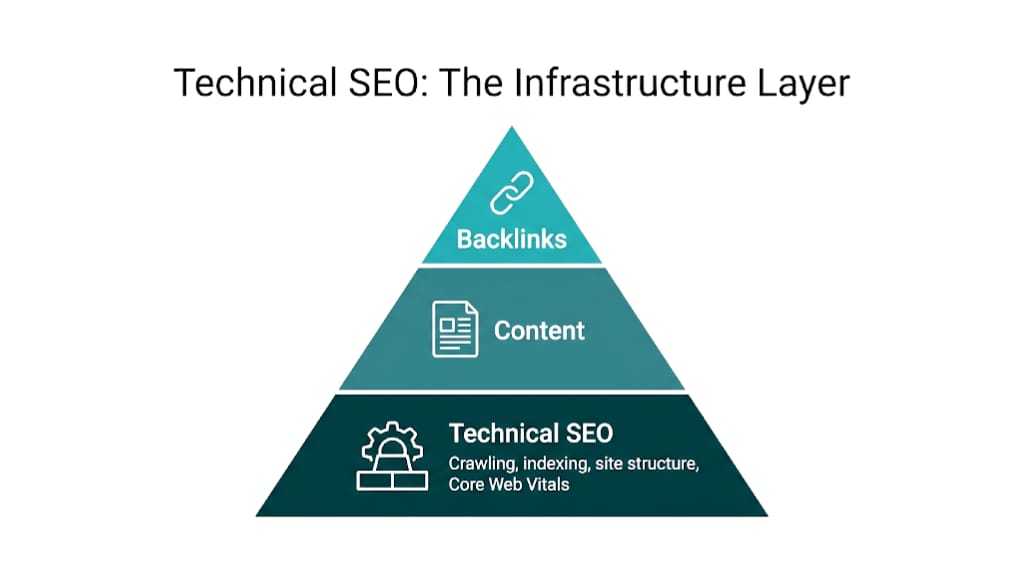
Technical SEO is the infrastructure layer. Get it wrong. Everything above it stalls.
Bottom line up front: Technical SEO covers the crawling, rendering, indexing, and site structure decisions that determine how search engines - and now AI systems - access, understand, and rank your content. It's not a checklist you complete once. It's an ongoing system that either amplifies or undermines every pound and hour you invest in content and links. For SEO managers and agency owners, the real skill isn't knowing all 40 technical factors. It's knowing which five to fix first.
That prioritization is the point of this guide. We cover the crawl-render-index pipeline, structured data, Core Web Vitals, and the rising AI search baseline, but we keep the focus on sequencing: how these systems interact, where link equity leaks, and how to build a tiered action plan that matches the reality of a resource-constrained team.
What Is Technical SEO? (And Why Most Definitions Miss the Point)
Most definitions of technical SEO describe it as "optimising your website for crawling and indexing." That's accurate but incomplete. It's like describing architecture as "making sure buildings don't fall down." Technically correct. Still missing what matters.
Technical SEO is the practice of ensuring that search engines can discover, render, understand, and rank your content - and that the structural decisions underneath your site don't destroy the authority you've built through content and links.
That structural layer is what most definitions skip. Technical SEO isn't only about access. It's also about preservation.
A site can earn 200 high-quality backlinks and still waste a big chunk of that authority by routing them through a chain of 302 redirects, or splitting signals across duplicate URLs without canonical tags. Most SEO teams don't measure that loss. Industry experience frames it clearly: technical issues act as a ceiling on your overall SEO performance. Content can't brute-force past that ceiling.
The three pillars that most definitions get right are:
- Crawlability - Googlebot and other crawlers can reach your pages.
- Renderability - Crawlers can process the JavaScript, CSS, and dynamic elements that make up your pages.
- Indexability - Google includes those pages in its index after crawling.
Indexing alone doesn't cover the full job. A complete definition also includes site architecture (how URL structure and internal linking distribute authority), performance (how fast pages load and how stable the layout stays), technical signals (HTTPS, mobile-first compliance, structured data), and AI crawler access (whether systems like GPTBot and ClaudeBot can reach your content for citation in AI-generated answers).
That same infrastructure layer is also what separates technical SEO from on-page and off-page work. On-page SEO covers content, title tags, meta descriptions, and keyword optimization - the signals within a single page. Off-page SEO covers backlinks, brand mentions, and external authority signals. Technical SEO is the base both sit on. Without it, on-page optimization loses impact because pages don't get indexed the way you expect, and off-page authority bleeds out through broken redirect chains and duplicate content.
For SEO managers who want a structured way to build expertise in this area, a technical SEO course can provide systematic grounding - but this guide gives you the conceptual framework that most courses spend weeks building toward. Understanding how link equity flows through your site architecture is one of the most valuable things that framework unlocks.
How Search Engines Actually Crawl, Render, and Index Your Site
Understanding technical SEO starts with the pipeline. Google doesn't just "visit" your website and decide where to rank it. There are three distinct stages - crawling, rendering, and indexing - and issues at any stage can kill visibility without a manual penalty or a clean, obvious error.
Crawling is the discovery phase. Googlebot, Google's web crawler, follows links from page to page across the web, discovers URLs, and adds them to a queue for processing. According to Google Search Central, Google finds pages primarily through links - both internal links from your own site and external links from other sites. That's why site architecture and internal linking aren't just UX choices. They're crawl choices. Miss the internal links, and you starve Googlebot.
A page with no internal links pointing to it - an "orphan page" - often won't get crawled.
Rendering is the processing phase. After crawling, Google has to render your pages - basically running the JavaScript and CSS so it can see what a browser sees. This step costs Google resources and adds real delay. Pages that lean on client-side JavaScript for main content often don't get that content indexed for days or weeks after the first crawl, because Google queues rendering separately from crawling. If your product descriptions, blog content, or navigation menus render via JavaScript, this isn't a hypothetical. It turns into a pipeline bottleneck fast.
Indexing is the storage and evaluation phase. Once rendered, Google decides whether to add the page to its index - the database it pulls from when someone searches. Not everything crawled gets indexed. Google runs quality checks, duplicate filters, and relevance evaluation here. So yes, a page can be crawled and rendered and still not indexed if Google sees it as thin, duplicated, or not useful enough to show.
That leads to the practical implication: when a page isn't ranking, the first diagnostic question isn't "is my content good enough?" It's "has this page been crawled, rendered, and indexed?" Google Search Console's Coverage report answers that directly, which is why it's the right starting point for any technical SEO audit before you reach for third-party tools like Ahrefs Site Audit or Semrush Site Audit.
Crawl Budget: Why Large Sites Need to Think About This First
Crawl budget is the number of URLs Googlebot will crawl on your site within a given timeframe. For most small sites - say, a 50-page business website - crawl budget doesn't matter. Google will crawl everything.
But for a mid-market e-commerce site with 50,000 product URLs, a news publisher pushing 500 new articles a week, or an enterprise SaaS platform where faceted navigation spits out millions of URL variants, crawl budget becomes a hard constraint. If Googlebot spends its time in the wrong places, your money pages wait.
Google's crawl budget documentation for large sites breaks it into two components: crawl rate limit (how fast Googlebot crawls without hammering your server) and crawl demand (how much Google wants to crawl based on popularity and staleness signals). Waste that budget on low-value pages - session IDs, filter parameters, printer-friendly versions, internal search result pages - and Google may never get to the pages that actually drive revenue.
The fix isn't complicated, but you do have to be intentional. Block low-value URL patterns in robots.txt. Use canonical tags to consolidate duplicate parameter URLs. Keep your XML sitemap limited to indexable, canonical URLs. For large sites, this is the first technical SEO conversation to have - before content, before links, before anything else. If you're unsure where to start, our guide on crawl budget optimization covers the full process in detail.
robots.txt and the noindex Tag: Two Tools That Do Very Different Jobs
These two get mixed up all the time, and that mix-up creates real problems.
robots.txt controls crawling. A Disallow directive in robots.txt tells Googlebot not to crawl a URL. But - and this is critical - it doesn't prevent indexing. If other sites link to a URL that's disallowed in robots.txt, Google may still index that URL based on link signals alone. It just won't crawl the page content. The result: indexed URLs where Google knows basically nothing beyond the URL and whatever anchor text points at it.
The noindex tag (placed in the <meta name="robots"> tag in the page's <head>, or delivered via an X-Robots-Tag HTTP header) controls indexing. It tells Google to crawl the page but keep it out of the index. Use this for pages you don't want in search results but still need accessible - thank-you pages, internal admin pages, staging environments.
The dangerous mistake: blocking a URL in robots.txt and adding a noindex tag to the same page. Googlebot can't crawl the page to see the noindex directive, so the noindex never gets processed. The URL can still show up in the index based on external signals. Use robots.txt for crawl efficiency. Use noindex for index exclusion. Never rely on robots.txt alone to keep a page out of search results. For a broader look at where these issues tend to cluster, the most common technical SEO issues guide is worth reviewing alongside this one.
Site Architecture: The Structural Decision That Affects Every Page You Publish
Site architecture is one of those technical SEO factors that usually gets framed as UX - logical navigation, sensible categories, breadcrumb trails. But the real reason it matters is PageRank distribution. Every internal link passes a fraction of authority from one page to another. Your architecture decides how that authority moves - or where it stalls.
Start with link depth. Pages that sit fewer clicks from the homepage get more crawl attention and more internal PageRank than pages buried five or six levels deep. A flat architecture - where key pages are reachable in two or three clicks - keeps authority concentrated where it pays off. A deep architecture, where product pages sit under category, subcategory, sub-subcategory, and then product, bleeds authority at every step and cuts crawl frequency for your most commercially important pages.
Here's what that looks like in practice. An e-commerce retailer sells running shoes. In a flat architecture, the URL might be domain.com/running-shoes/nike-air-zoom-pegasus. In a deep architecture, it might be domain.com/footwear/sports/running/mens/road-running/nike-air-zoom-pegasus. Same information. Different outcomes. The flat URL is two clicks from the homepage; the deep URL is six. Googlebot hits the flatter page more often, it receives more internal authority, and it has a better shot at ranking for commercial queries.
Breadcrumb navigation supports architecture because it creates extra internal linking paths and gives Google explicit hierarchy signals. Industry technical SEO research highlights that breadcrumbs don't just help crawling - they can show in search results as rich results when you mark them up with structured data, and they've been shown to lift click-through rates by giving users clearer context on where a page sits within a site.
Siloing is the architecture strategy of grouping related content into thematic sections, then linking mainly within those sections. A legal services site might run separate silos for personal injury, employment law, and family law - strong internal linking inside each silo, with selective cross-silo links when it makes sense. That concentrates topical authority and helps Google map the site's expertise structure, which lines up with how E-E-A-T signals get assessed at a site-wide level.
An architecture audit starts with Google Search Console crawl data, then a crawl in Ahrefs Site Audit or Semrush Site Audit. Look for pages with zero internal links pointing to them (orphan pages). Flag pages that take more than three clicks to reach from the homepage. And pay attention to category pages that have fewer internal links than the product pages beneath them. Those are architecture problems that content output won't solve on its own.
One more thing: URL structure signals hierarchy to users and crawlers. Clean, descriptive URLs with logical subdirectory structures beat parameter-heavy or randomly generated URLs for crawlability and click-through rates. This isn't keyword stuffing in URLs - it's structural clarity.
Internal Linking: The Technical SEO Quick Win Most Sites Are Leaving on the Table
Internal linking sits between site architecture and content strategy, but it needs its own section because it's the highest-ROI technical fix most sites have - and it stays underused.
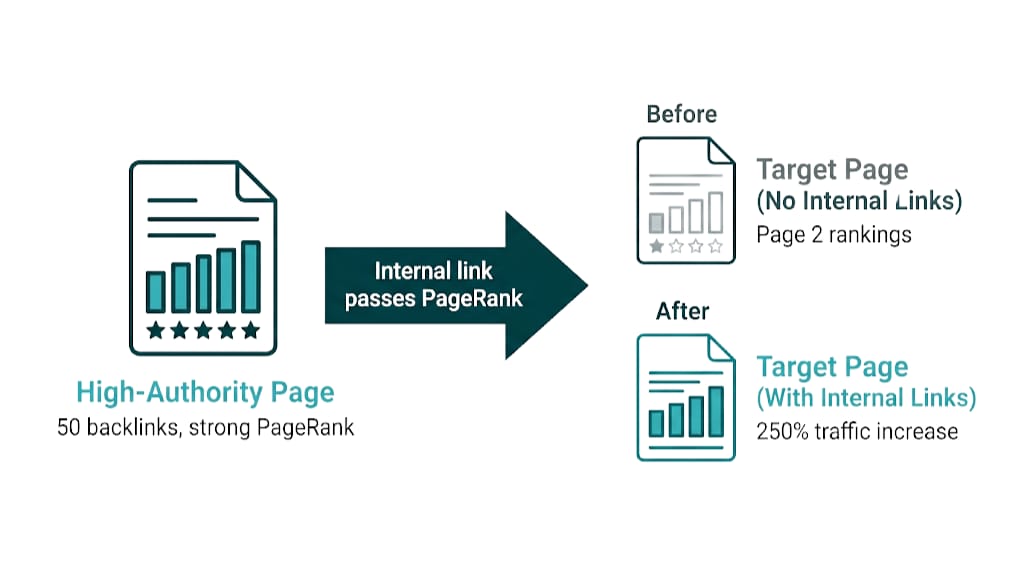
The proof point is straightforward. Backlinko ran an internal linking experiment on their own site, adding internal links to pages already sitting on page two for competitive queries. The result was a 250% increase in organic traffic within a single week - no new content, no new backlinks, no technical changes beyond adding internal links. The pages already had authority. The internal links moved it to where rankings could shift.
This is the mechanism: internal links pass PageRank. Link from a high-authority page to a lower-authority page and you send a portion of that authority along. Google's original PageRank documentation spells out that a page's authority depends in part on the number and quality of links pointing to it - and internal links count. A blog post that earns 50 referring domains and has 20 internal links pointing to it can pass real authority to every page it links to.
The internal linking failures we see most often across client sites:
- Orphan pages - important landing pages with no internal links pointing to them, so they sit outside Googlebot paths and PageRank flow
- Over-linking homepages - everything points back to the homepage (which already has max authority) instead of pushing equity into pages that need it
- Generic anchor text - "click here" and "read more" don't send a topical signal; descriptive, keyword-relevant anchors do
- Inconsistent linking - new posts link to old ones, but old posts never get updated to point to new content, so the flow runs one way
The fix needs a process. Pull your highest-authority pages in Google Search Console by sorting on total clicks or impressions, or use a backlink tool. Then pick the pages you want to rank - usually commercial landing pages or pillar content. Add internal links from high-authority pages to those targets, and use anchor text that matches the target page's primary keyword. And don't stop there. Your newest content should pick up internal links from relevant existing pages within its first week live, otherwise it starts life at a disadvantage.
For a technical SEO checklist mindset, internal linking is the item that keeps producing the fastest measurable gains at the lowest implementation cost. No dev tickets for most CMS setups. No outside dependencies. No waiting around for Google to "discover" the page - internally linked pages get recrawled faster than orphan pages. And if you want to accelerate authority flow beyond internal links alone, curated link placements are one of the most efficient ways to direct external PageRank exactly where your site needs it most.
Core Web Vitals and Page Speed: What Actually Affects Rankings in 2025
Google's Page Experience update made Core Web Vitals an official ranking signal, and by 2025, they're table stakes. They don't win rankings on their own. Core Web Vitals act as a tiebreaker, not a primary driver.
A technically perfect page with thin content won't outrank a slower page with exceptional content and strong backlinks. But in competitive SERPs, where content quality and link authority sit in the same range, Core Web Vitals can decide who edges out who.
The three metrics that make up Core Web Vitals are:
Metric | What It Measures | Good Threshold |
|---|---|---|
Largest Contentful Paint (LCP) | How long until the main content loads | Under 2.5 seconds |
Interaction to Next Paint (INP) | Responsiveness to user interactions | Under 200 milliseconds |
Cumulative Layout Shift (CLS) | Visual stability - how much the layout jumps | Under 0.1 |
INP replaced First Input Delay (FID) as a Core Web Vitals metric in March 2024. That change matters because Google moved from measuring a single moment (the first interaction) to measuring responsiveness across the session. Sites that tuned FID once and never revisited performance often miss the fact that they're now failing INP.
Those performance failures usually follow the same patterns. LCP takes the biggest hit from unoptimized hero images, render-blocking resources like JavaScript and CSS loaded in the <head> that delay rendering, and slow server response times. The fixes are straightforward: convert images to WebP or AVIF, lazy load below-the-fold images, and use a CDN to cut server response times. INP falls apart when JavaScript work blocks the main thread. CLS spikes when images lack explicit width and height attributes, content gets injected above existing content, or web fonts shift the layout while they load.
Server response times also tie page speed to crawl budget. Google's documentation notes that slower responses reduce how much Googlebot can crawl in a session. If a site takes three seconds to respond to each request, Googlebot gets far less crawl capacity than it does from a site responding in 200 milliseconds. That gap matters most on large sites with thousands of URLs competing for crawl attention.
Crawl capacity is where measurement comes in. Google Search Console's Core Web Vitals report shows field data from real users via the Chrome User Experience Report, which is what Google uses for ranking. Lab data from tools like PageSpeed Insights simulates performance, so it helps pinpoint the exact bottlenecks. We start with Search Console to gauge ranking exposure, then move to PageSpeed Insights to map fixes to the problems.
Canonical Tags and Duplicate Content: How to Stop Splitting Your Own Authority
Duplicate content is one of the most common and most damaging technical SEO issues on mid-to-large sites. And it's almost always self-inflicted. It shows up when the same content lives at multiple URLs: www and non-www, HTTP and HTTPS, URLs with and without trailing slashes, product pages reachable through multiple category paths, plus printer-friendly or mobile-specific variants.
The damage isn't a penalty. Google doesn't apply a "duplicate content penalty" for most sites, and its own documentation is clear on that. The damage is authority fragmentation. When three URLs serve identical or near-identical content, backlinks pointing to those URLs split authority across three pages instead of concentrating it on one. Google also has to pick which version to index and rank, and that pick doesn't always match what we want.
Authority fragmentation is exactly what the canonical tag (<link rel="canonical" href="[preferred URL]">) is built to prevent. It tells Google which version of a page is the main one. Google then treats the canonical URL as the version to index and rank and consolidates link equity from duplicates to that canonical. It's a signal, not a command - Google can ignore it if another URL looks like the better choice - but a clean canonical setup holds up in practice.
That "signal vs. command" difference is why a canonical tag isn't the same as a 301 redirect. A 301 sends users and crawlers to a new URL and marks the move as permanent. Use it when a URL truly moved: during a migration, when consolidating two pages into one, or when cleaning up legacy URL structures. Canonicals fit the opposite case - multiple URLs need to stay live for valid reasons, but we still want Google to fold their authority into one primary URL.
Link equity is where this gets expensive fast. For teams investing in link building, 301 redirects during migrations aren't optional. As industry technical SEO documentation notes, 301 redirects retain authority during migrations and replatforming. If a site moves from HTTP to HTTPS, or changes domains, and skips one-to-one 301s from every old URL to its new equivalent, it drops the accumulated link equity behind every backlink to those old URLs. On a site with thousands of referring domains, that's a catastrophic and preventable loss.
That same link equity problem also shows up as a crawl budget problem. If Google crawls thousands of duplicate parameter URLs and none are canonicalized, crawl budget gets burned on pages that won't rank. Canonical tags on parameter-generated URLs - filtering and sorting variants on e-commerce sites are the usual offenders - push crawlers back toward the pages that drive traffic and revenue.
Structured Data and Schema Markup: The Fastest Path to Rich Results (and AI Visibility)
Structured data means adding machine-readable markup to your HTML - usually Schema.org in JSON-LD - so search engines can parse the entities, relationships, and content types on a page. It won't move rankings on its own in the classic sense. But it does unlock rich results, which lifts click-through rate, and it also plays a bigger role in AI search visibility than most teams treat it as.
Google's Rich Results Search Gallery shows the rich result types structured data can trigger: FAQ accordions, How-To steps, Product ratings and pricing, Recipe cards, Event listings, Breadcrumb trails, Sitelinks search boxes, and more. Rich results win SERP real estate. They put context in front of the click. And they tend to beat standard blue links on click-through rate because users get more confidence before they commit.
The most impactful schema types by use case:
- Article / BlogPosting - marks up content type, author, publish date, and headline for news and blog content
- Product - enables price, availability, and review ratings in product listings
- FAQPage - can generate FAQ accordions directly in search results (availability has fluctuated, but remains active for some queries)
- Organization / LocalBusiness - establishes entity identity, contact information, and brand signals
- BreadcrumbList - generates breadcrumb rich results and reinforces site architecture signals
- HowTo - enables step-by-step rich results for instructional content
JSON-LD makes implementation clean. Google recommends it over Microdata and RDFa because you can drop it into the <head> without touching the visible HTML. Most CMS platforms have structured data plugins. For teams that care about accuracy and control, though, hand-rolled JSON-LD stays the better option.
That accuracy and control matters more once AI enters the picture. Systems like Google's AI Overviews and ChatGPT's browse-enabled responses build answers from multiple sources, and they gravitate toward structured, entity-heavy pages. When your markup spells out the entities on the page - the organization, people, topics, and relationships - those systems extract and attribute information with less guesswork. Recent industry case studies show this in practice: a website implemented technical fixes including structured data, published no new content, built no new links, and still logged measurable gains in AI Overview visibility. Entity clarity drives that outcome. Structured data gives AI systems the clear signals they need to cite your content with confidence.
Validate your implementation in Google's Rich Results Test tool and track performance in Google Search Console's Search Appearance reports. Bad structured data usually doesn't tank rankings. It just blocks rich results from showing up.
HTTPS, Mobile-First Indexing, and the Technical Baseline Google Expects
Some technical SEO items stopped being a competitive edge years ago. HTTPS and mobile-first indexing sit squarely in that bucket - not because they're optional, but because missing them takes you out of the running.
HTTPS became a Google ranking signal in 2014. Google's original announcement called it "a very lightweight signal" that affected fewer than 1% of queries at launch - and Google also said it would carry more weight over time. By 2025, HTTPS is table stakes. Competitive sites run it by default, and HTTP pages come with a ranking disadvantage plus browser security warnings that crush trust and conversion. If any pages still load over HTTP, treat this as a Tier 1 fix. The ranking lift is fine. The trust and conversion hit is the real penalty.
Mobile-first indexing means Google uses the mobile version of your site as the primary source for indexing and ranking. It's been the default for new sites since 2020 and expanded to all sites by 2023. Here's the operational impact: if mobile has less content, fewer internal links, or blocked resources compared to desktop, Google indexes the weaker version. Use Google Search Console's Mobile Usability report and Google's Mobile-Friendly Test tool to audit. Keep content, structured data, and internal links consistent across mobile and desktop.
That consistency sits inside a broader technical baseline Google expects: a clean XML sitemap submitted in Google Search Console, a correctly configured robots.txt file, no crawl errors on important pages, and consistent URL canonicalization (one preferred version of every URL). These aren't growth tactics. They're entry requirements.
A technical SEO checker like the one built into Ahrefs Site Audit or Semrush Site Audit will flag the baseline issues fast - and those are the first things we fix before spending time on anything more advanced.
Technical SEO for AI Search: What Changes When ChatGPT and AI Overviews Enter the Picture
Search in 2025 has a layer that didn't exist at meaningful scale two years ago: AI-generated answers that combine information from multiple sources and show it directly in the interface, often without a click. Google's AI Overviews, ChatGPT's browse capability, and Perplexity's answer engine work on similar principles - and they come with technical prerequisites most SEO guides still miss.
Those prerequisites start with AI crawler access. OpenAI's GPTBot, Anthropic's ClaudeBot, and Google's extended crawlers respect robots.txt. If your robots.txt blocks these crawlers - either explicitly or via overly broad wildcard rules - your content won't show up in the AI systems that could cite it.
This type of exclusion stays invisible. Most site owners don't realize they've set it up, and most audits don't flag it unless you're looking on purpose. Audit robots.txt and make sure AI crawlers are explicitly allowed, or at least not blocked by wildcard rules meant for other bots.
AI crawler access only gets you into the room. The next step is entity-level structured data, because AI systems don't just read content - they extract entities, relationships, and facts. A page that clearly identifies subject entities with Schema.org markup (Organization, Person, Product, Event, Place) gives AI systems the hooks they need to attribute information cleanly. A page that's only prose, even strong prose, takes more effort to parse and cite with confidence.
That "hooks" point is the mechanism behind these case studies: structured data improvements made the site's content more machine-readable, which translated to increased AI Overview appearances. For a deeper look at how link building for AI overviews intersects with these technical signals, the dynamics are worth understanding alongside the structured data work.
Machine-readable content still needs to load and crawl cleanly. That brings us to content accessibility and crawl hygiene. AI systems favor pages that are easy to process and free from technical barriers. Heavy JavaScript rendering delays, broken structured data, and sloppy heading hierarchy all slow down crawling and extraction.
The same hygiene that lifts traditional search performance also lifts AI search eligibility. That means one technical fix can pay twice: better indexing and better AI visibility.
That baseline keeps rising. The gap between technically sound sites and technically neglected sites is widening, not shrinking. Sites that treat technical SEO as a one-time setup will lose ground to teams that run technical hygiene as an ongoing practice.
How to Prioritize Technical SEO: A Practical Framework for SEO Managers
Every major technical SEO guide - from Backlinko to Semrush to Ahrefs - frames technical SEO as a flat checklist of 10 to 14 best practices. They don't tell you what to do first when you're running a two-person team, on a $3k/month budget, staring at 200 technical issues. This section does.
Ahrefs acknowledges that "for most sites, you're probably better off spending time on your content and links" than chasing technical perfection. That's not dismissing technical SEO. It's pointing at the real skill: prioritization.
Prioritization matters because technical issues don't carry equal weight. Some actively suppress crawling, indexing, or authority transfer. Others sit in the "nice to fix" bucket. Treat them all as urgent and teams burn cycles on image alt text while a crawl budget problem drags indexation down in the background.
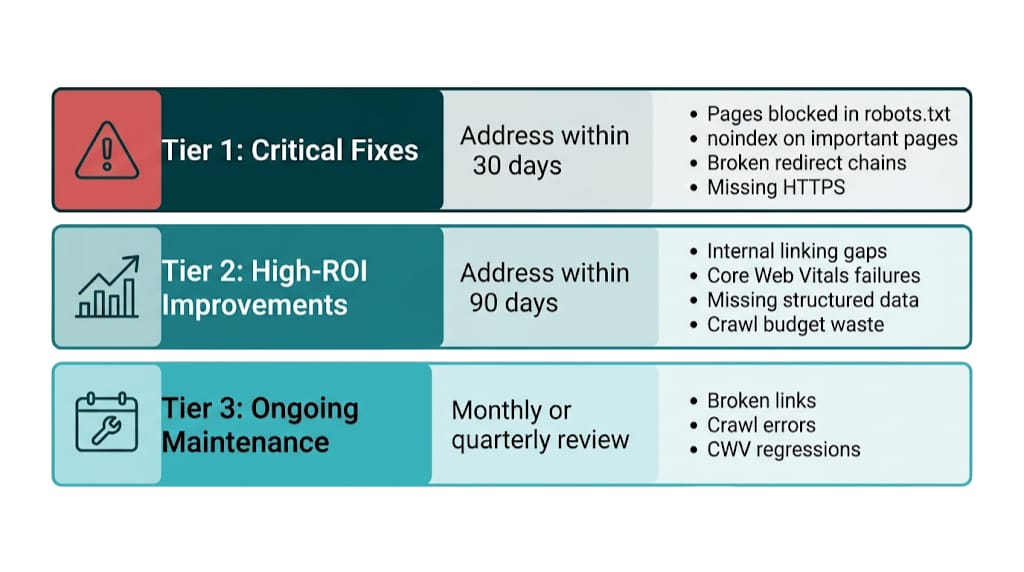
We use a three-tier framework:
Tier 1: Critical Fixes (Address Within 30 Days)
These issues block pages from being crawled, indexed, or credited with the authority they've earned. They hit hard, and many of them resolve fast once you identify the root cause.
Issue | Why It's Critical | First Diagnostic Step |
|---|---|---|
Pages blocked in robots.txt that should be indexed | Prevents crawling and indexing entirely | Google Search Console Coverage report |
noindex tags on important pages | Removes pages from the index | GSC Coverage > Excluded > noindex |
Broken redirect chains (3xx loops, 302s instead of 301s) | Leaks link equity from every backlink | Ahrefs Site Audit > Redirects |
Missing 301 redirects after URL changes | Loses all historical link equity | Ahrefs > Lost Backlinks report |
HTTPS not implemented | Ranking signal failure + trust destruction | Browser address bar |
Canonical tag errors (self-referencing wrong URL, conflicting canonicals) | Fragments authority across duplicates | GSC Coverage > Duplicate URLs |
Tier 2: High-ROI Improvements (Address Within 90 Days)
These issues won't crash the site, but they cap growth. They take more dev time than Tier 1 work, and they pay back in rankings and traffic.
- Internal linking gaps - orphan pages, plus high-authority pages that don't point to commercial targets
- Core Web Vitals failures - LCP and CLS problems on priority landing pages
- Missing or malformed structured data - product, article, and organization schema issues show up often
- Crawl budget waste - parameter URLs, session IDs, and faceted navigation burning crawl allocation on large sites
- Site architecture depth - key pages sitting more than three clicks from the homepage
Tier 3: Ongoing Maintenance (Monthly or Quarterly Review)
These issues build up as the site changes. No fire drill. But they do need a repeatable review cycle.
- Broken links created after content deletions or URL changes
- Crawl errors tied to newly published pages
- Core Web Vitals regressions after feature releases
- Structured data errors caused by CMS or template updates
- robots.txt changes that block new URL patterns by mistake
The starting tool for this framework is Google Search Console - free, trusted, and aligned with what Google sees. Pull the Coverage report, the Core Web Vitals report, and the Mobile Usability report before you touch a paid tool. Then run Ahrefs Site Audit or Semrush Site Audit for what Search Console won't show - redirect chains, orphan pages, crawl depth analysis, and internal link distribution.
That internal link distribution is where the framework earns its keep, because it ties technical issues to business impact. A Tier 1 issue on a site that's actively building links - a broken redirect chain bleeding equity from 50 referring domains - outranks a Tier 2 issue on a site that hasn't started link acquisition. Priority follows context. Treat the framework as a starting structure, not a fixed hierarchy.
That prioritization only works if the team can diagnose issues cleanly. For teams that want a more structured way to build those skills, a structured technical SEO course helps with classification - but the framework is what turns that knowledge into a prioritized action plan instead of an endless checklist.
Technical SEO isn't glamorous. It doesn't produce the content that gets shared on LinkedIn or recycled on conference slides. But it decides whether the rest of the program works at all.
Strong technical foundations amplify every link earned, every page published, and every dollar spent on SEO. For teams looking to put those foundations to work, our managed link building service pairs technical hygiene with ongoing link acquisition so neither side of the equation gets neglected. Technical debt does the opposite, quietly.
The real skill is focus - knowing the difference between a ceiling and a floor.
Frequently Asked Questions About Technical SEO
What is technical SEO and how does it differ from on-page and off-page SEO?
Technical SEO covers the infrastructure decisions that control how search engines crawl, render, index, and rank your site - site speed, crawlability, structured data, site architecture, and URL management. On-page SEO covers content, title tags, and keyword optimization within individual pages. Off-page SEO covers backlinks and external authority signals. Technical SEO is the foundation both disciplines sit on. Without it, on-page and off-page work deliver diminished returns.
Why does technical SEO matter if my content and links are already strong?
Because technical issues act as a ceiling on performance, not a floor. Strong content and links can't compensate for pages that aren't indexed, link equity that leaks through broken redirects, or authority that splits across duplicate URLs. Technical SEO makes sure every link you earn passes PageRank and every page you publish gets crawled and indexed efficiently.
What are the most important technical SEO factors for rankings in 2025?
The highest-impact technical SEO factors in 2025 are: correct crawl and index configuration so nothing gets blocked by mistake, 301 redirects that preserve link equity across URL changes, canonical tags that consolidate duplicate content signals, Core Web Vitals performance with a focus on LCP and INP, structured data that unlocks rich results and improves AI discovery, and mobile-first compliance. HTTPS is table stakes. It won't move rankings by itself.
When should I use a canonical tag versus a 301 redirect?
Use a 301 redirect when a URL has permanently moved and you need both users and crawlers to land on the new location. Use a canonical tag when multiple URLs serve the same or near-identical content for valid reasons, like e-commerce filter variants, and you want Google to consolidate authority to one preferred version without changing what users see.
Site migrations make the line clear. 301 redirects are the right tool because they carry link equity in a way canonical tags can't on their own.
Does technical SEO affect visibility in AI Overviews and ChatGPT?
Yes. AI crawler access starts with robots.txt - if you block GPTBot or ClaudeBot, those systems can't read your content.
That crawler access only gets you so far. Entity-level structured data helps AI systems extract and attribute information with fewer errors, which increases citation eligibility. General technical hygiene matters too: fast load times, clean HTML structure, clear heading hierarchy. It all reduces friction for crawlers parsing the page.
Recent case studies show the upside here. Pure technical fixes, with no new content or links, can drive measurable AI Overview visibility gains.
related Blog Posts




Join 2,600+ Businesses Growing with Rhino Rank
Sign Up
Stay ahead of the SEO curve
Get the latest link building strategies, SEO tips and industry insights delivered straight to your inbox.