
 Back to all posts

Google Shopping sits at the intersection of paid search, product discovery, and organic visibility - yet most ecommerce teams still treat it like a pure ads channel owned by PPC. That framing costs them.
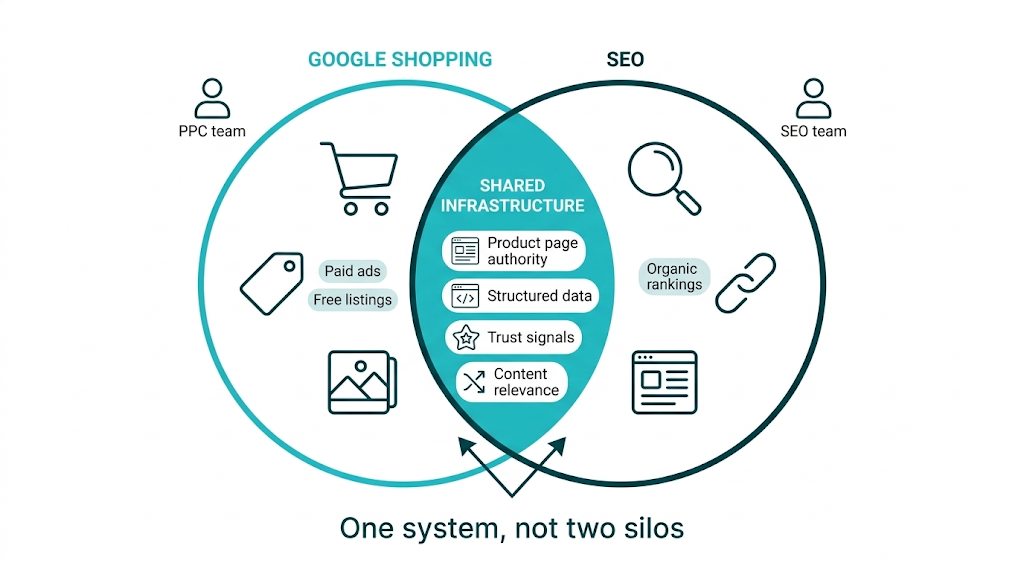
The same inputs that drive organic SEO - page authority, structured data, content relevance, and trust signals - also shape how products show up across Google's Shopping ecosystem, including paid placements and free listings.
We'll make the case most agencies avoid. Google Shopping and SEO aren't competing budget lines. They feed each other, and brands that connect the two will beat competitors who keep PPC and SEO in separate rooms. Whether you're a marketing director evaluating Shopping for the first time or an SEO manager trying to get more out of an existing Merchant Center account, this guide covers the mechanics, the strategy, and the tactics that tie Shopping performance to organic search strength.
The bottom line: Google Shopping is a product discovery and purchase channel that surfaces product listings - both paid and free - directly on the SERP. Feed quality, product page authority, structured data, and trust signals determine placement. Get these right, and you lift Shopping performance and organic rankings at the same time. This guide explains how to do that, including where link building fits as a direct lever for both channels.
What Is Google Shopping and Why Does It Matter for Ecommerce Brands in 2025?
Google Shopping is a dedicated product discovery surface within Google's search ecosystem. It lets consumers browse, compare, and purchase products directly from search results. They see images, prices, retailer names, and star ratings before they click. Google's own Shopping help documentation positions the platform as a way to connect shoppers with merchants across categories, from consumer electronics and glasses to home goods and apparel.
The numbers justify the attention.
Google Shopping ads drive a large share of ecommerce paid search revenue, and the rollout of free product listings in 2020 expanded reach to merchants of every size. A Shopify 2025 master guide to Google Shopping points out that the platform has become a primary discovery channel for product-intent searches - the high-commercial-intent queries where buyers compare options and pricing before they buy. For ecommerce brands, that's prime real estate.
That "prime real estate" looks different in 2025 because Google has pushed Shopping deeper into the main SERP. Product listings show up in standard organic results, in the Shopping tab, in Google Images, and increasingly inside AI-generated summaries. Visibility no longer comes down to one input like a bid or a keyword. Google weighs feed quality, product page authority, pricing competitiveness, and merchant trust signals together. SEO teams already live in that world.
Those trust signals are why the channel matters for three practical reasons. First, Shopping results reach buyers at peak intent - users searching for specific products with prices in-view are close to purchasing. Second, the free listings tier means brands can win SERP visibility even without a Shopping ads budget. Third, the work that improves Shopping performance overlaps heavily with organic SEO best practice. Brands that treat that overlap as shared infrastructure - not two separate workstreams - build compounding gains over time, much like the approach covered in our guide to ecommerce link building.
Compounding gains are also the only way to stay competitive in 2025. Categories like consumer electronics, fashion, and home goods are packed with well-funded advertisers. A bigger bid won't separate you for long. Authority on the product page will. So will feeds that communicate relevance with zero ambiguity, plus a merchant profile that signals trust to Google's systems and to the shoppers scanning results.
How Google Shopping Actually Works: From Product Feed to SERP Placement
Google Shopping starts in the Google Merchant Center - the platform where merchants upload and manage product data. Merchant Center is the backend that supplies Google's Shopping systems with what they need to understand your catalog: titles, descriptions, prices, availability, images, GTINs, and dozens of other attributes from Google's product data specification.
Once that data is in place, Google matches it to intent. When someone searches "blue light blocking glasses" or "pixel care phone case," Google's systems compare the query to what merchants submitted in Merchant Center. Relevance leads, then price competitiveness, landing page quality, and - for paid placements - the advertiser's bid. Products that hold up across those checks win placement in the Shopping results carousel or the Shopping tab.
That placement starts with the feed. Google's product data specification lists mandatory attributes like title, description, link, image link, price, availability, and condition. It also includes optional attributes - product type, brand, GTIN, MPN, size, color, material - that sharpen Google's ability to map products to real queries. A merchant submitting only the minimum fields won't compete on equal footing with a merchant submitting complete, accurate data. The feed sets relevance before a single bid is placed or a single click is earned.
Product Title optimization deserves extra focus. Google weights the product title heavily for query matching. "Blue Light Glasses" is vague. "Blue Light Blocking Glasses - Anti-Glare Rectangular Frame - Unisex" gives the system more to work with, so it can match a wider set of relevant searches without turning the title into a word pile. That's keyword work inside a feed, and structurally, it sits closer to SEO than most teams want to admit.
Images matter for a simpler reason: they drive clicks. Google's systems assess image quality, and weak images drag down click-through rate even when the listing wins placement. High-resolution images on clean backgrounds earn more engagement across Shopping ads and free listings. The Image attribute in the feed also needs a crawlable, indexable URL - so your product images must be accessible to Google's crawlers, which puts this back in technical SEO territory.
Google Shopping Ads vs. Free Product Listings: What's the Difference?
Google Shopping runs on two tiers. Strategy falls apart fast if you treat them as interchangeable.
Google Shopping ads - formally called Performance Max or Standard Shopping campaigns within Google Ads - are paid placements. Merchants set bids (or let Google's automated bidding handle them), and products enter an auction for top placement in the Shopping carousel at the top of the SERP, in the Shopping tab, and across the Google Display Network. That auction weighs bid, product feed quality, landing page relevance, and historical performance data. Paid Shopping ads don't carry a loud "advertisement" label the way older text ads did - they show up as product cards with images, prices, and retailer names, which helps explain their click-through rates.
Free product listings, introduced by Google in 2020 and expanded since, let merchants appear in the Shopping tab without paying per click. Google's Shopping help documentation states that free listings are available to merchants who meet product data requirements and follow Shopping policies. Free listings usually sit below paid placements in the Shopping tab, but they also show in Google Images and in the main organic SERP - most often on long-tail product queries where paid competition is lighter.
Feature | Shopping Ads | Free Listings |
|---|---|---|
Cost | Pay-per-click | No direct cost |
Placement | Top of SERP carousel, Shopping tab | Shopping tab, Images, organic SERP |
Control | Bid-based, campaign-managed | Feed quality and policy compliance |
Visibility speed | Immediate on approval | Varies, depends on crawl and indexing |
Optimization lever | Bid strategy + feed quality | Feed quality + page authority |
Free listings function like an organic channel. The ranking inputs look a lot like SEO: product page quality, feed accuracy, and merchant trust signals decide where you show. For brands that already have solid SEO foundations, free listings add more visibility without adding cost.
Google Shopping and SEO: Why Most Agencies Treat Them as Separate Silos (And Why That's Wrong)
Most agencies split Google Shopping and SEO down the org chart. PPC managers own Shopping. SEO managers own organic. Same client. Different playbooks. The PPC side tweaks bids and feed attributes. The SEO side builds links and tunes content. Both teams do their jobs. The gap sits in the handoff they never make.
That gap costs revenue.
Here's the structural issue. Google's Shopping system scores landing page quality as part of relevance and quality. A product page with real organic authority - supported by relevant backlinks, strong on-page copy, and clean technical SEO - sends better signals than a thin page with no inbound links and bare-minimum content. So the SEO work that builds product-page authority lifts Shopping performance too, across paid and free listings.
That landing page is the common denominator.
Shopify's 2025 Google Shopping guide quotes Threadheads founder Chris Lawe on treating the product listing experience as a single system - not an isolated ad unit, but a reflection of brand credibility and product relevance. That's the right frame. Google doesn't tag a URL as "Shopping-only" or "SEO-only." It grades the page. Full stop.
The page is also where E-E-A-T shows up.
The E-E-A-T framework from Google's Quality Rater Guidelines reinforces this. Experience, Expertise, Authoritativeness, and Trustworthiness are the signals quality raters look for, and those same signals line up with what tends to win in organic rankings and in the landing-page component of Shopping efficiency. Product pages that show real product knowledge, earn links from authoritative sites in the niche, and put trust signals front and center - reviews, secure checkout, clear returns - perform better across Google surfaces. Understanding what makes a high quality backlink is essential context here, because not all links move these signals equally.
Teams that treat the page as the unit of performance make different choices. They handle Shopping feed optimization like an SEO deliverable. They share query data between PPC and SEO. They point link building at commercial URLs, because product-page authority flows into Shopping outcomes as well as organic rankings. Teams that keep silos intact do the opposite: they push budget into Shopping while sending traffic to thin pages with weak structured data and zero link equity, then act surprised when Quality Scores lag and CPCs climb.
Quality Score is where the silo mentality turns into a line item.
The cost is measurable. Higher CPCs in Shopping tie back to lower Quality Scores. Lower Quality Scores reflect weaker landing page relevance and authority. Stronger product page SEO reduces CPCs. This isn't theory - it's how Google Ads quality scoring works.
How Google Shopping Data Can Inform Your Organic Keyword Strategy
This is the closed-loop tactic most agencies skip, even though it's one of the highest-value moves for ecommerce SEO teams.
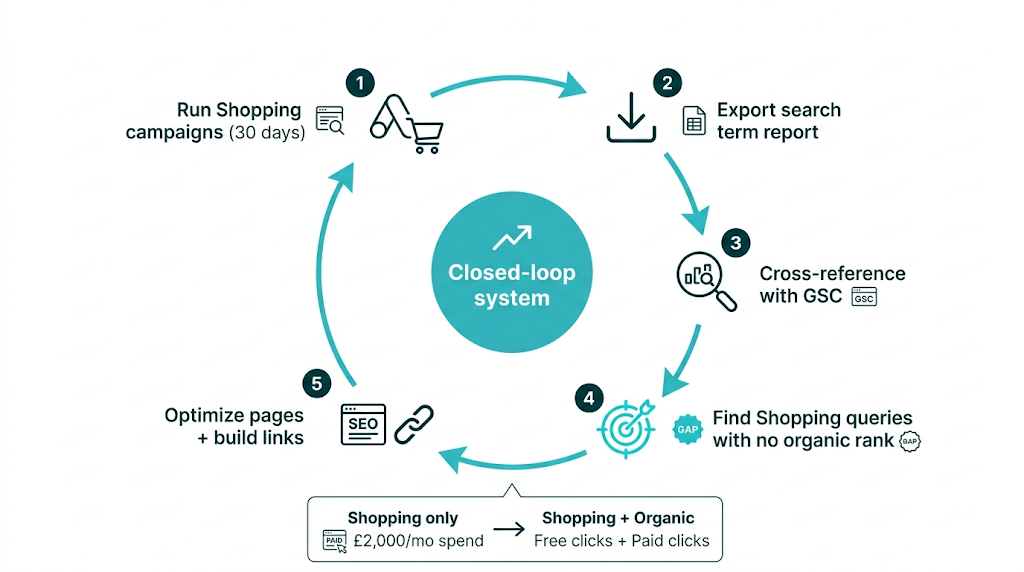
Inside Google Ads, Shopping campaigns generate a search term report - the exact queries that triggered Shopping ads. That list beats guesswork. Keyword tools estimate demand; the search term report shows what real buyers typed before they clicked, and you can tie those terms to conversions in the same account. These are transactional queries with proven intent, because the conversion data sits next to them.
The workflow is straightforward:
- Run your Shopping campaigns for at least 30 days to accumulate meaningful search term data
- Export the search term report from Google Ads, filtered to show queries with at least one conversion or a strong click-through rate
- Cross-reference these queries against your current organic rankings in Google Search Console
- Identify queries where you're getting Shopping impressions but no organic presence - these are your highest-priority content and on-page SEO targets
- Build or optimise product pages, category pages, and supporting content to target these queries organically
A mid-market apparel brand spending £2,000 per month on Shopping ads might find that "slim fit chino trousers 32 waist" drives steady Shopping conversions, yet the brand doesn't rank organically for the phrase at all. The fix isn't another ad. It's tightening the product page title, adding a proper size guide, and earning a handful of relevant links to that URL. Once the organic ranking moves, the brand picks up free clicks on a term it used to pay for.
Google Search Console's Performance report closes the loop. Use product-related queries, line up impression share against clicks, and flag pages where Shopping and organic should both win but only one channel shows up today. That dual-channel view turns keyword targeting from a static list into a revenue-tied feedback system. If you're new to the tool, our guide on how to use Google Search Console walks through the key reports step by step.
The Role of Product Page Authority: Where Link Building Meets Google Shopping Performance
This is the section most SEO guides won't write, because most SEO guides about Google Shopping are written by PPC specialists who don't think about backlinks.
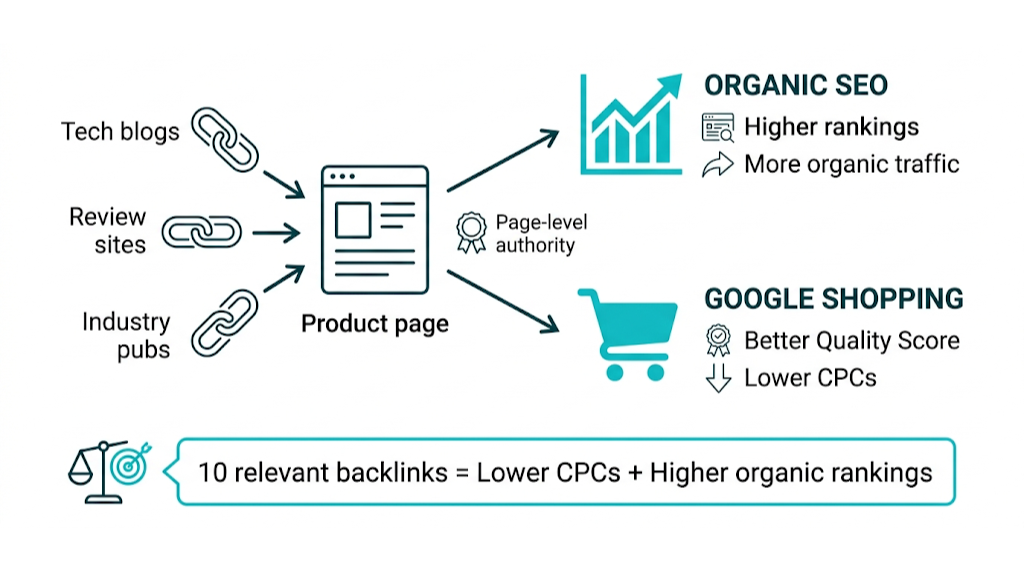
Page authority - specifically, the referring domain profile pointing to a product or category page - influences that page's performance in Google Shopping. It works through two channels. Backlinks to product pages lift organic rankings for those pages, which increases organic traffic and tells Google the page is a credible result. Page authority also feeds into Google's landing page quality assessment in the Shopping ads auction, which affects Quality Score, which then shapes ad position and CPC.
Google's Quality Rater Guidelines spell out that Expertise, Authoritativeness, and Trustworthiness get judged at the page level, not only at the domain level. A product page for "anti-glare blue light glasses" that earns links from optometry blogs, tech review sites, and consumer health publications sends stronger authority signals than an identical page with no backlinks. Even if both pages sit on the same domain. That page-level authority is what shows up in Shopping placement.
That page-level authority also shows up in third-party data. Ahrefs and Semrush data shows a strong correlation between page-level referring domains and organic ranking position. Pages with 20 or more unique referring domains outperform pages with fewer than 5 in competitive categories. Ecommerce product pages sit at the weak end of most backlink profiles, because teams point links at the homepage or blog content. Product and category URLs get ignored, then they struggle to rank.
Ignored URLs are where the opportunity sits.
The practical implication is simple: link building to product and category pages isn't only an organic SEO play. It's infrastructure that makes Shopping campaigns cheaper to run. An ecommerce brand that builds 10 relevant, authoritative backlinks to its top-performing product pages should see organic rankings move, Shopping ad CPCs ease, and free listing visibility lift. Same spend. Multiple returns.
We've seen this play out with clients at Rhino Rank. A marketing agency client investing £1,500 per month in our curated link building service achieved a 133% increase in tracked keyword rankings within their campaign period. The links targeted key landing pages - not just the homepage - so the authority gains flowed into the pages competing in Shopping placements. That showed up as a clear improvement in organic click share and Shopping ad Quality Scores on those pages.
That only happens when the targeting is disciplined. Not all product pages deserve equal investment. Prioritization matters.
Which Pages Should You Prioritize for Link Building to Boost Shopping Performance?
Not every product page on a large ecommerce site is worth building links to. Spread budget across hundreds of URLs and you get weak movement everywhere. Focus on a small set and the gains stack.
The prioritization framework should consider four factors:
Revenue potential: Pages tied to high-margin, high-volume products deserve the budget. Use Shopping campaign data to find which product pages drive the most conversion value, then review their current organic ranking and backlink profile. Pages that already convert in Shopping but rank poorly organically are the first targets.
Current authority gap: Use Ahrefs or Semrush to compare the referring domain count for your target pages against the pages ranking in the top 3 organically for those product queries. If your competitor's product page has 35 referring domains and yours has 4, that's the gap. A backlink gap analysis will surface exactly where you're losing ground. Close it with relevant links and you pull one of the few levers that maps cleanly to both organic rank and Shopping competitiveness.
Shopping impression share: In Google Ads, Shopping impression share tells you what percentage of available Shopping impressions you're winning. Pages with low impression share on high-value queries are underperforming. And page authority sits among the factors Google's system uses to decide placement eligibility.
Structured data completeness: Pages with complete product schema markup - including price, availability, review aggregate, and brand - give Google's systems richer signals. Pair clean structured data with authoritative backlinks and you create a compounding effect across organic and Shopping performance.
Prioritize 5-10 pages at a time. Build 3-5 high-quality referring domains per page per month. Measure the impact on organic rankings and Shopping impression share after 60-90 days. Then move to the next tier.
Google Shopping Reviews, Ratings, and Trust Signals: What SEOs Need to Know
Star ratings in Google Shopping listings aren't decorative. They drive conversions, build trust, and feed - indirectly - into performance signals Google observes. A product listing showing a 4.7-star rating from 340 reviews will beat an identical listing with no rating on click-through rate. CTR matters. Google tracks it.
Google Shopping shows two rating types: product ratings and seller ratings. Product ratings aggregate feedback from the merchant site, third-party review platforms, and Google's own review collection. Seller ratings reflect the overall merchant experience - shipping speed, customer service, return handling - and show up in Shopping ads as a separate retailer star rating. Google's Shopping help documentation ties both rating types to the trust profile of a listing. That trust profile is what we end up managing.
Structured data sits right under that trust profile. Aggregate rating schema on product pages passes review data to Google's crawlers, which supports rich results in organic search and Shopping. When review schema is implemented and validated cleanly, Google has a clearer path to surface rating data in Shopping listings. This is technical SEO work - markup, testing, validation - and it shows up in Shopping performance. Running through a solid technical SEO checklist before launching Shopping campaigns will catch the schema gaps that quietly cost you placement.
Shopping trust doesn't stop at ratings. Google also evaluates merchant policies - return windows, shipping clarity, pricing transparency - as part of its Shopping quality assessment. Google's merchant policies documentation calls out accurate pricing, clear returns, and secure checkout. Those aren't paperwork items. They operate as trust signals, and Google uses them to judge merchant quality, which flows into listing placement decisions.
Listing placement decisions get harder in categories where trust blocks the sale. Health products. Premium electronics. Specialist items like Pixel Care accessories. In those spaces, strong review schema, clear merchant policies, and authoritative product page content create a trust profile that holds up across Google surfaces. This is E-E-A-T applied to ecommerce, and it maps to the same framework behind organic ranking lifts.
Setting Up Google Shopping: A Step-by-Step Overview for SEO and Marketing Teams
Getting products into Google Shopping means wiring a few systems together. The process isn't complex, but one mistake can stop listings from serving or trigger disapprovals. This sequence is the cleanest path for SEO and marketing teams setting it up for the first time.
Step 1: Create and verify your Google Merchant Center account
Go to Merchant Center at merchants.google.com and create an account using your business Google account - this becomes your Google Shopping login for merchant management. During setup, verify and claim your website domain. Google supports several verification methods: adding an HTML tag to your site's <head>, uploading an HTML file to your server, or using Google Tag Manager or Google Analytics. Domain verification is standard SEO ops - it's the same workflow we use for Google Search Console verification.
Step 2: Configure your business information and policies
Merchant Center needs complete business info: business name, address, customer service contact, plus clear policies for returns, shipping, and privacy. These details show in your seller profile and feed into your seller rating. Incomplete or inconsistent business info triggers listing disapprovals and weakens the trust signals your merchant profile sends to Google's systems.
Step 3: Build and upload your product feed
Your product feed is a structured data file - usually Google Sheets, XML, or a direct API connection - that holds your product attributes. Required attributes include: id, title, description, link, image_link, price, availability, and condition. For most categories, GTIN (barcode number) is also required. Other attributes pull their weight too: product_type, brand, color, size, material, and custom_label fields for campaign segmentation.
Step 4: Connect Merchant Center to Google Ads
For paid Shopping placements, link Merchant Center to Google Ads. That link lets your feed power Shopping campaigns. Set it up in Merchant Center settings, and make sure you have admin access to both accounts.
Step 5: Monitor feed health and resolve disapprovals
Merchant Center's diagnostics dashboard flags feed errors, warnings, and item disapprovals. Common causes: price mismatches between the feed and landing page, missing GTINs, policy violations, and image quality issues. Fixes can't wait. Disapproved items don't show in Shopping results, which means lost visibility on high-intent queries.
Step 6: Enable free listings
In Merchant Center, open "Surfaces across Google" and confirm free product listings are enabled. That setting makes you eligible for unpaid placement in the Shopping tab, Google Images, and the main SERP. No extra budget needed - feed quality and policy compliance decide whether products show.
Google Merchant Center Feed Optimization: The SEO Principles That Apply
Feed optimization is keyword research and on-page SEO applied to a structured data file. The parallels are direct. The principles transfer.
Title optimization follows the same logic as title tag optimization. Put the most important descriptive terms first. Add attributes that match buyer intent - size, color, material, use case. Avoid keyword stuffing, but don't trade specificity for brevity. A title like "Rectangular Blue Light Glasses - Anti-Glare, UV400 Protection, Unisex" targets multiple relevant queries without losing clarity.
Description optimization mirrors meta description and product page copy best practice. Feed descriptions need to be accurate and specific. Write for the buyer, not the algorithm. Call out key attributes, intended use cases, and differentiators. Google uses description text to judge relevance, so thin or generic descriptions lower match quality for long-tail and high-intent queries. The same principles that apply to creating effective SEO content apply directly to feed copy.
Custom labels let you segment your feed for campaign management - tagging products by margin, seasonality, or strategic priority. This stays operational, but it ties straight back to business priorities. Budget goes where it should.
Prices in the feed must match prices on the landing page exactly. Discrepancies trigger disapprovals. If you run a Google Shopping price tracker or a dynamic pricing system, keep the feed in sync in real time or update it daily at minimum. Price mismatches pull listings offline.
Measuring Google Shopping's Impact on Your Overall SEO Performance
Most ecommerce teams track Google Shopping and SEO in separate dashboards. Shopping sits in Google Ads. SEO lives in Google Search Console. The link between the two - how Shopping visibility connects to organic performance - often disappears between tools.
That link shows up fast when you track shared metrics side by side:
Metric | Source | What It Tells You |
|---|---|---|
Shopping impression share | Google Ads | How often your products appear vs. total eligible impressions |
Organic click share for product queries | Google Search Console | What percentage of organic product-query clicks you're winning |
Product page referring domains | Ahrefs / Semrush | The authority level of your key product pages |
Landing page Quality Score | Google Ads | Google's assessment of product page relevance and experience |
Organic ranking position for Shopping search terms | GSC + Ads search term report | Where you rank organically for queries driving Shopping conversions |
The overlap report is where this gets useful. Pull queries where you have Shopping impressions but no organic presence, or organic rankings but no Shopping placement. Those gaps are high-value because Google already sees relevance in one channel, which means you have a clear path to earn visibility in the other.
Run the overlap report monthly. Link building lifts product page authority, and that authority should translate into better organic rankings for queries where Shopping already converts. Feed work pushes Shopping impression share up for queries where organic already performs. Manage the two together and they reinforce each other. Tracking the right link building metrics alongside your Shopping data makes it far easier to attribute authority gains to specific ranking and placement improvements.
How to Build a Google Shopping Strategy That Amplifies (Not Competes With) Your SEO
The integrated framework below is designed for ecommerce brands and their agencies. It's not a recap - it's a five-step system for running Shopping and SEO as one channel instead of two silos.
Step 1: Audit your product page authority baseline
Before you put serious budget into Shopping campaigns or feed optimization, document the authority of your key product and category pages. Use Ahrefs or Semrush to pull referring domain counts for your top 20 revenue-driving pages. Put those numbers against the pages ranking in positions 1-5 for your target product queries. The comparison shows the authority gap and gives you a clear list of pages that need link building before Shopping hits its ceiling.
Step 2: Align your product feed with your on-page SEO
Your feed titles and descriptions should follow the same keyword strategy as your product page title tags and H1s. If your SEO research targets "anti-glare blue light glasses for gaming", that phrase belongs in both the product page title tag and the Merchant Center feed title. That consistency tightens relevance signals across both channels. Audit the feed against your on-page keyword targets and close the gaps.
Step 3: Implement and validate product structured data
Every product page should carry complete product schema markup, including name, image, price, priceCurrency, availability, and aggregateRating where review data exists. Validate with Google's Rich Results Test. Clean schema supports rich results in organic search and improves the accuracy of what Google pulls into Shopping listings. This is a one-time technical job, and it keeps paying off. Search Engine Journal's guide to ecommerce structured data best practices covers the full implementation detail for product schema across large catalogs.
Step 4: Run Shopping campaigns to generate keyword intelligence
Launch Shopping campaigns - even at modest budget - with the goal of producing search term data. After 30-60 days, export the search term report and compare it against organic rankings in Google Search Console. Flag the transactional queries driving Shopping conversions where you have no organic presence. Those become your next 90 days of on-page SEO and content targets. Shopping spend stops being just acquisition cost and starts funding keyword research you can use in organic.
Step 5: Build authority to product pages with targeted link building
Use the authority audit from Step 1 and the keyword priorities from Step 4 to commission a targeted link building campaign for your highest-priority product and category pages. The goal is simple: close the referring domain gap between your pages and the organic leaders for your target queries. Prioritize links from relevant sources - industry publications, product review sites, niche blogs - and skip generic directory links.
Our managed link building service at Rhino Rank is built for this use case. We build contextual links to the specific pages that need authority to compete, whether that's organic search or Shopping placements.
The 133% keyword increase we delivered for a marketing agency client on a £1,500 per month curated links budget shows what page-level link building can do when it's pointed at the right URLs. Apply the same approach to your product and category pages and the authority gains flow through to Shopping Quality Scores, free listing placement, and organic rankings at the same time.
This five-step framework closes the loop between Shopping and SEO. Each channel feeds the other with data, the optimization work stays consistent across both, and link building acts as infrastructure that lifts performance across every Google surface - not just organic rankings.
%20Your%20SEO.png)
Frequently Asked Questions About Google Shopping and SEO
What is Google Shopping and how does it work?
Google Shopping is Google's product discovery and comparison channel. When users search for products, Google surfaces Shopping listings - product images, prices, retailer names, and ratings - in a carousel near the top of the SERP and inside the Shopping tab.
The system runs on product data from Google Merchant Center. Merchants upload structured feeds with titles, descriptions, prices, images, and other attributes. Google matches that feed data to search queries, then sorts listings based on relevance, price, landing page quality, and, for paid placements, bid amount.
Is Google Shopping free or do you have to pay for listings?
Both options exist.
Google Shopping runs on two tiers: paid Shopping ads, managed in Google Ads campaigns, and free product listings. Paid ads show up in the Shopping carousel and compete in an auction. Free listings, introduced in 2020, can appear in the Shopping tab, Google Images, and the main SERP without a per-click charge. Placement for free listings comes down to feed quality, policy compliance, and product page relevance, so it behaves like an organic channel.
Most teams should run both tiers at the same time. Our view is simple: use paid to buy coverage where you need it, and use free listings to pick up incremental clicks.
How does Google Shopping affect SEO and organic search performance?
Google Shopping and organic SEO tie together more than most agencies admit. Product page authority - built through backlinks, structured data, and solid on-page content - feeds into both organic rankings and Shopping placement quality.
That overlap shows up in Google's ad system too. Quality scoring for Shopping ads checks landing page relevance and experience, and those same inputs drive organic performance. Shopping search term reports also give conversion data on high-intent product queries, which should shape your organic keyword strategy. Brands that run Shopping and SEO as one program beat teams that split the work across separate silos.
Does link building help Google Shopping performance?
Yes. There's a clear cause-and-effect.
Backlinks to product and category pages raise page authority, and that lifts Google's quality read of the landing page in the Shopping ads auction. Better landing page quality scores cut CPCs and improve ad placement. Stronger authority also improves organic rankings for product queries, which grows free click share.
A page-level link building strategy - aimed at the exact product and category pages tied to your Shopping campaigns - improves Shopping ad efficiency and organic visibility in the same push. Ecommerce teams leave this on the table all the time.
How do I optimise my product feed for better Google Shopping results?
Feed optimization follows the same basics as on-page SEO. Start with titles. Lead with the most descriptive terms, include specific attributes like color, size, material, and use case, and match your language to the queries buyers use.
Descriptions need to stay accurate and buyer-focused. Skip keyword stuffing. Then tighten up your attributes: make sure all required fields are complete and correct, especially GTINs for branded products. Keep feed pricing synced with on-page pricing, because mismatches trigger disapprovals.
Merchant Center diagnostics should be part of the routine. Use it to spot and fix feed errors. And make sure your product pages include full product schema markup, since structured data improves the accuracy of what Google shows in Shopping listings. Semrush's breakdown of how Google Shopping works and how to optimise your listings is a useful reference for teams building out their feed optimization process from scratch.
related Blog Posts




Join 7,000+ Clients Growing with Rhino Rank
Sign Up
Stay ahead of the SEO curve
Get the latest link building strategies, SEO tips and industry insights delivered straight to your inbox.